

developer_mh
-
Posts
1,860 -
Joined
-
Last visited
-
Days Won
173
Everything posted by developer_mh
-
Hi Andreas Lundberg, we are happy that you are considering to purchase our software. And then of course, we are not happy that you experience problems while working with it. If I get your first problem right it seems that PV*SOL is sent to the background when you click on 'Start'. I would guess that there is another program/tool involved on your machine that causes this behaviour, since we can't reproduce this here and have no other customers complaining about this. Normally, the splash screen should appear after you click 'Start', and finally the software should open up in the foreground. Perhaps you can check what antivirus software you are running and allow PV*SOL there in the whitelist. Concerning the second problem: Could you describe exactly what you do to produce the crash? Is it reproducible? That a lot in advance for collaborating, I am sure we will find the solution to your problems. Kind regards, Martin
-
Hi M.Khalifa, I guess you refer to the sizing factor or dimensioning factor that describes the PV power installed on the DC side in comparison to the nominal AC power of the inverter? Right now it is not possible to include it in the report, I am afraid, but since we are in the progress of redesigning the report, I will forward this request to my colleague. Thanks and kind regards, Martin
-
Hi James, the solution in this case would be to select the Polystring option (called 'Polystring Configuration' in the software). Then you can select any inverter you want and connect the strings form different module areas as you desire. Hope that helps, kind regards, Martin
-
Hi Mohamed Alaa, I just opened up a new thread for your question since it touches a slightly different topic, I hope this is ok for you. The message 'Bad file version' pops up if you try to open project files in older program versions. For example, when you create a project in PV*SOL premium 2018 R9, you can't open it in PV*SOL premium 2017 R9, or sometimes even in newer versions of PV*SOL premium 2018 (i.e. R8 and before). So, please ensure that you have the same software version of both of your devices. Kind regards, Martin
-

pvsol Configuration of two roof areas with 2 inverters multiple MPPT's
developer_mh replied to Marius's topic in PV*SOL
Hi Marius, you are right, when configuring tow module areas together you cannot see the inverters separately. In your case you would have to split your eastern module area in two smaller units (10 x 18 modules and 3 x 18 modules), so that you can connect a part of the eastern module area to inverter 1 and the other parts to inverter 2, together with the western module area. Hope that helps, kind regards, Martin -
Small increase of PR in simulations with power optimizers
developer_mh replied to UserPV's topic in PV*SOL
Hi João, what you found it is absolutely right. The use cases where power optimizers really can help to generate significantly more energy are rare. The results you report here are realistic, in general you will have only one or two percent more energy yield. For a conference earlier this year we had a poster contribution that came to the same conclusion: https://www.valentin-software.com/sites/default/files/poster_leistungsoptimierer.pdf It is in German, but from the images and figures you will get the point. We compare different shading situations and connection schemes and present the energy surplus that you can excpet from different power optimizing techniques. Hope that helps, kind regards, Martin -
Hi João, there are shortcuts to move the camera, like W (move forward), A (move left), S (move backwards), D (move right), R (move up) and F (move down), but unfortunately not for rotating objects. But I will forward your input to our 3D team. Kind regards, Martin
-
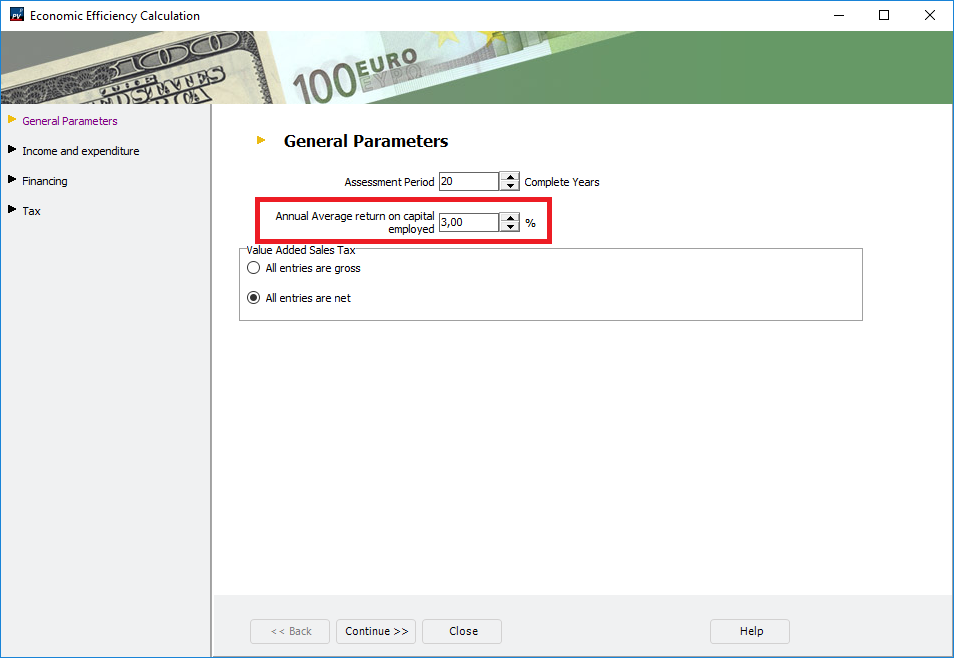
Hi mads, sorry for the late reply, we had a lot of colleagues on holiday and parental leave at the same time in the last weeks. Could you provide a project file so that we can better understand the problem? But in general, the electricity cost trend and all other economic parameters are overlayed by the Annual average rate of return on capital, which you can edit on the page 'Economics', then first button on the page 'Edit', and first tab: Hope that helps, kind regards, Martin
-
Hi João, you are absolutely right, we only designed a part of the Neuhardenberg project for the PV*SOL example project. And I guess you are also right about the estimation of the annual energy yield . 19,690,000 kWh per year would be a bit poor, I reckon they forgot a 0 there. Kind regards, Martin
-
Hi Jon, sorry for the late reply, we had a lot of colleagues on holiday and parental leave at the same time in the last weeks. The timestamp is local time, yes. But we do not account for the daylight time saving switch in March and October. So for Madrid it will be UTC+1. Kind regards, Martin
-
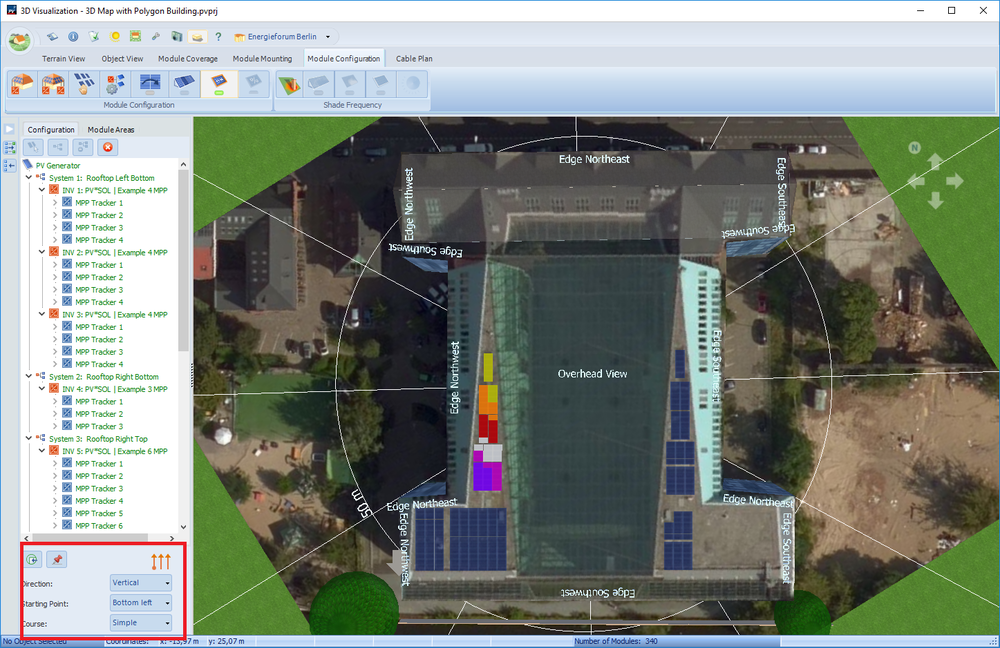
Hi james, sorry for the late reply, we had a lot of colleagues on holiday and parental leave at the same time in the last weeks. You can select the direction and the starting points for the automatic connection with the buttons in the bottom left corner of the 'Module Configuration' page: With these options you can achieve almost every desired connection scheme. And in addition you can also edit the connection manually if you want. Just drag and drop the modules around. Hope this helps, kind regards, Martin
-
Hallo Tim, wir hinterlegen keine Preise für Module oder Batteriespeicher oder andere Komponenten in der Datenbank. Grund dafür ist, dass jeder Projektierer oder Anlagenplaner mit Sicherheit unterschiedliche Preise bekommt, je nachdem, welche Volumen er bei welchem Großhändler abfragt, wo auf der Welt er sich befindet und wie der Markt dort gerade läuft. Die Stückkosten oder Gesamtkosten für die Anlage sind also individuell vom Planer in PV*SOL einzutragen, entweder als Einzelposten oder pauschal in €/kWp. Beste Grüße, Martin
-
Hi again, could you tell me what version of PV*SOL premium 2018 you are using (R1 to R9)? Also, could you send me the log file (C:\ProgramData\Valentin EnergieSoftware\log\PVSOLpremium.log), via private message? And if you don't mind, some information about the machine you are using would be helpful. Kind regards, Martin
-
Dear RVinea, we are sorry to hear that you keep getting error messages in 3D. Could you give us some details about the steps that lead you to the errors? Thanks and kind regards, Martin
-
Hi everyone, please see our new tracking videos here: Kind regards, Martin
-
Hi everyone, please see our new tracking videos here: Kind regards, Martin
-
see our new tracking videos here:
-
See our new tracking videos here:
-
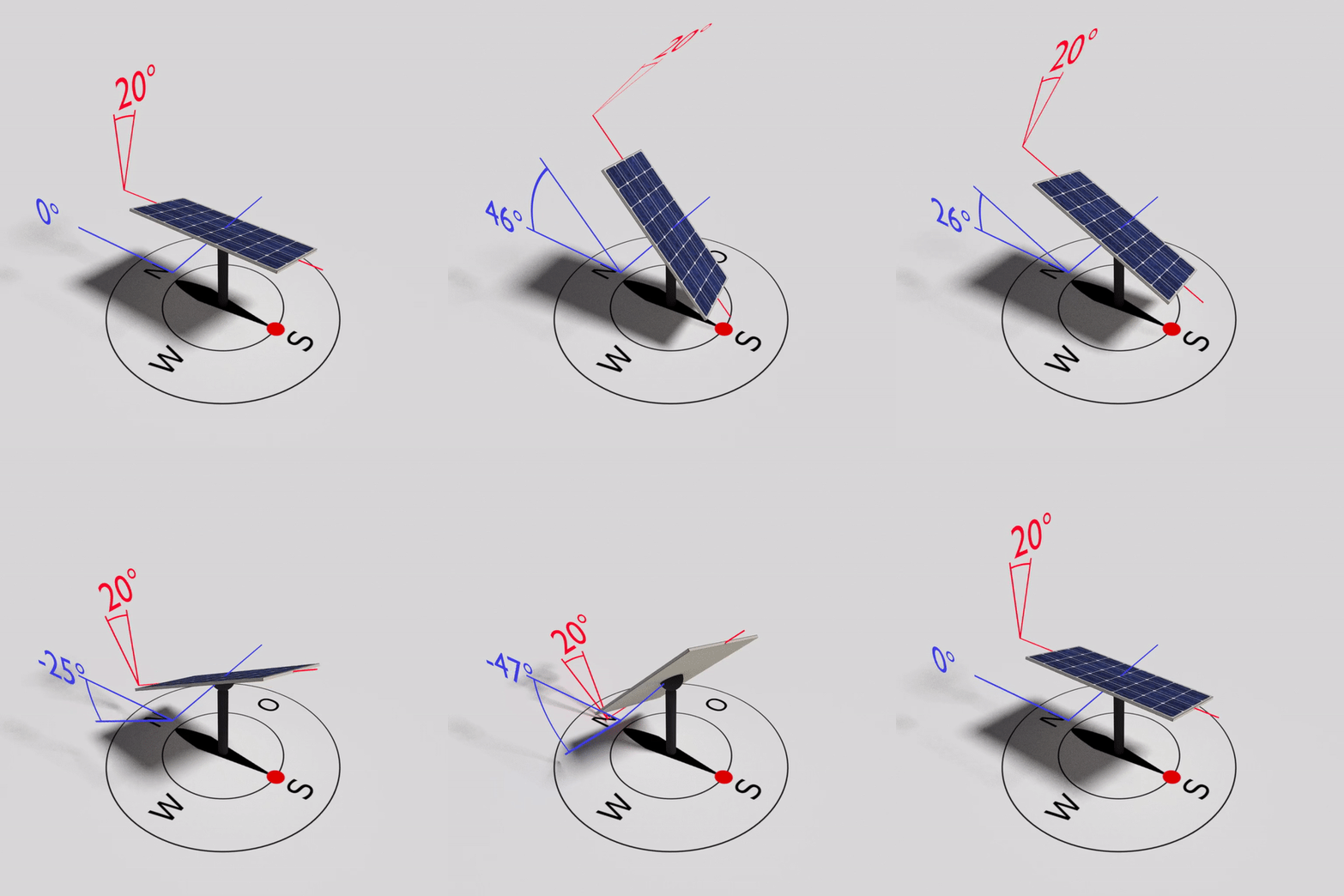
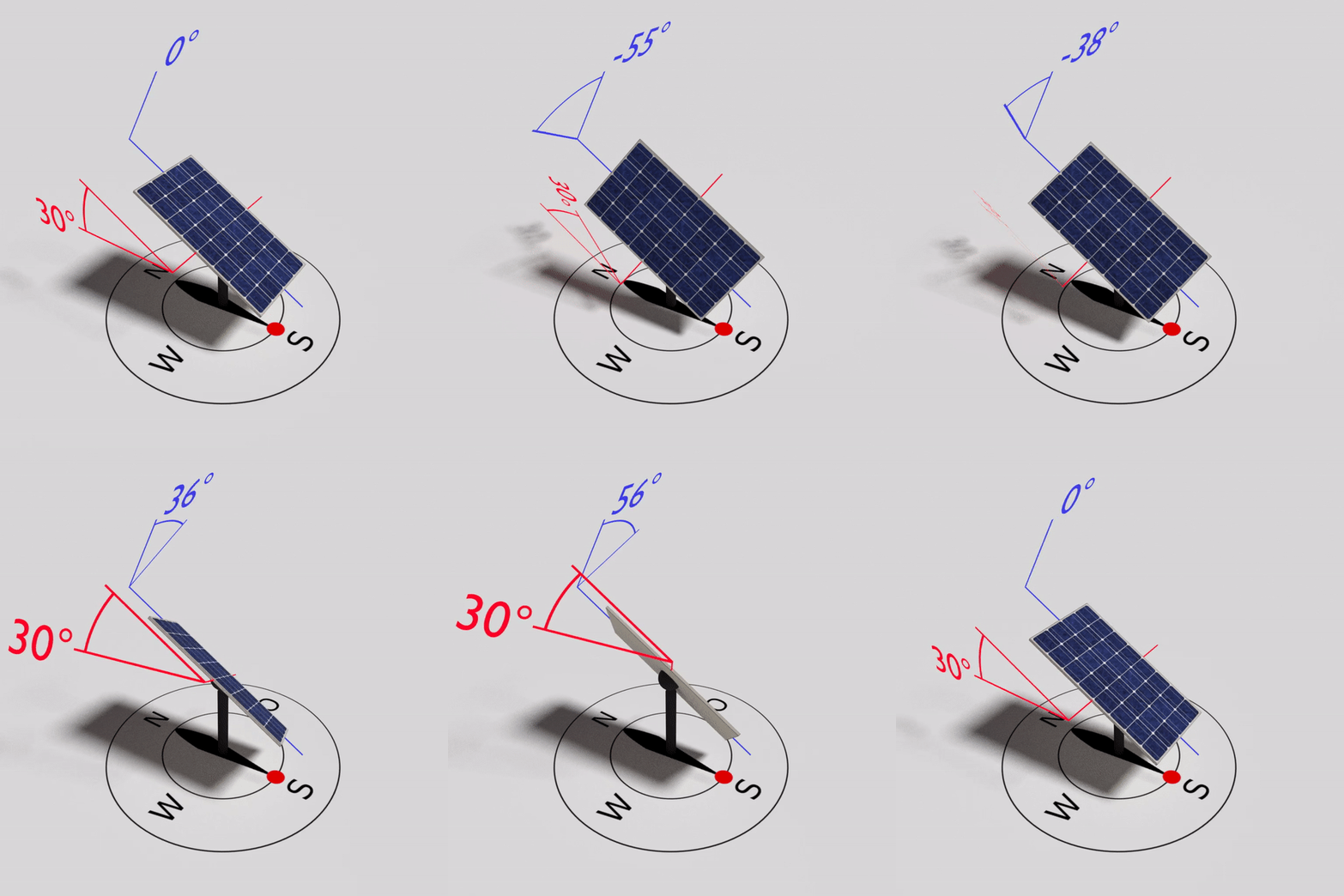
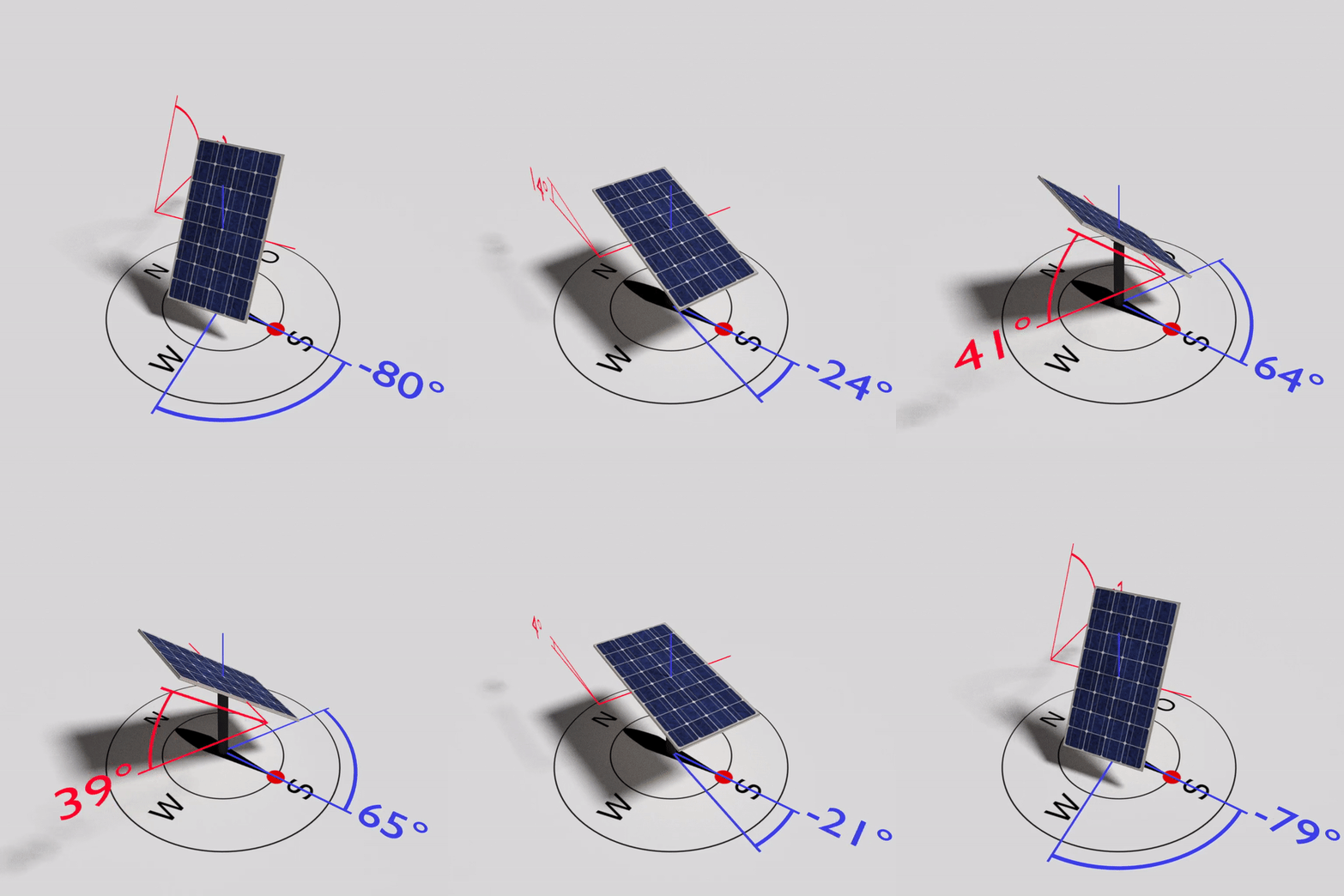
Hi Maha, our 3D team just finished the tracking videos, and I really like what came out, please have a look. This is 1-axis East-West, with red being the Rotation Axis Incline axis (20°) and blue being the Rotational Angle of Opening. This is plus/minus 50° here, so in PV*SOL you enter 100°. This is 1-axis North-South, with red being the Rotation Axis Incline of the (30°) and blue being the Rotational Angle of Opening. This is plus/minus 60° here, so in PV*SOL you enter 120°. This is 1-axis vertical, with red being the inclination of the modules (40°) and blue being the Azimuth Angle of Opening. This is plus/minus 60° here, so in PV*SOL you enter 120°. And then there is 2-axis tracking, I think this is clear to everybody. There is the inclination of the module (red) and the azimuth angle (blue), which you can limit by the Maximum Inclination and Azimuth Angle of Opening. I hope this clarifies the tracking options a bit further, kind regards, Martin

-
Hallo Christian, mittlerweile lässt sich PV*SOL einfach deregistrieren und dann auf dem neuen Rechner wieder registrieren: Um die Einstellungen auch wieder auf dem neuen Rechner zu haben, empfiehlt es sich, den Ordner C:\Users\USERNAME\Documents\Valentin EnergieSoftware\PVSOL premium 2018 zu sichern und nach der Installation auf dem neuen Rechner über den entsprechenden Ordner rüber zu kopieren. Wenn auch selbst angelegte Datenbank-Einträge übernommen werden sollen, einfach die Datenbank rüberkopieren: C:\ProgramData\Valentin EnergieSoftware\PVdatabase\Version5.0\PVSOL.sdf Beste Grüße, Martin

-
Hallo Kamal, auch bei den DC-gekoppelten Batterie-Speichern wird die Anzahl der Batterie-Systeme (2x) und die Anzahl der Batterien pro System (3x) angezeigt. Bei DC-gekoppelten Systemen ist zu beachten, dass sie immer am ersten Wechselrichter hängen. Bei generator-gekoppelten DC-Speichern am erstern MPP-Tracker des ersten Wechselrichters. Wenn zwei DC-Systeme gewählt werden, sind sie also beide am ersten WR angeschlossen. In Zukunft wird man die Zuordnung auch einstellen können, aber derzeit verhält es sich wie oben beschrieben. Beste Grüße, Martin
-
?
-
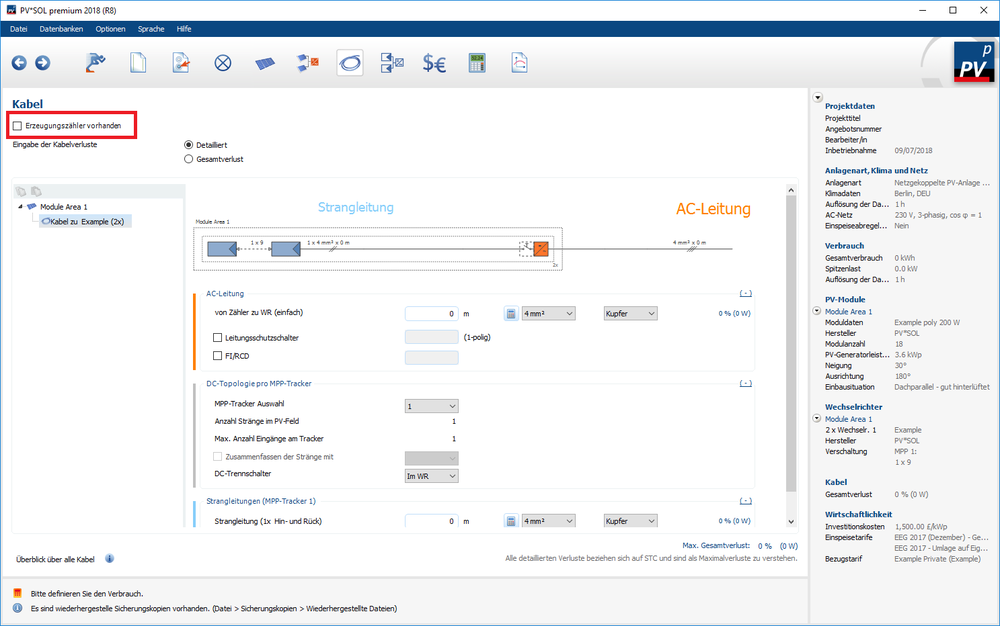
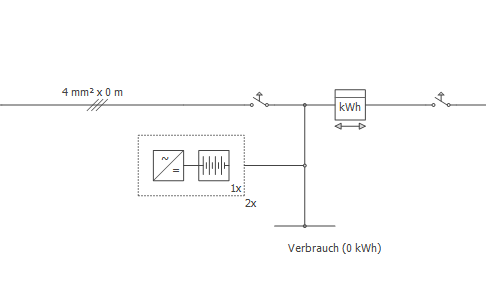
Hallo Kamal, den Erzeugungszähler kann man oben auf der Kabel-Seite an- oder abwählen: Was die Batterie-Systeme angeht: Wenn man zwei Batterie-Systeme auswählt, wird im Plan nur eins gezeichnet (mit der entsprechenden Anzahl Batterien eines Batterie-Systems) und ein "2x" darunter geschrieben: Ich bin mir aber nicht sicher, ob ich den Punkt der Frage richtig verstanden habe.. Beste Grüße, Martin
-
Hi Esteban, I will send you the link per private message. Kind regards, Martin
-
Good to hear that it all works fine for you now. Kind regards, Martin