developer_mh
Administrators
-
Joined
-
Last visited
Everything posted by developer_mh
-
Hi Ricardo, could you provide the two project files, please? You can send them with a private message here in the forum. Thanks and kind regards, Martin
-
Hi Infinitech, with a single license you can only run PV*SOL on one computer. You can, however, move the license from one computer to another, using the "Change Registration" dialog under Help -> Registration. But you can do this only once every six months. This is really only meant for situations where you set up a new computer or re-install your OS or something like that. Hope that helps, kind regards, Martin
-
Hi Jimmy, I was just about to ask you if creating template projects wouldn't be an option for the default value issue. Glad that this way works for your needs. But I will put the wish of more default options on our list. Concerning your other points: Parts list: We didn't change this for 2021, the delete buttons were always there, but only for items that you user created "Third is the map selection in 3D view. When I first start the map selection the page is just white and it won't load. " - Does this happen all the time when you open the map view? And then thanks for your words about the features you liked We are always doing out best to deliver a software product that is really helpful for the users. But no matter how hard and intense we test (we have a huge bunch of automated tests, and we do nothing but manual testing weeks before we release), there are always issues in the first releases of a major version that we do not find. Sorry for that. Kind regards, Martin
-
Hi Jimmy, just a short hint for the issue with the small/unusable buttons in 3D. Could you try to apply the work-around that is described here and see if it helps, please? Also, another one here: The paths need to be adjusted for 2021, of course. Please let us know if that helps. Concerning the rest I will get back to you - for now, thanks for the feedback! Kind regards, Martin
-
Hi Jimmy, you are right, there is no possibility for end users to change the localized texts in a persistent way. The only way indeed would be to correct the translations for us. If you wish, I can forward your email address to my colleagues that take care of the localization, so that they can contact you. Kind regards, Martin
-
Hi Alex, thanks for your question. I am not 100% sure if I understand you question right, but perhaps I can translate a question and answer from the German section of the forum here, perhaps this will point you in the right direction: Question: Answer: Hope that helps, kind regards, Martin
-
Hi Gytis, please refer to this section of our help in order to see how the dat file has to look like: https://help.valentin-software.com/pvsol/2021/en/pages/system-type-climate-and-grid/meteosyn/#options And also be aware that the PVGIS data seems to be shifted in time, so you will have to correct that as well: Hope that helps, kind regards, Martin
-
Hi Marcel, hi Vishnu, as Vishnu already pointed out, there is no undo feature right now in PV*SOL. And yes, we are really aware of how urgent the users of our software want it. We have it on our list, and we will definetely implement it in the future. But I can't give a date for it right now, I am afraid. Kind regards, Martin
-
-
Hallo bene-solar, es könnte gehen, wenn man zuerst die oberen Grenzen nach oben setzt und dann nach und nach die unteren weiter nach oben. Also die 127 auf z.B. 150, dann die 107 auf 130 etc. Viele Grüße, Martin
-
Hi Ricardo, ok, this is strange. Usually the user id is not renewed or reset except when you install it on a new device. One quick work around for you would be to copy the module with hidden user id when you open the project file where it is contained. This would make it available for you in other projects as well. I'll ask you to send me some files via private message in order to analyse the problem. Kind regards, Martin
-
Hi Ricardo, it seems that you database user id has changed from one PV*SOL to the other. Perhaps you re-installed PV*SOL on a new device? If so, make sure that you take along your database user id from the computer where you entered the PV modules and enter it in the newly installed PV*SOL. Read more here: https://help.valentin-software.com/pvsol/2020/databases/#user-ids https://help.valentin-software.com/pvsol/2020/options/#databases Hope that helps, kind regards, Martin
-
Hi Vishnu, no, right now there is no possibility to add a power price in addition to an energy price - and yes, we have it on our list Kind regards, Martin
-
Hallo Mourad, nein, leider gibt es so eine Funktion derzeit leider nicht. Wir haben das auch schon auf unserer Liste, aber in kann dazu leider noch ein Datum nennen. Viele Grüße, Martin
-
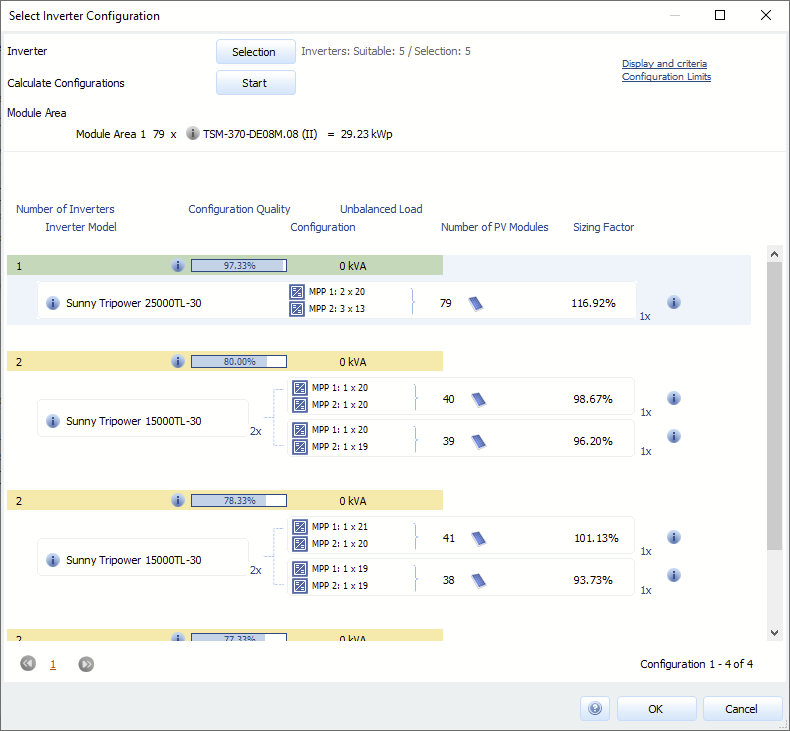
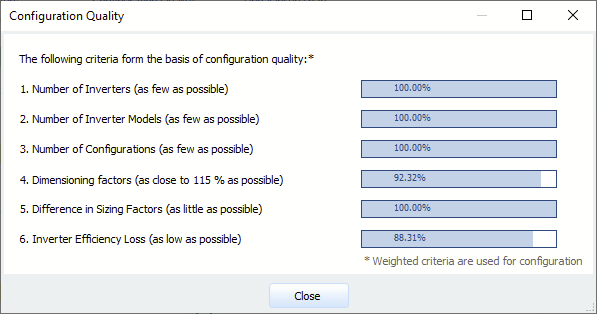
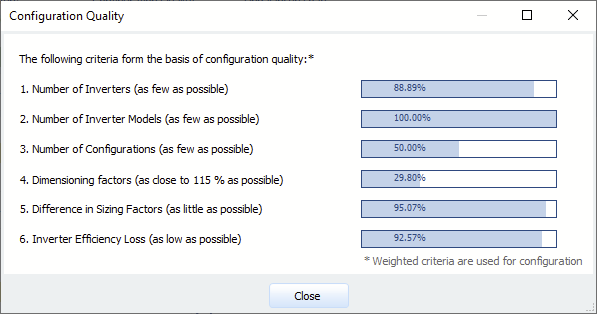
Hallo Art, sehr schöne Frage! Sorry für die späte Antwort, wir sind gerade ziemlich im Trubel wegen des anstehenden Releases von PV*SOL premium 2021 R1. Zu deiner Frage: In die automatische Verschaltung in PV*SOL fließen viele Bewertungskriterien ein. Einer davon ist der Dimensionierungsfaktor, ein anderer, der hier eine Rolle spielt, ist die Anzahl benötigter Wechselrichter. Der Dimensionierungsfaktor (installierte DC-Nennleistung der PV-Module geteilt durch AC-Nennleistung des Wechselrichters) sollte dabei über 100 % liegen, einfach aus Kostengründen. Dimensionierungsfaktoren von unter 100% machen aus wirtschaftlicher Sicht keinen Sinn. Ab Dimensionierungsfaktoren von 115 % machen sich die Verluste, die man durch die Leistungsbegrenzung des Wechselrichters hat, erst bemerkbar (aber sind da noch relativ niedrig). Mit steigendem Dimensionierungsfaktoren steigt dann ab diesem Punkt auch der energetische Verlust an. Aus wirtschaftlicher Sicht kann sich das trotzdem lohnen. Wenn man stark unterdimensioniert, kann man evtl. einen WR anschließen, der laut Datenblatt vielleicht zwei Nummern zu klein ist - dafür ist er aber deutlich guünstiger. Und wenn man dann nur sagen wir 3 % Abregelungsverluste im Jahr hat, kann die Rechnung durchaus aufgehen. Wichtig: Zum Berechnen der Abregelungsverluste unbedingt in Minutenwerten rechnen. Der zweite Faktor, der hier eine Rolle spielt, ist wie gesagt die Anzahl an Geräten. Wir bewerten eine geringe Anzahl besser als eine hohe. Für unseren Algorithmus ist es also vorteilhafter, einen STP 25000 zu nehmen, der in einem Dimensionierungsfaktor von 116 % resultiert, als zwei von den STP 15000, die dann zusammen auf einen Dimensionierungsfaktor von unter 100 % kommen. In der Übersicht über die automatischen Verschaltungen kann man sich dann die Rangliste und die einzelnen Bewertungskritierien nochmal genauer anschauen. Wenn man dort auf die kleinen (i)-Buttons neben den blauen Balken mit den Prozent-Werten klickt, sieht man die Einzelwertungen. Für den STP 250000: Für die zwei STp-15000: Viele Grüße, Martin
-
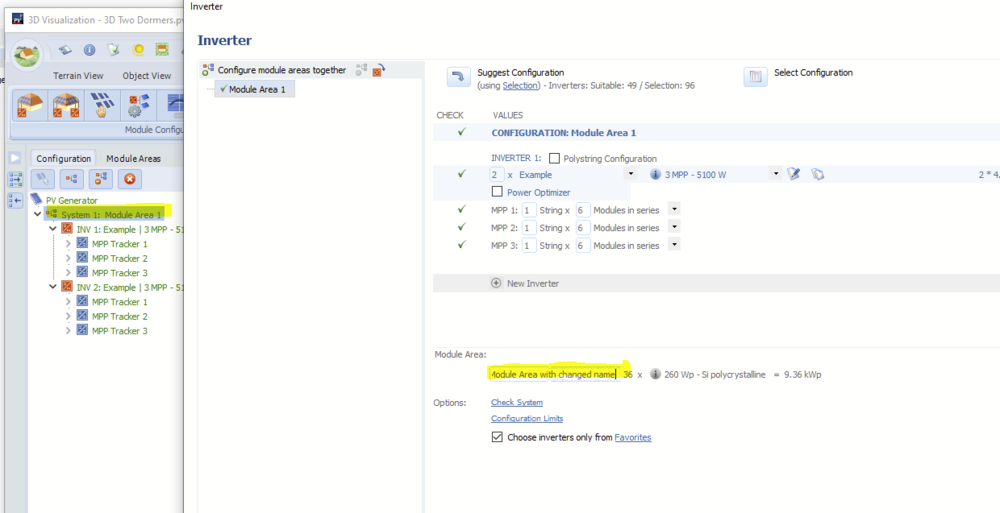
Hi Patrik, the name you have to change in 3D is the module area name, not the building name. At least once the module areas are created. Module areas are named by the name of the building at the time of their creation. So, in order to change the module area name afterwards, just go into the configuration panel and change the names of the module areas in the lower section there: Kind regards, Martin
-
Dear Falah, we don't have a video right now, but thanks for the suggestion. Perhaps these help pages might help you getting started: https://3d-help.valentin-software.com/pvsol/en/#t=html%2Fen%2F3d%2FEinfuehrung_in_den_Kabelplan.htm Kind regards, Martin
-
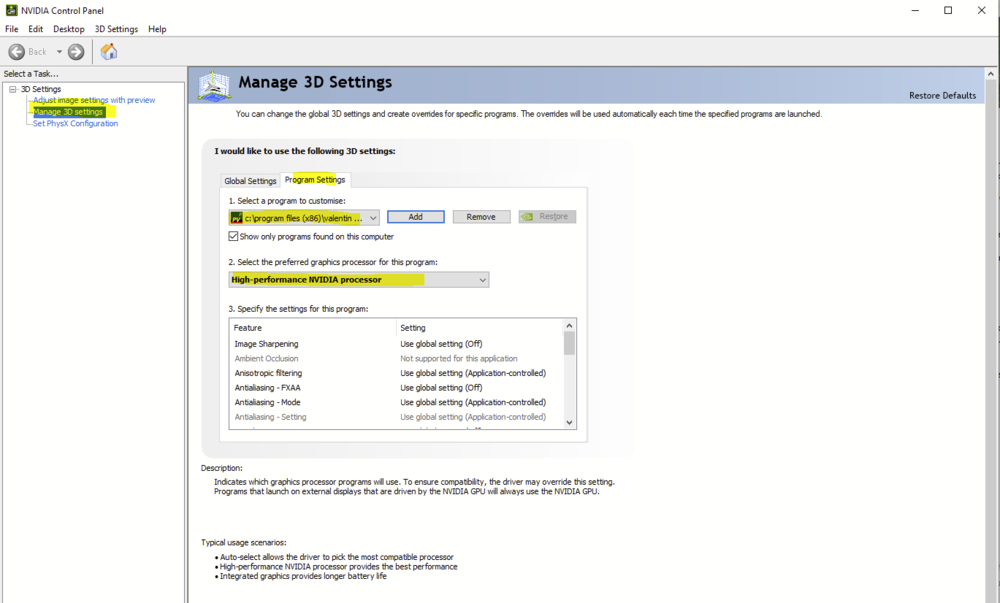
Hi Marc, thank you for sending the project. In my case I was able to go into 3D, configure the modules, change the configuration a bit, go back, calculate the shadows and then simulate the whole system without a problem. RAM usage was moderate, also during autosave. The highest peak was around 900 MB. Could you describe in which situations the program crashes? Also, I realized that PV*SOL is using my GPU a lot during the shading calculations. Perhaps you have a dedicated GPU in your computer as well? If so, try configuring PV*SOL to use the better GPU, like so (example is for NVIDIA, but I guess for other manufacturers it is similar): Kind regards, Martin
-
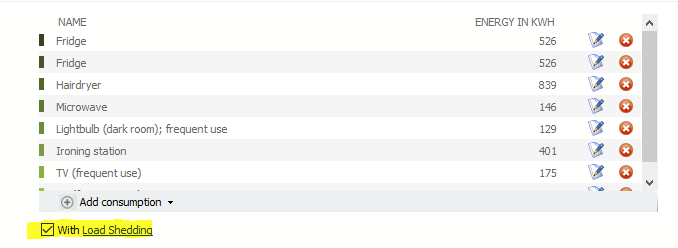
Hi, thank you for sending the project. The problem here is that in winter the consumption is way too high compared to the PV production. In January for example you have a consumption of around 250 kWh, but the PV production is only around 70 kWh. This won't work. In order to be able to simulate and see how much consumption you can cover in which month, just set the check box for "Load Shedding" below the list of appliances: Then you'll be able to simulate and see the results. The loads will always be switched off when there is not enough PV power. Hope that helps, kind regards, Martin
-
Hi Marc, if you didn't receive an email with a reference number, the error was thrown in the 3D environment. But I found the error in our logs (ref nr. 0178262, just for me to remember). The problem here is really that the process is out of memory. PV*SOL is a 32bit process which means that there is a limit of around 1.3 GB of RAM. If you send me the project I could have a look if there is a possibility somewhere to save memory (by private message please). Kind regards, Martin
-
-
Hi Marc, PV systems in 3D of this size can cause heavy load on the computer. Did you already send us a crash report? If so, could you provide a reference number? We could then have a look into the error and see what is happening. Kind regards, Martin
-
Hi David, this is correct, the power optimizers in PV*SOL only have one MPP tracker. The SolarEdge M2640 has four. So there is no "clean" way to enter it. As a workaround you could either enter it as PV inverter with four MPP trackers, and with the DC/AC values of the PV inverter you want to connect. So that you'll have a device that combines the M2640 and the PV inverter. The other way would be to enter it as power optimizer with only one MPP tracker, and take into account that you'll lose the simulation accuracy. If you don't have difficult shading situations on the roof, you could go this way. Hope that helps, kind regards, Martin
-
Hi Himanshu, if you want to compare two PV plant designs, I would recommend the project comparison: https://help.valentin-software.com/pvsol/2020/project-comparison/ Kind regards, Martin
-
Hi Ricardo, thanks for the project. These are two different module types and if you select all of them, the generator power is calculated from the total number of modules and the lower of the two module powers. This only affects the display, however, the correct generator power will be displayed during interconnection and after exiting 3D. But I will set the issue on our list as it can easily confuse. Thanks for reporting! Kind regards, Martin