
developer_mh
-
Posts
1,860 -
Joined
-
Last visited
-
Days Won
173
Everything posted by developer_mh
-

generator energy Wrong amount of PV Generator Energy (AC grid)
developer_mh replied to Marcin's topic in PV*SOL
Hi Marcin, in the 3D environment of PV*SOL, we decided not to calculate bifacial gains if we have east/west mounting structures like in your pictures on the left. We assume that there is no irradiance hitting the backside of the module, since the triangular space below the modules will be dark. Also for facade structures, we decided not to calculate bifacial gains, since we considered them to be usually parallel to a vertical wall. But we just discussed it here and we will modify that in the future. Mounting structures of type 1 ("Tilting of modules") and type 3 ("Facade tilt") will calculated with the view factor bifacial model for inclination angles between 10° and 80°, and with the "vertical" model for angles between 80° and 90°. If the inclination angle is below 10°, no irradiation gains will be calculated. But for now, if you want to calculate with vertical modules oriented towards East/west, just use the mounting structure type 1. Kind regards, Martin -
Photo Plan Massverhältnis First/Traufe zu Dachbreite
developer_mh replied to Hampi's topic in PV*SOL
Hallo Hampi, entschuldige die späte Antwort, dein Post ist irgendwie untergegangen. Solche Luftbildaufnahmen sind generell schwierig in Photoplan umzusetzen, da man so gut wie keine Möglichkeit hat, vertikale Orientierungslinien einzuzeichnen. Photonplan ist gut für von vorne aufgenommene Bilder. Das Bild hier wäre eher ein Fall für den Kartenimport in 3D. Hast du das mal versucht? Vielleicht kommst du da zügiger zum Ergebnis. Beste Grüße, Martin -
Hi Jacek, another thing you could try then would be to manipulate you ini file. Close PV*SOL, and locate this file here: C:\Users\USERNAME\Documents\Valentin EnergieSoftware\PVSOL premium 2020\PVSOL.ini Open this file in a text editor (notepad++ is a good one ) and locate the line (near the end of the file) <MainPagerWider>0</MainPagerWider> Replace it with <MainPagerWider>-1</MainPagerWider> save the file, and start PV*SOL again. For some customers, this works, so I hope this works for you as well.. Kind regards, Martin
-
Hi Jacek, you could try out the measures explained in this post here: Let me know if that helped. Kind regards, Martin
-
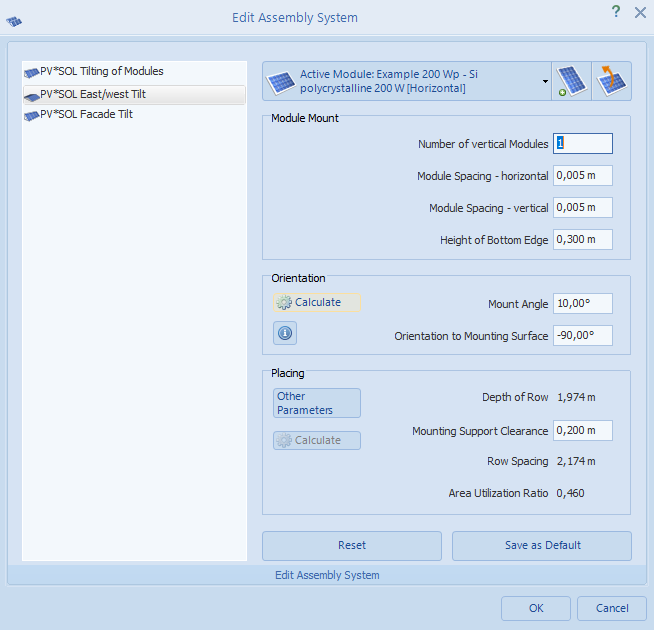
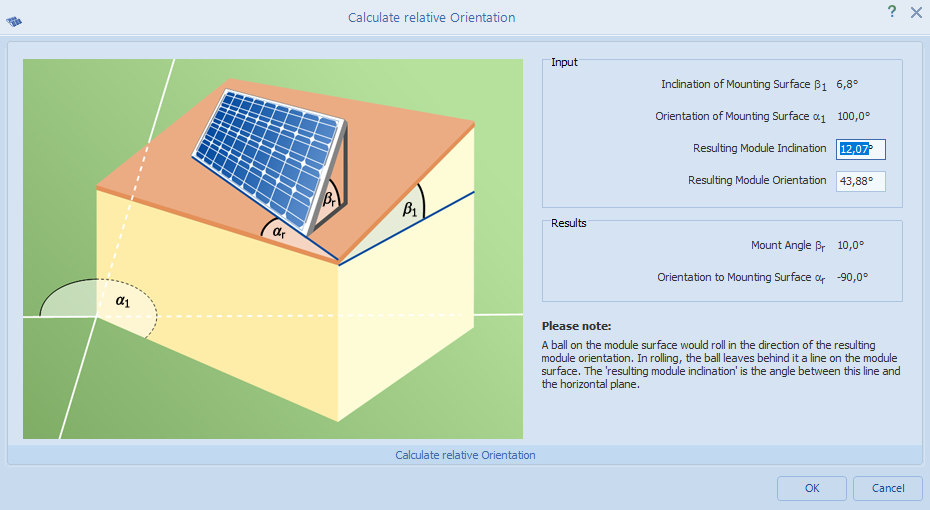
Hi Daniel, it looks like your roof has a ridge that is not exactly in North-South direction, is that correct? In that case, if you have a small inclination of the roof surface and you mount a PV system with its own orientation and tilt, the resulting orientation and tilt (or inclination) will be different. For that reason there is also a small dialog in the mounting system dialog that explains this a bit: Click on Orientation -> Calculate Hope that helps, kind regards, Martin
-
Hi Robin, we are currently in the stage of testing. If our tests go well, the release will be forwarded to the "publishing" stage, where other people also perform some tests. After that it will be released. This process usually takes less than a week, but always depends on how the tests go and what else our team and the publishing team have on their todo lists. Kind regards, Martin
-
Abweichung Eigenverbrauch DC / AC Speichersysteme
developer_mh replied to Christian Dorst's topic in PV*SOL
Hallo Christian, das ist eine sehr interessante Frage, wie ich finde! Es gibt immer noch viele Unsicherheiten beim Thema DC- und AC-Kopplung von Speichern, viele Missverständnisse, und auch (leider) ein paar Fallstricke in PV*SOL, über die man stolpern kann, wenn man die Kopplungsarten vergleicht. Vielleicht fange ich mit dem Fallstrick Nr. 1 an: Die zeitliche Auflösung in PV*SOL. Solche Vergleiche sollten grundsätzlich in minütlicher Auflösung gemacht werden, da nur dann sichergestellt ist, dass alle Effekte so realistisch wie möglich behandelt werden. Es ist in deinem speziellen Fall vor allen Dingen so, dass das genutzte Lastprofil ("2 Personen mit 2 Kindern") in 1min-Auflösung vorliegt, was bei DC-Kopplung dazu führt, dass auch PV-Wechselrichter und Batterien in 1min-Auflösung gerechnet werden, bei AC-Kopplung jedoch nicht. 2. Problem: Die minimale Einspeise-Leistung des Wechselrichters im Zusammenspiel mit einem relativ niedrigen Verbrauch. Der gewählte PV-Wechselrichter hat eine minimale Einspeise-Leistung von 25 W. Das gewählte Lastprofil hat vor allem nachts sehr häufig Leistungswerte von um die 15 W. Das bedeutet, dass das DC-gekoppelte Batteriesystem hier nicht zur Deckung des Verbrauchs beitragen kann, da es nicht über die "Schranke" des WEchselrichters kommt. AC-seitig angeschlossen besteht dieses Problem nicht. Das ist im Übrigen ein tatsächliches Problem in der Praxis, das oft nicht beachtet wird. 3. Problem: Die Wirkungsgradkennlinie des PV-Wechselrichters im Zusammenspiel mit einem relativ niedrigen Verbrauch. Der verwendete PV-wechselrichter hat eine Nennleistung von 4 kW. Die Wirkungsgrad-Kennlinie bezieht sich damit auf eben diese 4 kW, wenn die Auslastung berechnet wird. Wenn nun der relativ geringe Verbrauch, mit einer Leistung von z.B. 80 W aus dem Batteriesystem gedeckt wird, liegt man auf der Wechselrichter-Kennlinie bei 80/4000 = 2% Auslastung. Also etwa hier: Beim vorliegenden Verbrauchsprofil, skaliert auf 200 kWh im Jahr, sind 26 % aller Leistungen geringer als 400 W, und damit unterhalb der 10% Auslastung aus Sicht des PV-Wechselrichters. Fazit: Es ist bei DC-Systemen noch viel wichtiger als bei AC-gekoppelten, dass man die Anschlussleistungen der Geräte und des Verbrauchs gut aufeinander abstimmt. Ich hoffe, dass die Frage damit halbwegs beantwortet ist. Es kommt immer auf den Einzelfall und die verwendeten Geräte an. In keinem Fall kann man aber sagen, dass AC-Geräte schlechter angebunden seien. Häufig ist sogar das Gegenteil der Fall, da man AC-gekoppelt die Probleme 2 und 3 nicht hat. Beste Grüße, Martin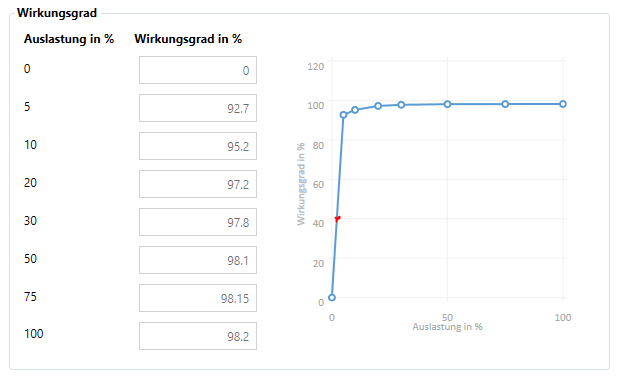
-
Jeweils 1 Batteriesystem an einen Wechselrichter
developer_mh replied to Brenner Energie's topic in PV*SOL
Hallo Marcel, das geht leider in der Form derzeit noch nicht in PV*SOL. Die Batteriesysteme können immer nur an einen Wechselrichter, bzw. MPP-Tracker bei DC-Generatorkopplung, angeschlossen werden. Es gibt viele Kunden, die sich hier mehr Flexibilität wünschen, und wir haben es relativ weiter oben auf unserer Feature-Liste. Wir bemühen uns nach Kräften, da so bald wie möglich eine Lösung anbieten zu können. Beste Grüße, Martin -
Hi Daniel, could you provide a project file or a screenshot of your PV system? This would be very helpful in order to analyse the problem. Thank you and kind regards, Martin
-
Hi Robin, yes, it will arrive in one of the next updates, most probably R4. It depends on how the tests go Kind regards, Martin
-
DC-link coupling in a Off-grid PV system with auxiliary generator
developer_mh replied to Juan Antonio's topic in PV*SOL
Hi Techsie, I am not sure if I can follow your reasoning. The offgrid functionality is a small subset of the PV*SOL features, and it is not limited to SMA products. We are aware of the feature request to allow for DC coupled offgrid systems, but we don't have a schedule for it now. Kind regards, Martin -
Hi Ragy, I am glad to hear that it helped. And thank you for sharing the settings that worked for you! Kind regards, Martin
-
Dear RobS, could you please provide a screenshot that illustrates your problem. I am afraid that I don't really know how your problem looks like. Thanks in advance, kind regards, Martin
-
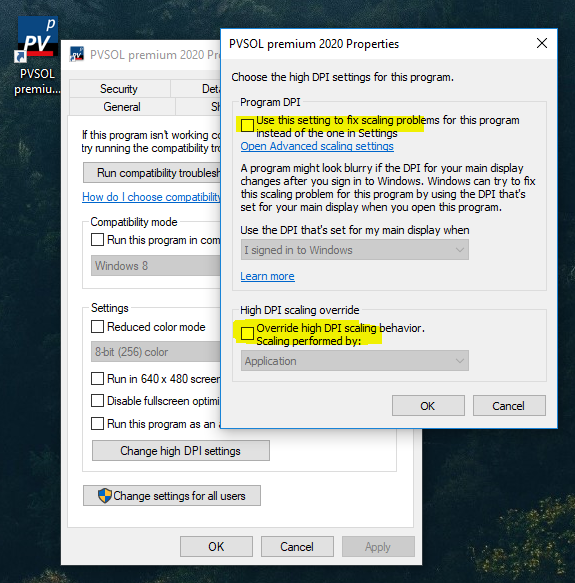
Hi Ragy, thank you for the screenshot. This looks very weird, I haven't seen anything like that. Also the button bar has a much larger spacing than usually. I guess there is something wrong the DPI scaling settings. Could you try the following: Right click on the shortcut icon of PV*SOL on your desktop If you don't have a shortcut icon there, locate the PVSOLpremium.exe in C:\Program Files (x86)\Valentin EnergieSoftware\PVSOL premium 2020, and right clik there Select Properties and then the tab "Compatibility" Play around with the options under "High DPI settings", often our customers report that with the settings "High DPI scaling override" set to "Application" things are displayed correctly You can also try to set the Compatiblity mode to Windows 8 We'd be glad if you could report which settings helped for your computer (if any). Kind regards, Martin
-
Hi Remu2, thank you for the request. I will forward it to our database team. It would be helpful as well if you could contact the manufacturer so that they add their systems into our database. Kind regards, Martin
-
Hallo Hesham, leider sind sowohl der Herbst letzten Jahres als auch das Release von 2020 R1 verstrichen, ohne dass wir die Klimadaten aktualisieren konnten. Wir arbeiten an einer Lösung, die jedoch mehr Zeit in Anspruch nimmt, als wir zunächst gedacht haben. Aber wir finden sicher eine Lösung, um bald ein Update zur Verfügung stellen zu können. Bitte habt Verständnis, wenn wir keine genauen Release-Daten nennen können. Beste Grüße, Martin
-
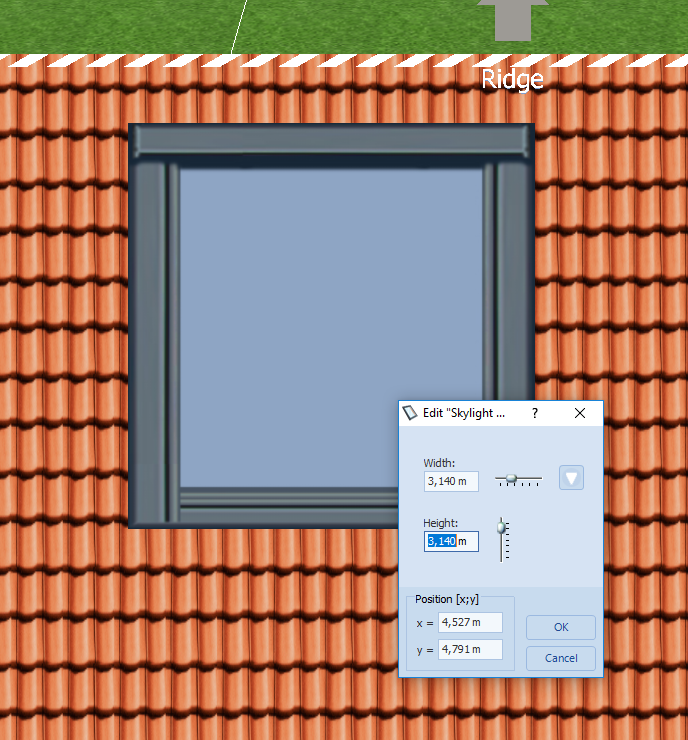
Hi Rob, I just checked it again, and it "works on my machine": Perhaps you have colliding objects near the skylight that inhibit the expansion? Kind regards, Martin
-
Hi Rob, did you try to import your old PV*SOL database (it is in *.sdf format) using the import dialog? https://help.valentin-software.com/pvsol/2020/databases/#database-import Then they should be visible also for new projects. Kind regards, Martin
-
Hi all, just an info for the other users. Using power optimizers in the configuration and the cabling plan in 3D, can lead to the problem that projects can't be loaded in 3D anymore, for some customers at least. We are looking into it, but please be aware of the problem in the meantime. Sorry for the inconvenience, kind regards, Martin
-
Hallo Anton, Projektdateien aus der aktuellen Programmlinie (2020) lassen sich nicht mit der Vorgängerversion öffnen, das ist immer so. Leider hatten wir vor dem R3 die Beschränkung der Dateiversion nicht scharf geschaltet, weswegen Projekte von 2020 R2 und R1 noch in 2019 geöffnet werden konnten, nur eben nicht sinnvoll. Unter der Haube hat sich so viel verändert, gerade auch beim Laden und Speichern, dass es rein technisch nur mit einigem Aufwand möglich ist (wenn überhaupt, da bin ich mir gar nicht sicher), die neuen Projekte zurückzuwandeln. Was bei ein Das Problem lässt sich also nur lösen, wenn alle mit der gleichen Programmlinie, also ab PV*SOL premium 2020 R3 arbeiten. Beste Grüße, Martin
-
Dear Ragy, could you provide a screenshot please, where you are missing the "Add" button? And also a screenshot on where the "l" of "symbol" is missing. This would be very helpful, thanks a lot in advance. Kind regards, Martin
-
Hi there, the cabling plan ofr mounted systems is on our feature request list for a long time, and we know how much our customers want it. We are working on it, but at the moment, we can't give a date for the release. Regarding the initial question: For the shading simulation, it doesn't matter which module comes first, when they are all connected in series. In the fourth image on the bottom, the arrays (2.1.1.1 - 2.1.1.16) and (2.1.2.1 - 2.1.2.16) are electrically identical. This is also why the cabling order makes no difference in the module configuration view, compare image 1 and 2. At the moment not, I am afraid. But you can preselect the modules before configuring to make sure, the right modules are connected together. Hope that helps, kind regards, Martin
-
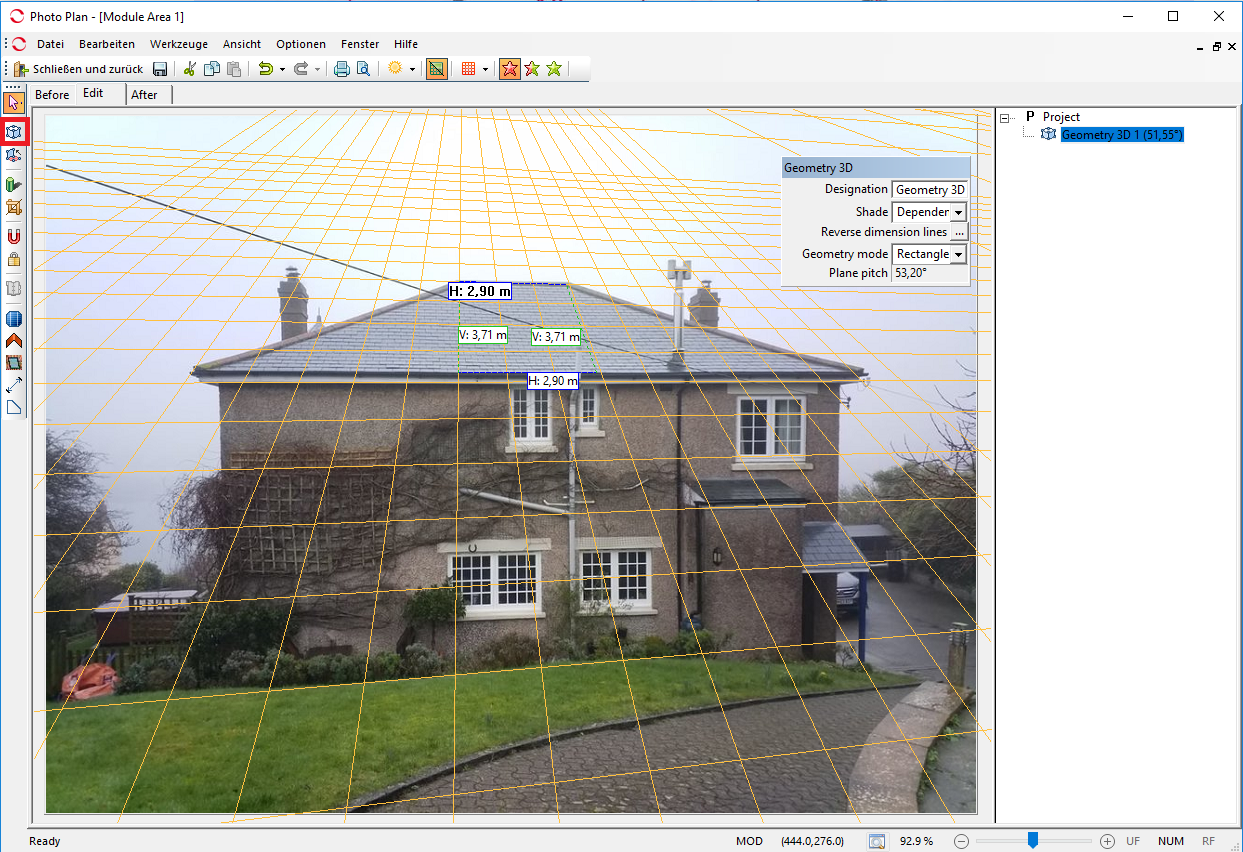
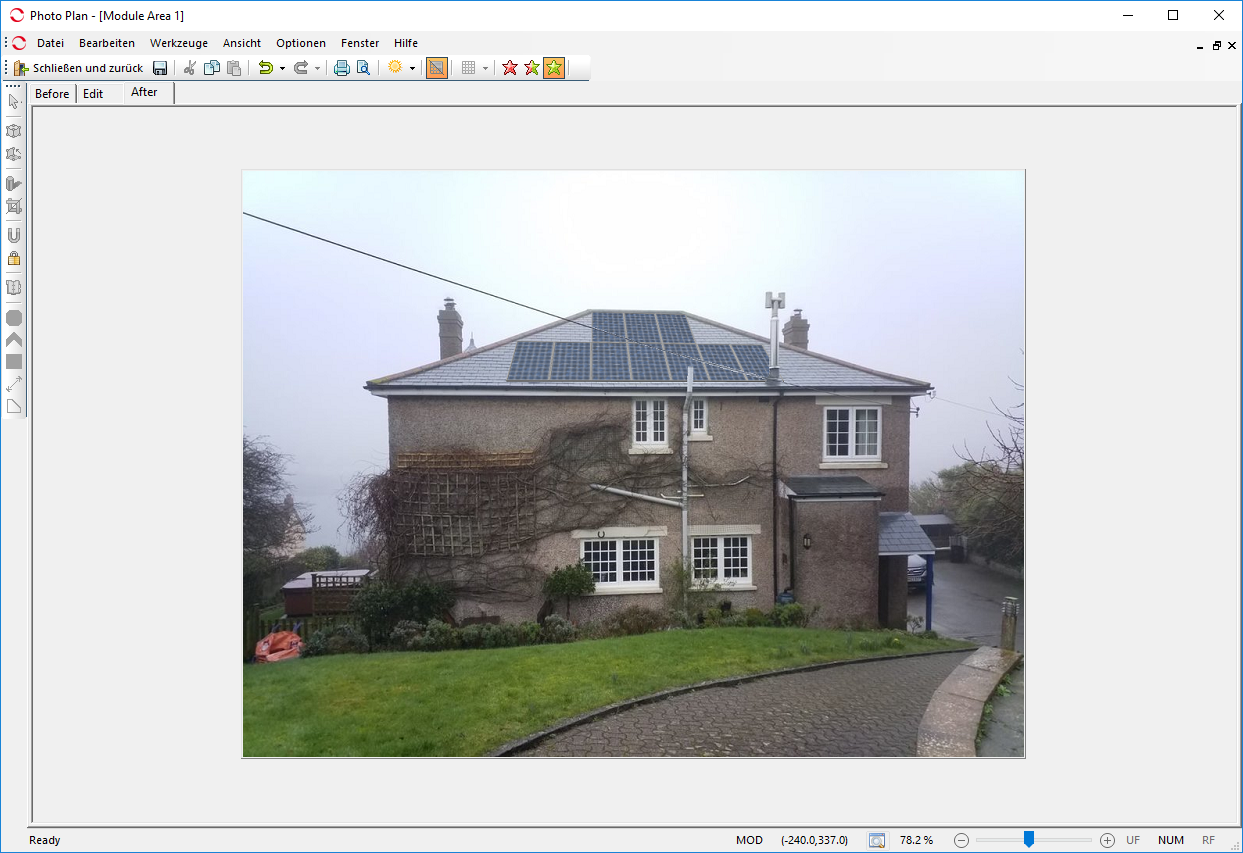
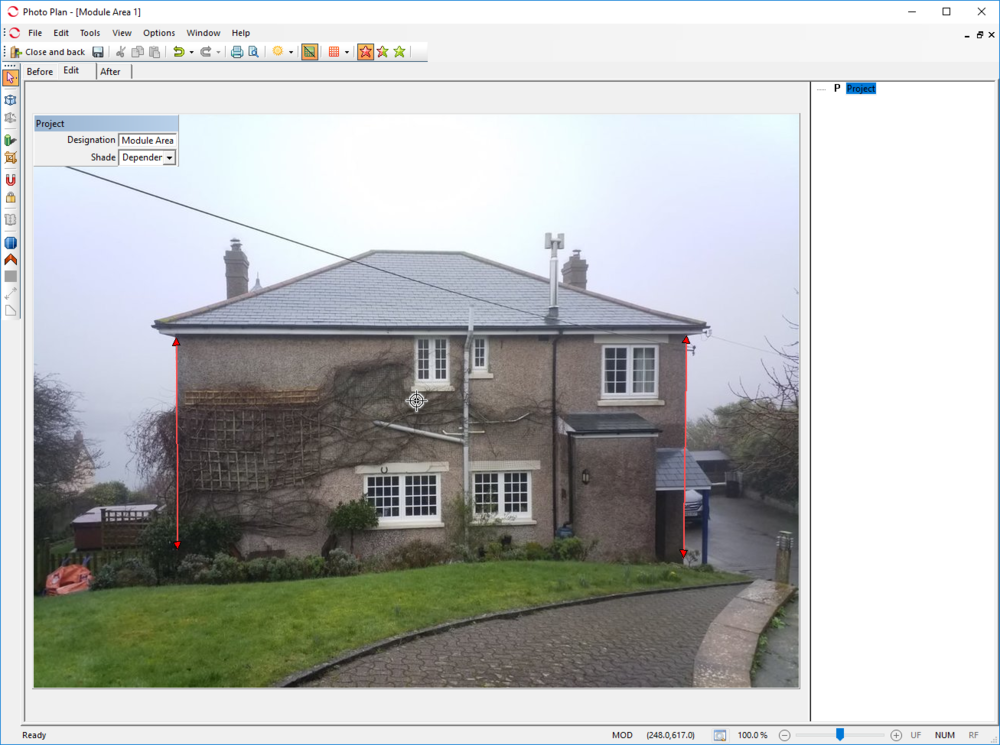
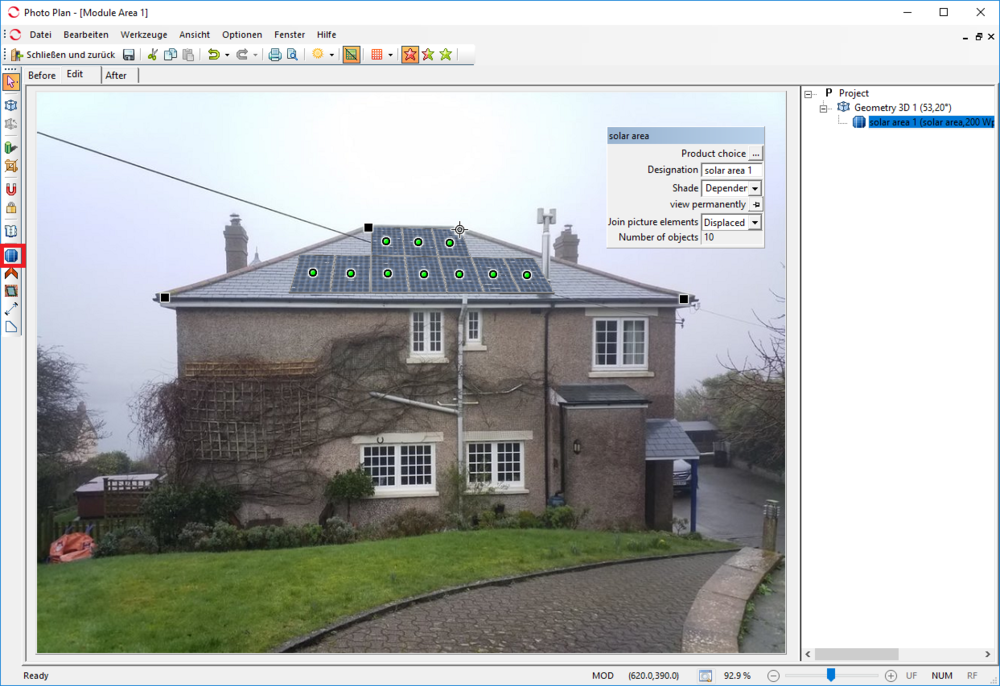
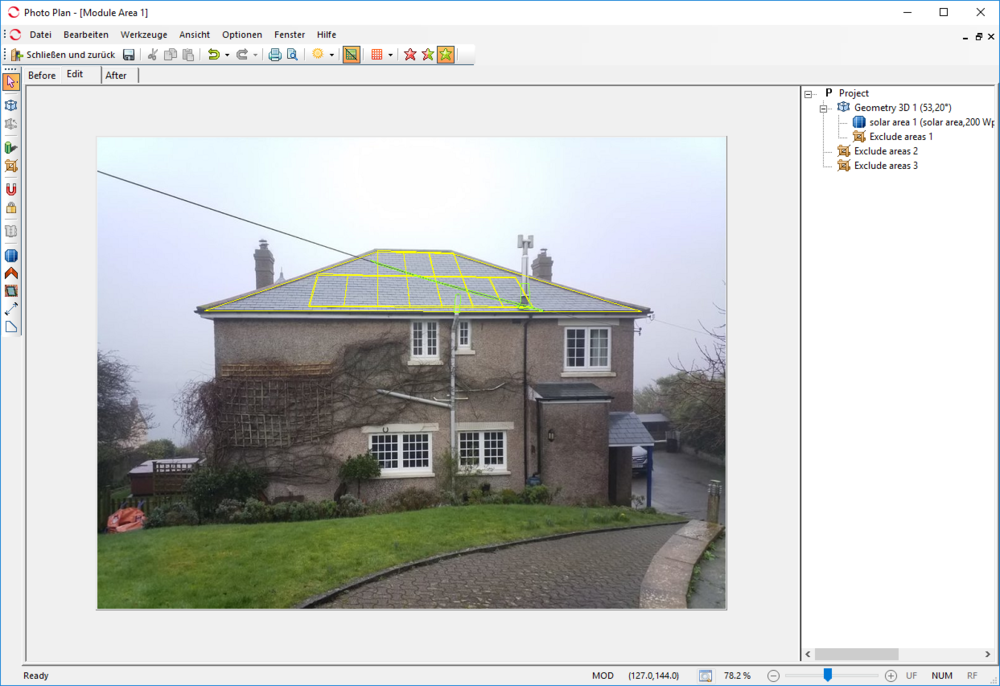
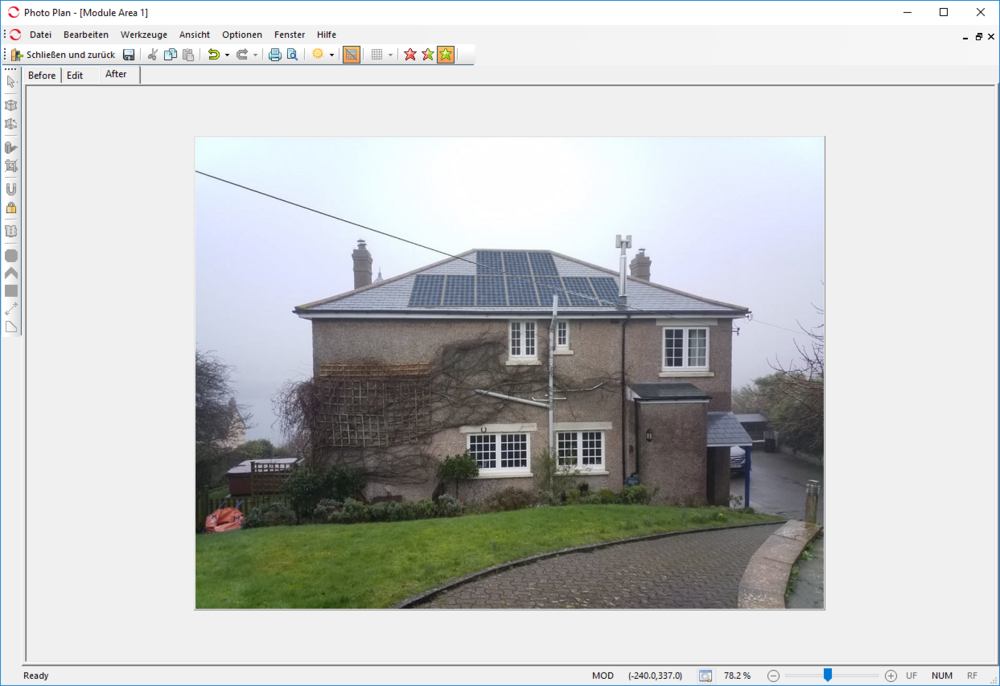
Hi Jordn, this should be possible in Photoplan. 1) Load the picture in Photoplan an set the two red lines to vertical edges of the house. 2) With the "Add geometry 3D" tool, draw a rectangular area onto the roof, so that the 3D plane (in yellow, it appears when you drag the corners of the rectangular) matches the roof 3) Then, with the "Solar Area" tool, draw a trapezoid along the edges of the roof, select the PV module (only for graphical purposes), and you see the modules placed on the roof: 4) Then choose the "Detach element" tool and draw polygons around the chimney and the power line, so that they appear in front of the PV array afterwards: 5) Then, as a result, you get this: So this is only a fast sketch, with more accuracy you will get better results. Hope that helps, kind regards, Martin

-
Hi SunLord, hi Bene-Solar, thank you for the input, we will put these suggestions on our feature list. Kind regards, Martin
-
Hallo David, der Weg über GeoT*SOL ist leider momentan der einzige - mit dem bekannten Nachteil, dass die Wärmepumpe nicht auf das PV-Dargebot reagieren kann. Wir planen aber, in Zukunft auch Wärmepumpen direkt in PV*SOL simulieren zu können. Wann genau das kommen wird, ist aber noch nicht klar. Viele Grüße, Martin