
developer_mh
-
Posts
1,860 -
Joined
-
Last visited
-
Days Won
173
Everything posted by developer_mh
-
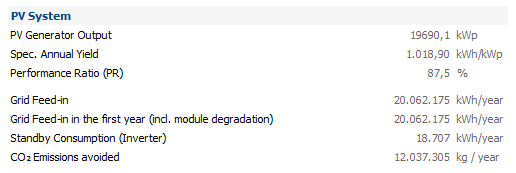
Hi UserPV, in the case of the example project "Solar Park Neuhardenberg incl P90", we have module degradation as well as P50/P90 analysis. See these topics for more information: https://help.valentin-software.com/pvsol/2019/pages/financial-analysis/bankability-p50p90/ https://help.valentin-software.com/pvsol/2019/pages/pv-modules/module-degradation/ These two factors effect the amount of energy that is fed into the grid in the first year. If you set the P50/P90 bankability to 50 and the module degradation to 100% (no degradation), then hese two numbers are equal: You can play around with the factors to see how they influence the results. Kind regards and good luck, Martin
-
Hallo Villamizar, der Lastabwurf ist nur bei Offgrid-Projekten (Anlagenart netzautark mit oder ohne Diesel-Generator) verfügbar. Kannst du genauer beschreiben, wie das Energie-Konzept mit Net-Metering und Batterie-Speicher "im Sinne des Lastabwurfs" aussehen soll? Vielleicht finden wir eine Lösung. Beste Grüße, Martin
-
Freut mich, dass du die Lösung dann noch gefunden hast. Beste Grüße, Martin
-
Hi UserPV, could you provide an example project file so that we can take a look at it? Thanks a lot, kind regards, Martin
-
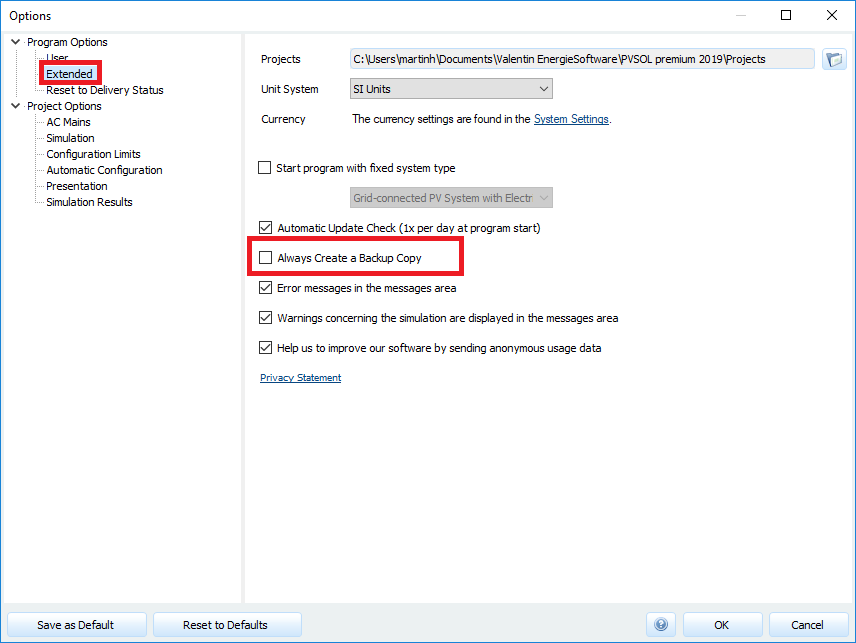
Hi Andrei, that would be here in the program options: Also refer to these pages for more information: https://help.valentin-software.com/pvsol/2019/options/ Kind regards, Martin
-
Hi José, do you mean you want to start a tariff zone e.g. on March 15 and end it on September 15? I am afraid that this is not possible right now. You can enter different values for each month, but the changes from one tariff zone to another can only take place at the beginning of the month. Kind regards, Martin
-
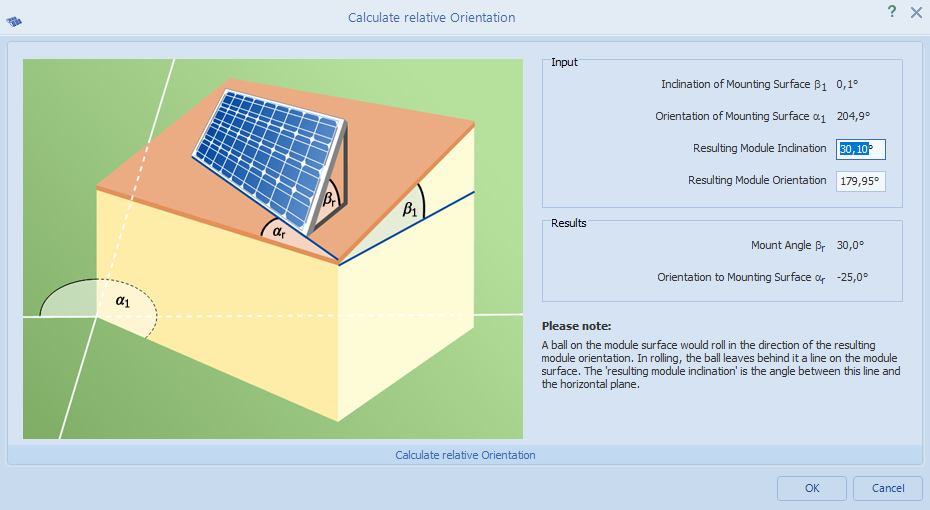
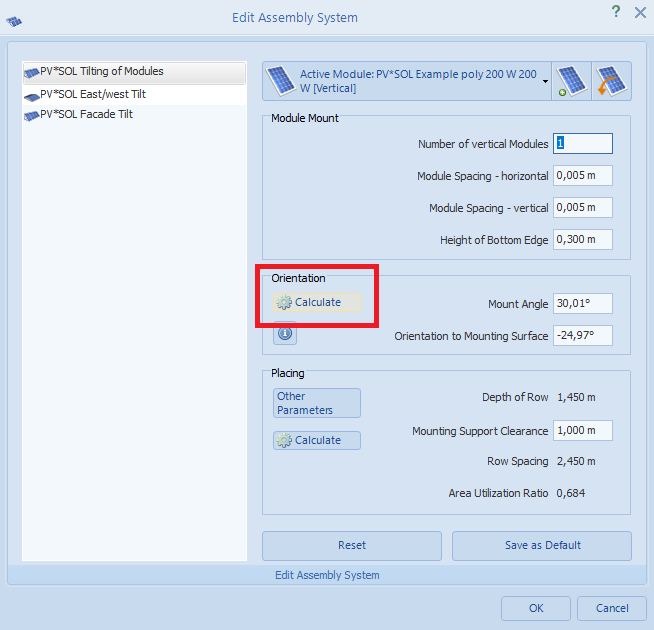
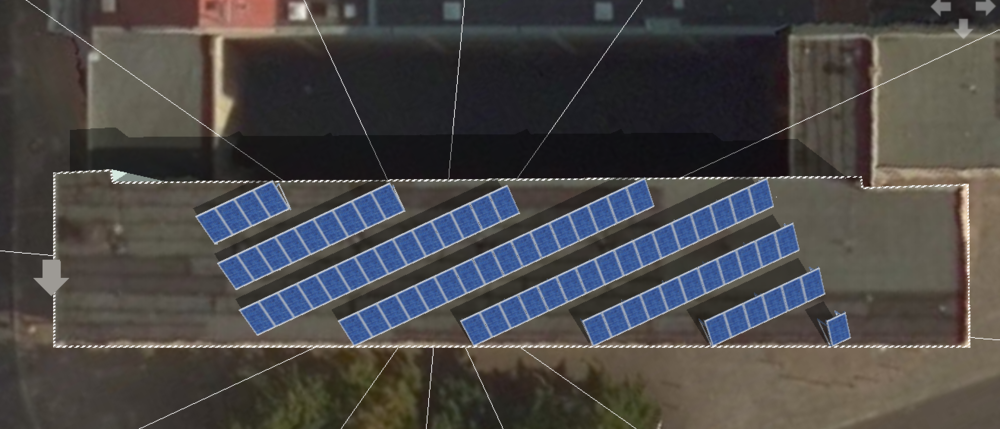
Hi Remu, please correct me if I got your question wrong, but you don't have to calculate anything by hand if you want to place module mountings on flat roof tops. There is a dialog that helps you to get the inclination and orientation of the PV modules that you want: Then the program will determine the orientation to the mounting surface and enter the values accordingly: Hope that helps, kind regards, Martin
- 1 reply
-
- 1
-

-
@Vishnu: Thanks a lot for answering here! We really appreciate it a lot when you help out each other!
-
Hi Alberto, Vishnu is right, the reason is the different relfection behaviour of the PV modules. There is a factor called IAM (incidence angle modifier) and is part of the data that is entered by the manufacturers: https://help.valentin-software.com/pvsol/2019/databases/components/pv-modules/#further https://help.valentin-software.com/pvsol/2019/calculation/pv-modules/reflection-in-module-plane/ And then, as Vishnu also mentioned, the module orientation and inclination of the PV modules has to be identical in order to be able to compare the results. From what I see in the energy balance that you attached, there is a difference between the two systems (one with -3.61 kWh/m² and the other with +2.48 kWh/m²) Kind regards, Martin
-
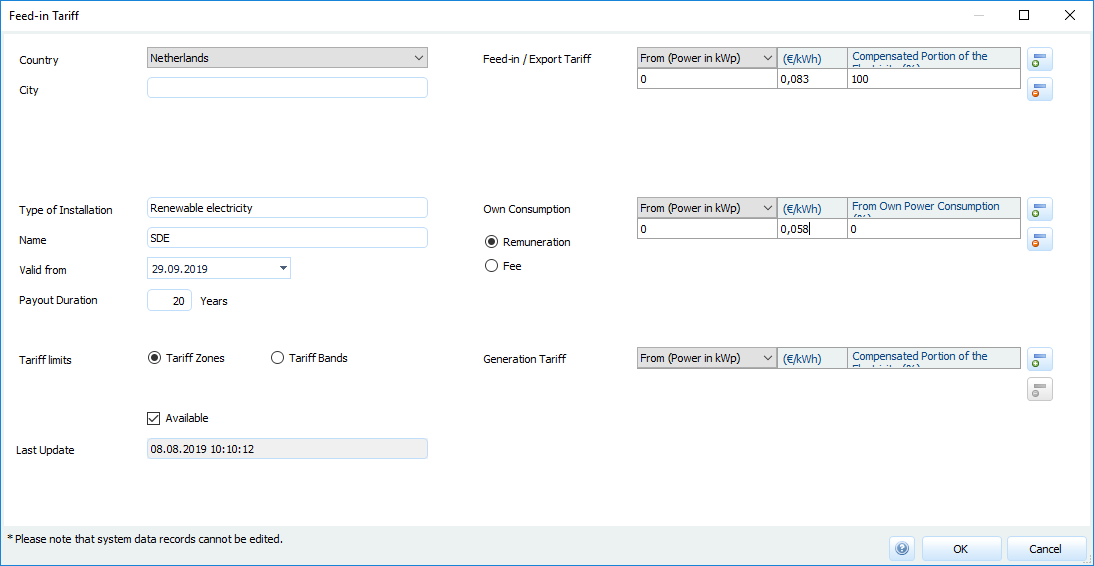
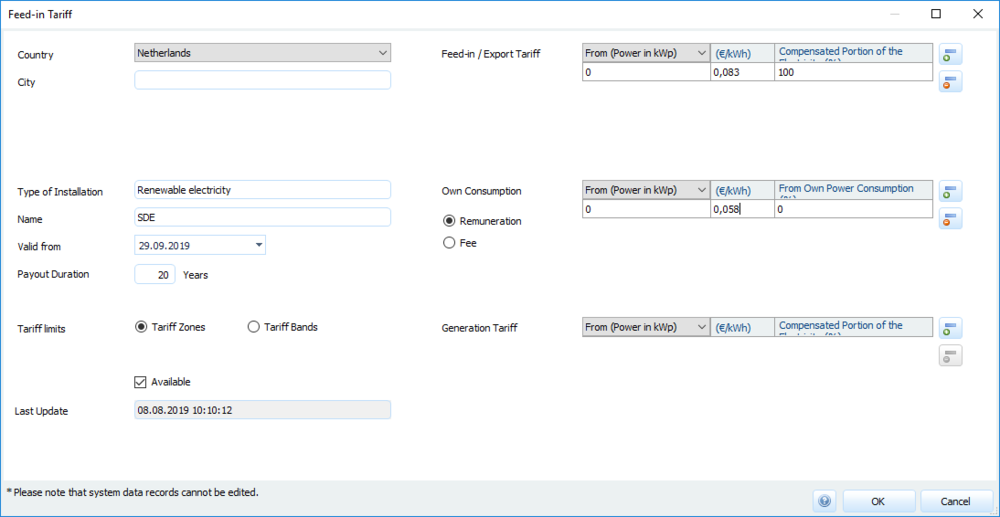
Hi again, maybe I am getting something wrong, but I think you just have to enter the resulting subsidy values for feed-in and own consumption in the according fields of your tariff, linke so: Prices are in €/kWh, so you get 0,083 €/kWh of fed-in (delivered) energy and 0,058 €/kWh for own consumption. I will attach an example project file with that tariff that you see here so that you can try it out. Keep in mind that the percentage of own consumption will be a result of the simulation, you don't have to enter it manually. Kind regards, Martin PVSOL 2019 R10 project with SDE tariff model from Netherlands.pvprj
-
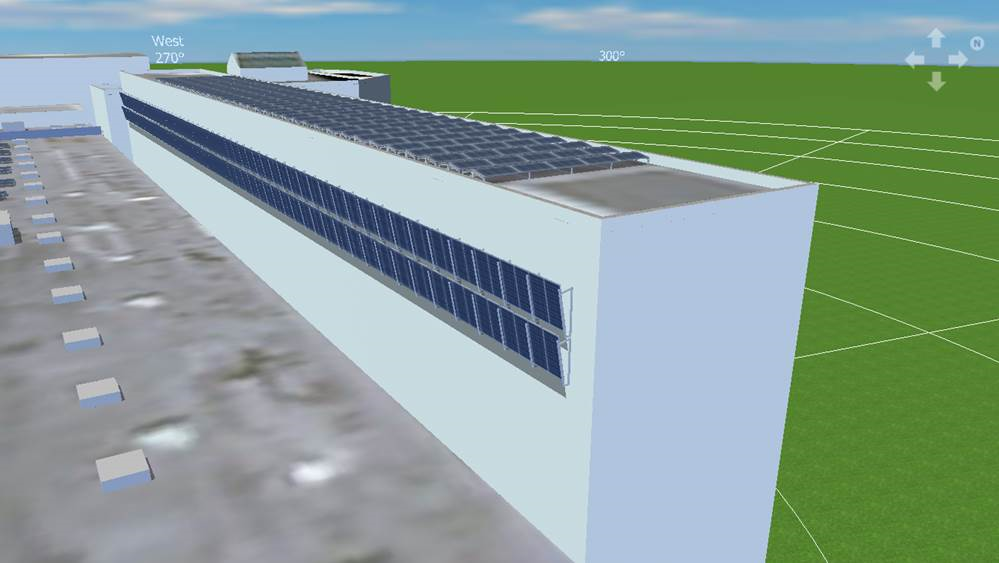
Dear forum users, together with Marta we were able to track down the error and we wanted to let you know the problem and the solution. In the PV system there was a wall mounted PV array with an inclination angle of more than 90°, that is, the modules are in fact more than vertical and already facing the ground. In these cases, our 3D shading simulation has a bug. It doesn’t calculate proper shading values, and as a consequence the yield simulation crashes. Unfortunately we can’t fix the bug in the 3D environment now. So as a workaround we would suggest to remove this PV mounting system from the wall and place a normal PV array there, so that the inclination angle is not exceeding the 90°. Kind regards, Martin
-
Hi Vishnu, in this case it would be best to contact our technical support team at hotline@valentin-software.com, they can help you out properly. It would be helpful if you could also attach the corresping project file. Kind regards, Martin
-
Hi stubzy, please have a look at these resources that will help you to understand the shading calculation in PV*SOL more in detail: https://help.valentin-software.com/pvsol/2019/calculation/irradiation/horizontal-shading/ https://help.valentin-software.com/pvsol/2019/calculation/pv-modules/shading-due-to-nearby-objects/ And then some threads from the forum where we discuss the various shading results: Hope that helps. If you have any further question, please don't hesitate to ask. Kind regards, Martin
-
Hi stelpanel, from what I understand from that brochure here https://english.rvo.nl/sites/default/files/2019/04/Brochure SDE Spring 2019.pdf is that you receive a feed-in tariff for your produced energy that is dependent on the "correction amount", i.e. the current market price of energy. In total, if I understand it right, you will always get 9, 11 or 13 ct/kWh as a result, partially from the subsidy, partially from the market price. In this case, calculating SDE in PV*SOL is easy. Just create a new feed-in tariff with the according remuneration (9, 11 or 13 ct/kWh) and select it on the page "Financial Analysis". Please correct me if I understand the SDE+ system wrong. Kind regards, Martin
-
Dear stelpanel, I will translate your post using deepl.com: We will have a look into this, but please be aware that it might take a moment until we find the time to respond. Kind regards, Martin
-
Hi Marta, we are sorry that you are experiencing this error. We are looking into the issue. There is no need to open more than one thread here in the forum. And you don't need use the report function, this is intended to report inappropriate content to the moderators. Thank you for filing the bug report. As it is a larger project, it might take a while to debug. Thank you for your understanding, kind regards, Martin
-

2 strings (different in lengths) connected to one MPPT
developer_mh replied to K24's topic in PV*SOL
Hi Kamal, these kind of bends occur when you have unequal number of modules in your strings. The curve section from 0V to the point where the bend occurs is where the two strings both deliver a current for the given voltage. After the bend, up to the open circuit voltage of the longer string, only the longer string (with 21 modules) can deliver current, the other string is not contributing anymore. Kind regards, Martin -
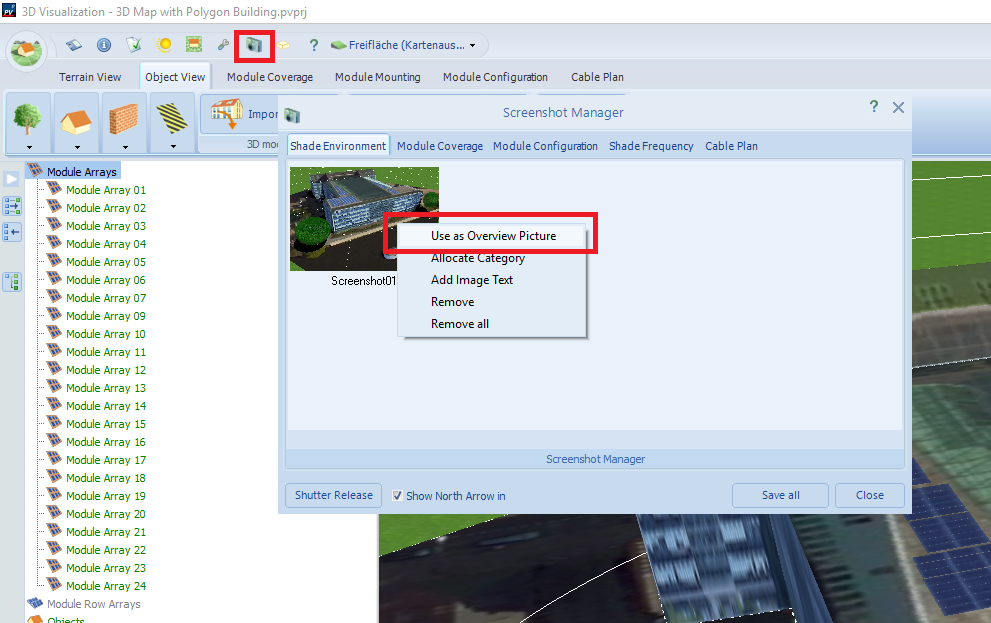
Hallo ojsolar, die Gebäudedarstellungen werden automatisch generiert. Wenn man mit der Ansicht nicht zufrieden ist (bei großen Gebäuden ist das manchmal der Fall), kann man auch eigene Screenshots mit dem Screenshot-Manager der 3D-Umgebung machen und diese als Übersichtsbild festlegen: Dann wird das gewählte Bild auch im Projektbericht verwendet. Beste Grüße, Martin
-
2 strings (different in lengths) connected to one MPPT
developer_mh replied to K24's topic in PV*SOL
Hi Karam, no, I would not say that connecting strings with different module numbers is a red line in general. Why not try it out in PV*SOL directly? We calculate the losses due to string mismatch with great accuracy, so you can just see how much energy you loose in you PV system and see for yourself if you can accept these losses. You can also see the resulting IV characteristics of your parallel strings in the results page (under Simulation -> Diagram Editor -> Type of Diaram: Characteristics) Kind regards, Martin -
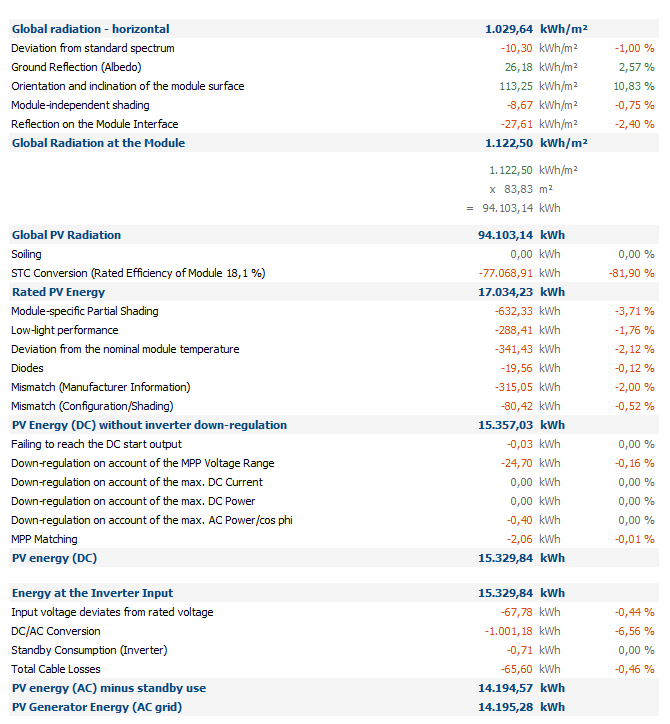
Hi Fritz, the Module-independent shading is reducing the global radiation on the module, sure, but it is not part of the PR calculation. It just leads to a reduction of the radiation, like it would if you take climate data for another location with less solar radiation, for instance. In contrast, the losses due to the reflection on the module surface are both reducing the global radiation that is available for electrical conversion _and_ it is accounted for in the PR calculation. Yes. Or more precisely, yes, given that the modules are connected to the same MPP tracker and are part of the same module area. The lowest diffuse shading value of the modules connected to one MPP tracker is taken as module-independent shading factor. No, the shadow calculations work for all kinds of shading objects in the same manner. Concerning the UA, you are referring to this help page, I guess: https://help.valentin-software.com/pvsol/2019/calculation/pv-modules/module-temperature/ The heat loss rate is part of the PV module temperature calculation and is therefore also part of the PR calculation. To put it the other way round: All the losses you see in the energy balance, between (Global Radiation at the Module + Reflection on the Module Interface), and the PV energy (AC) minus standby use, is integrated in the PR calculation. Hope that helps, kind regards, Martin
-
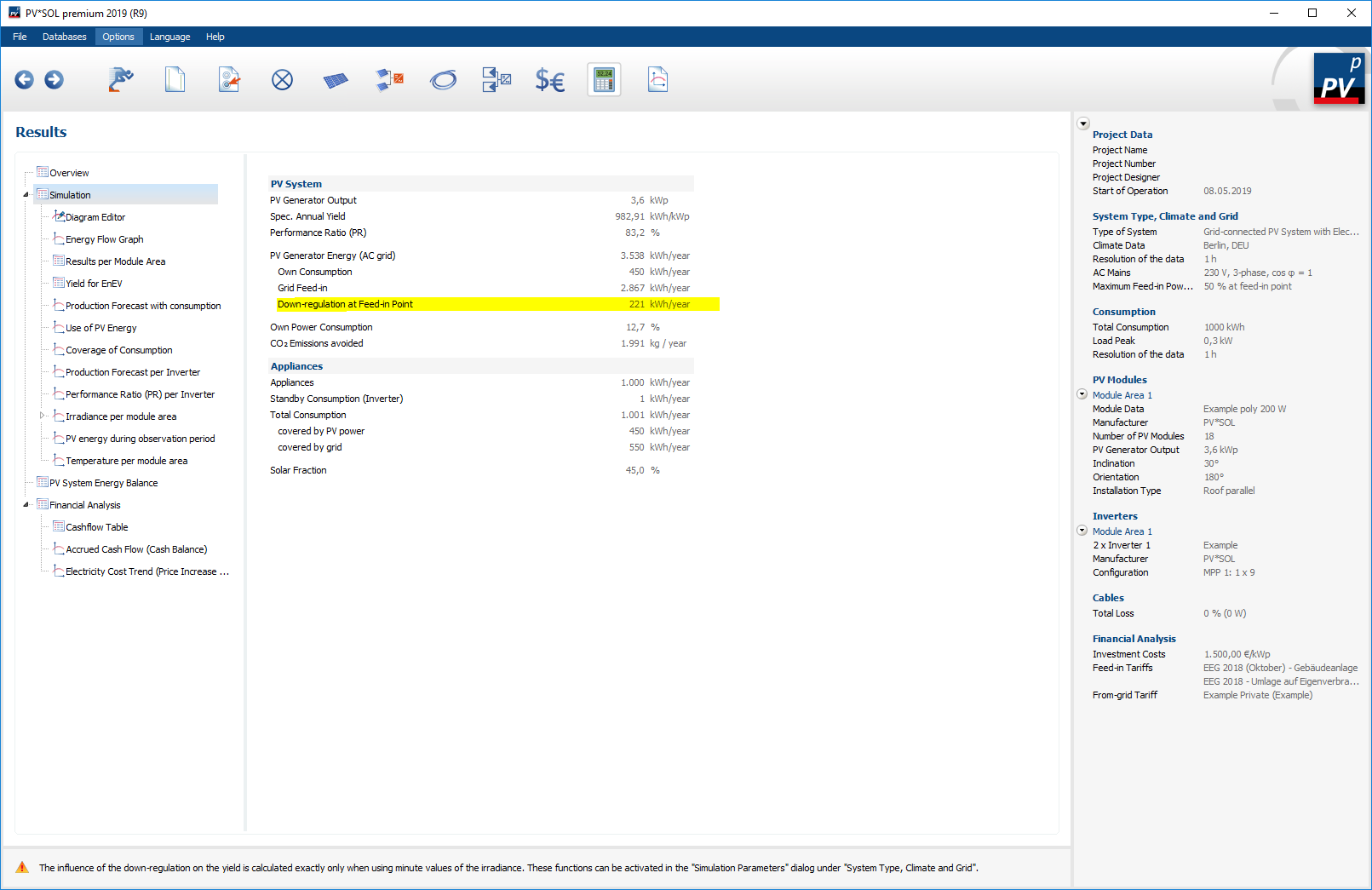
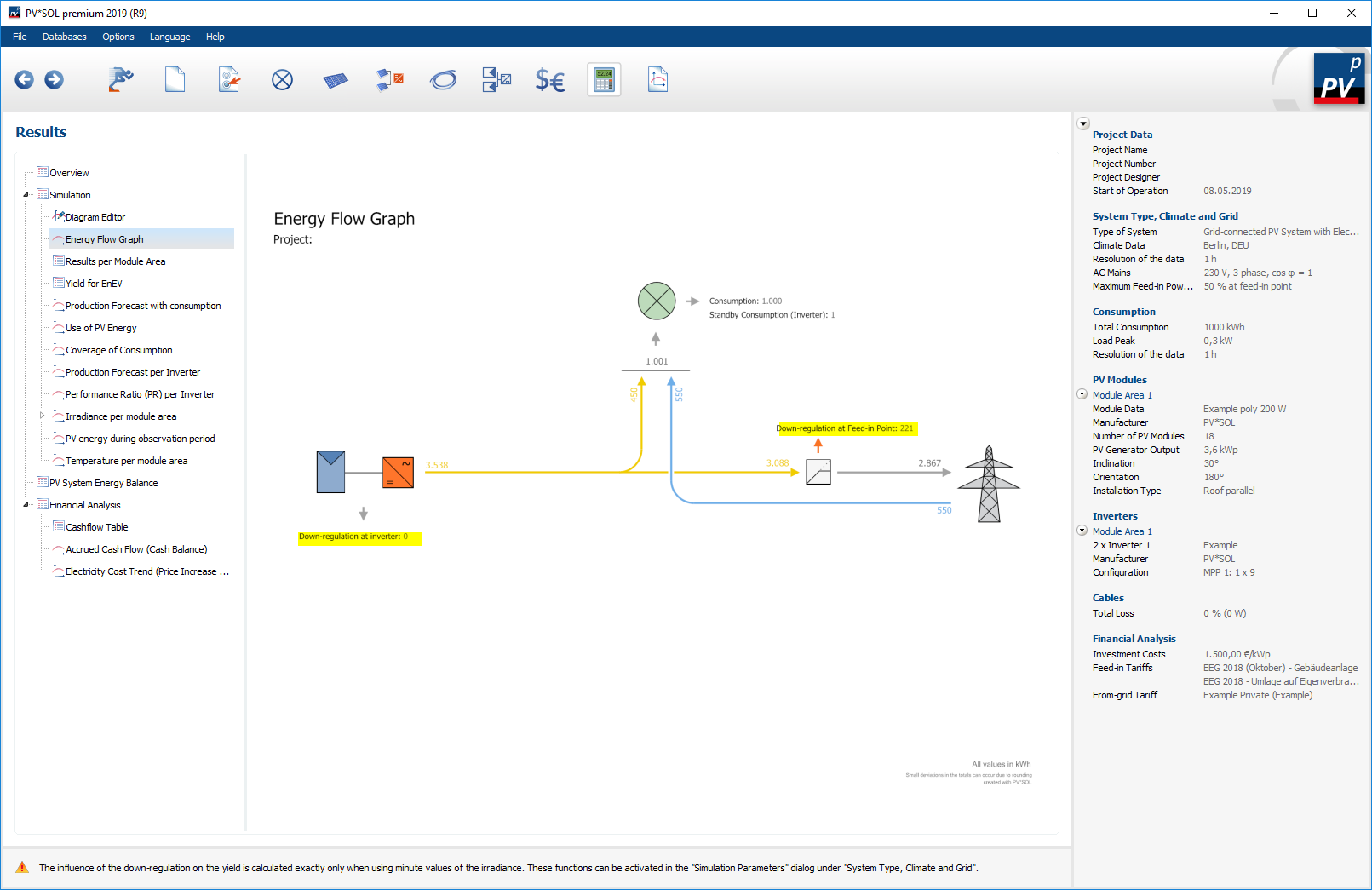
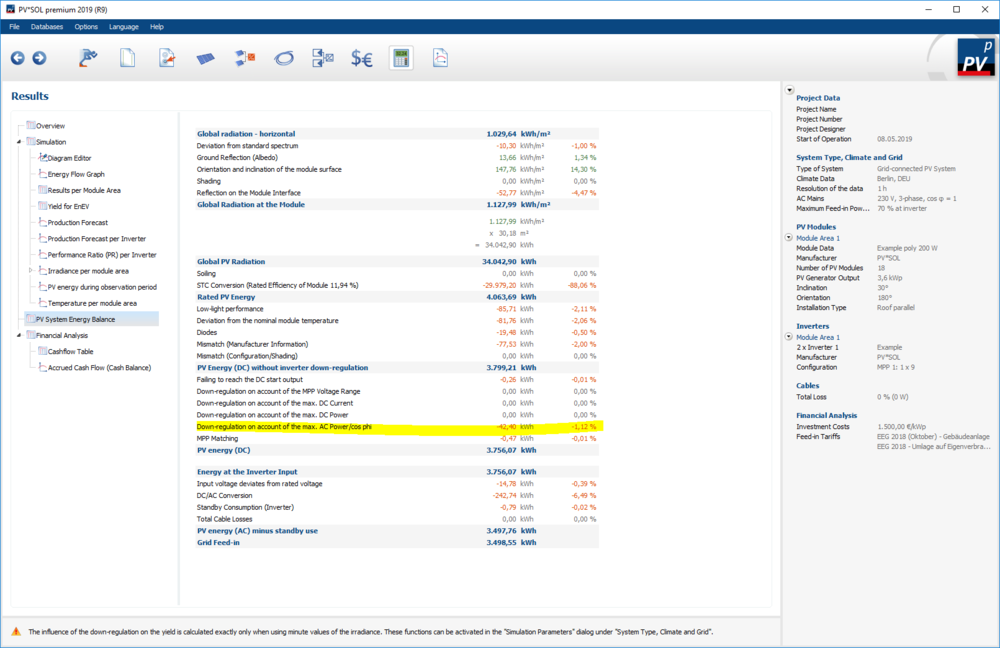
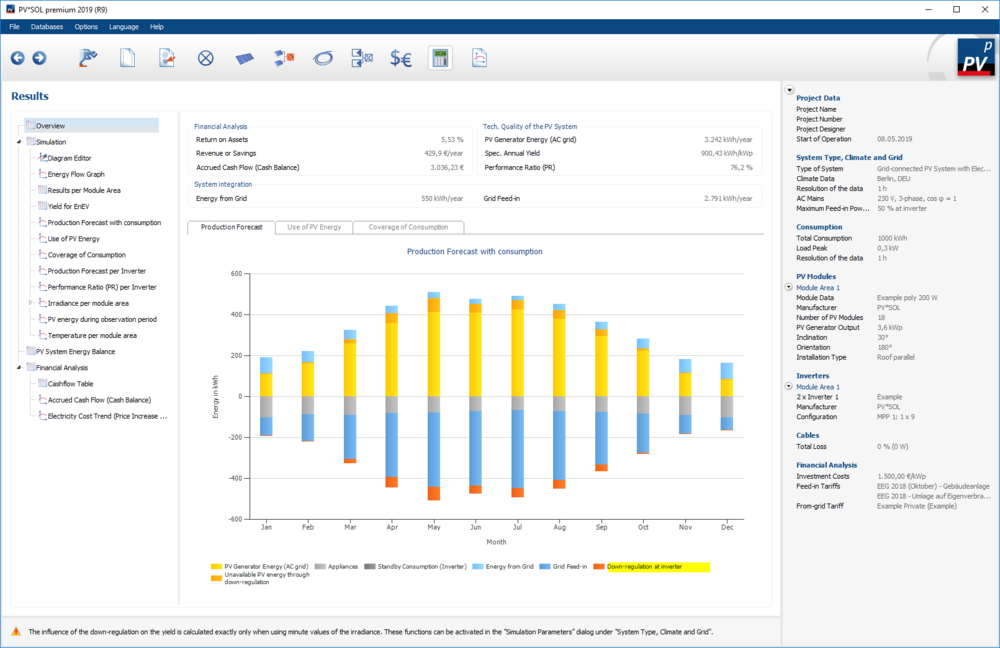
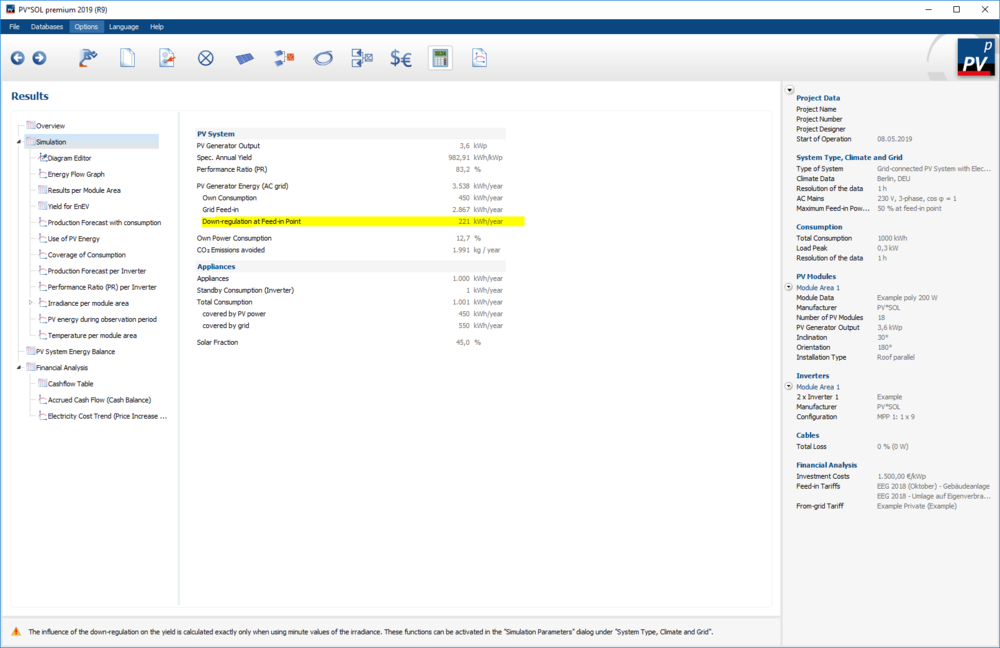
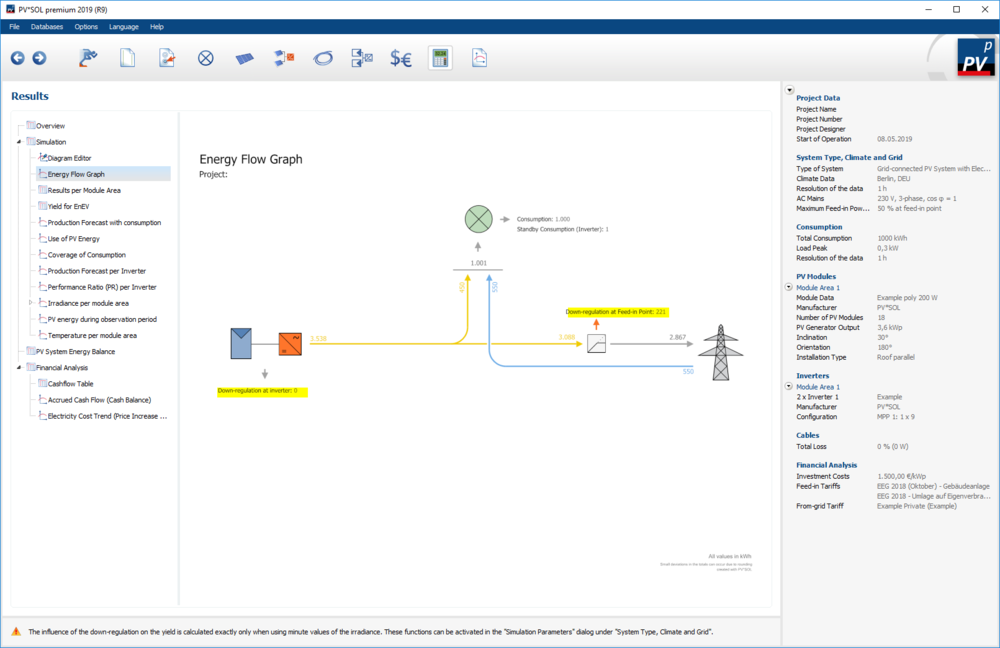
Hi Vishnu, the feed-in management or maximum power clipping or "Einspeisemanagement" in German can be edited on the page "System Type, Climate and Grid". https://help.valentin-software.com/pvsol/2019/pages/system-type-climate-and-grid/#ac-grid https://help.valentin-software.com/pvsol/2019/navigationsseiten/anlagenartklimaundnetz/#ac-netz There you can enter the power clipping in % of the installed DC power, and you can choose if the inverters are limiting the power or if it can be done at the feed-in point. In case of the latter, possbile self consumption or battery charging can take place before limiting the PV production. The results (the actual losses due to clipping are shown on the results page. DEpending on what type of clipping you choose, the values are presented differently. If you don't have electrical appliances (consumers) in your system, the losses can be found in the energy balance of the PV system: If you have electrical appliances and you choose power clipping at the feed-in point, the losses can be found on the overview pages: In the diagrams: In the table views: And of course in the energy flow graph: And a side note: If you analyse clipping behaviour and you want to know the energy losses, we strongly recommend using one-minute resolution for the simulation. Hope that helps, kind regards, Martin
- 1 reply
-
- 1
-

-
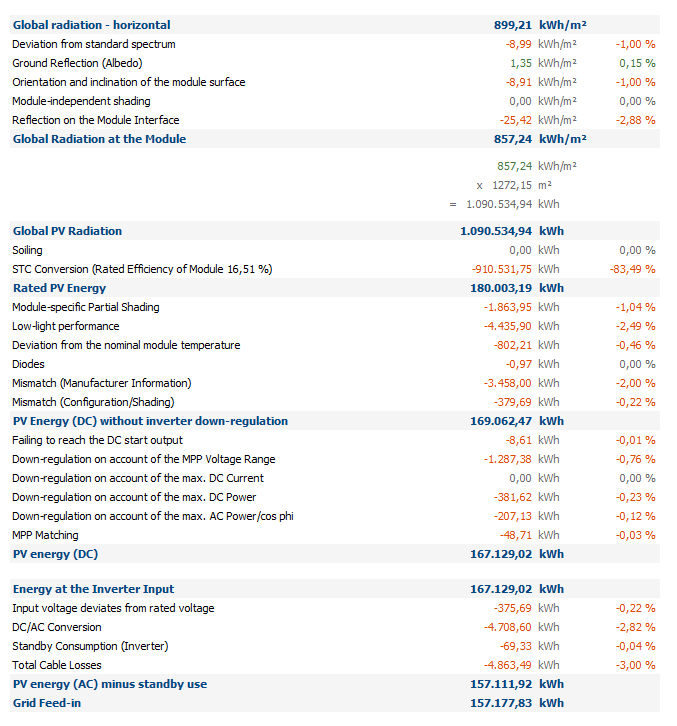
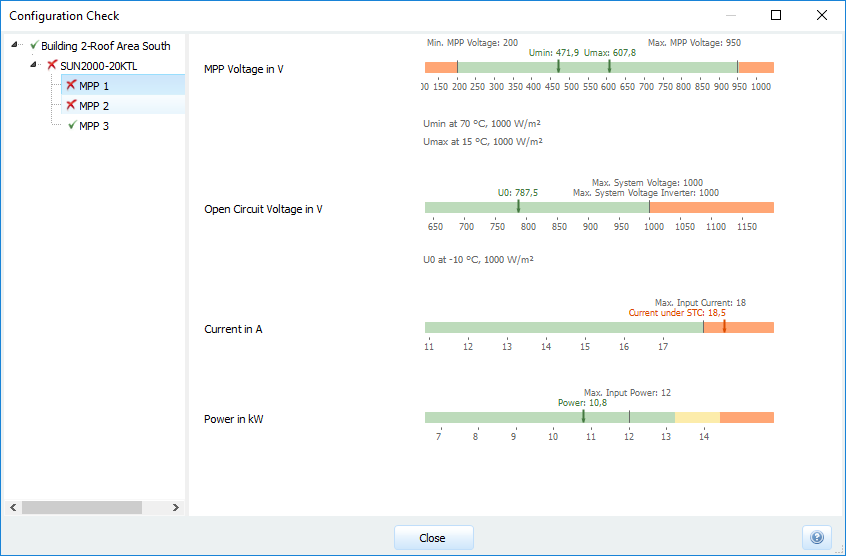
Hi ZhAta, it is true that formally the MPP voltage is too low and the current is too high if you connect 6 x 22 JA Solar JAP6(K)-60-270/4BB modules to a Fronius Eco 27.0-3-S. With the check temperatues of 15°C (U_Mpp_Max), 70°C (U_MPP_Min) and -10°C (U_OC) there is no way around it. You could have 5 x 24 modules, then the current limit isn't hit and the MPP voltage limits are fine, but still the Open Circuit voltage will be exceeded. But the question is, how much energy do you loose if you connect your system like this? I simulated your system with one-minute resolution (to get a realistic estimation of the clipping losses) and it looks ok: The down-regulation on account of the MPP voltage is relatively high, 1287 kWh, but it is still only -0,76% of you energy that you loose. It is then up to you, the planner, to decide if you want to accept these losses. If you are bound to these specific modules and this inverter, I guess you have to You can try different configurations, simulate them and see what you prefer. Hope that helps, kind regards, Martin
-
PV*SOL Programmabsturz beim Öffnen vorhandener Projekte
developer_mh replied to Richard-K's topic in PV*SOL
Hallo Richard, aus dem Fehlerbericht ist herauszulesen, dass es zu Problemen beim Laden von den Tarifen kommt. Die Version, die ihr benutzt ist leider ziemlich alt, so dass wir diesen Fehler höchstwahrscheinlich in der Zwischenzeit schon behoben haben. Daher lohnt es sich immer, mit der aktuellsten Version zu arbeiten. Es sind auch viele, viele neue Features darin und ihr könnt sie 30 Tage kostenlos testen: https://www.valentin-software.com/produkte/photovoltaik/57/pvsol-premium Beste Grüße, Martin -
Hi Ricardo, I mean you could still use the configuration as in your version 2. The maximum current is only exceeded by 0.54 A, I guess that the energy losses due to current clipping will not be too high. I just simulated it with one-minute values for Berlin, and the current clipping (down-regulation) is really insignificant. Kind regards, Martin
-
ah, you were faster. So the database entry is wrong. I will inform our database team.