developer_mh
Administrators
-
Joined
-
Last visited
Everything posted by developer_mh
-
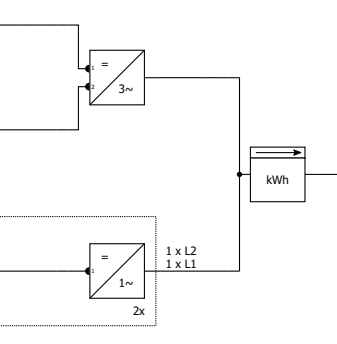
Hallo Udo, ebenfalls ein frohes und erfolgreiches neues Jahr! 3-phasige Wechselrichter werden mit einer 3~ angezeigt, wie bei dem oberen Wechselrichter in dem Screenshot unten. Wenn 1-phasige Wechselrichter an einem 3-phasigen Netz angeschlossen werden, werden die jeweiligen Phasen angezeigt: Es lassen sich aber die 3 Phasen nicht getrennt darstellen, also als drei getrennte Linien. Viele Grüße, Martin
-
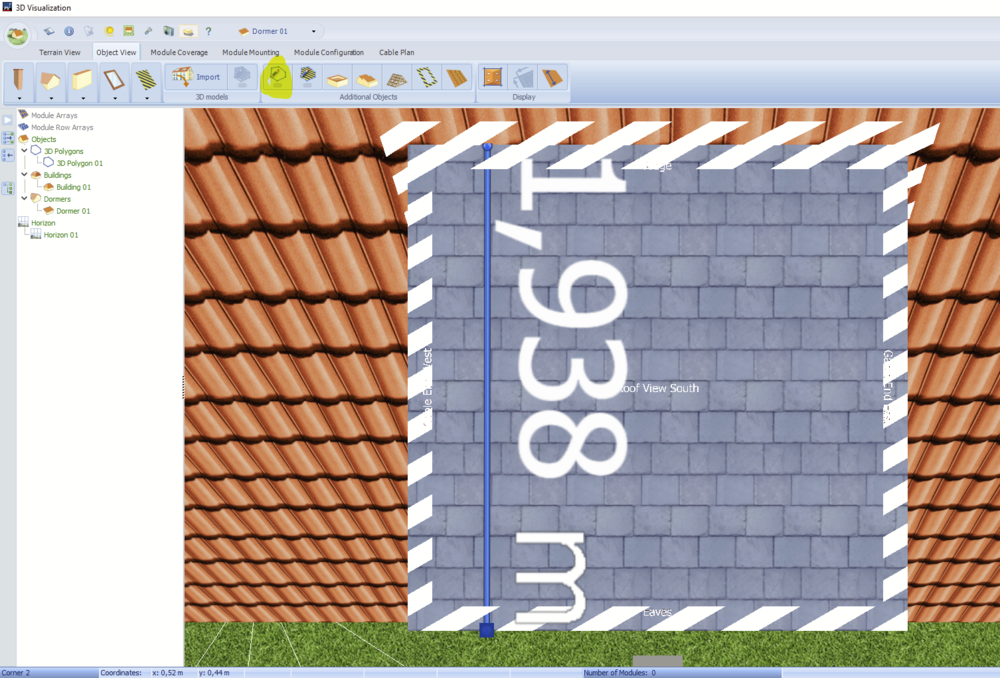
Hallo lwi, Frohes neues Jahr! Doch, es lassen sich beliebige Strecken mit dem Polygon-Tool messen: Beste Grüße, Martin
-
Hi Santos, happy new year! The link doesn't work for me, unfortunately. But we didn't change anything with Photoplan in the latest releases. Kind regards, Martin
-
Hi Muhammad, unfortunately this operation mode is not yet available in PV*SOL premium. We have this on our list though, but right now we can't name a date when it will be published. Kind regards, Martin
-
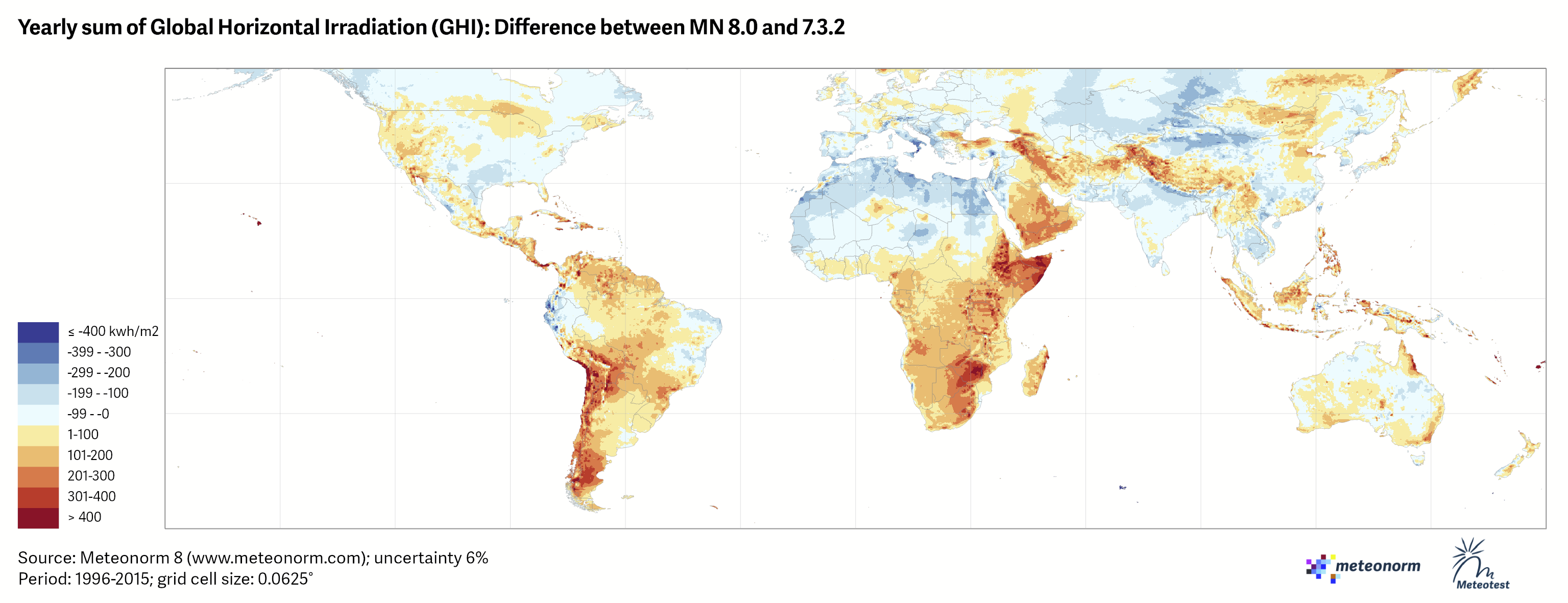
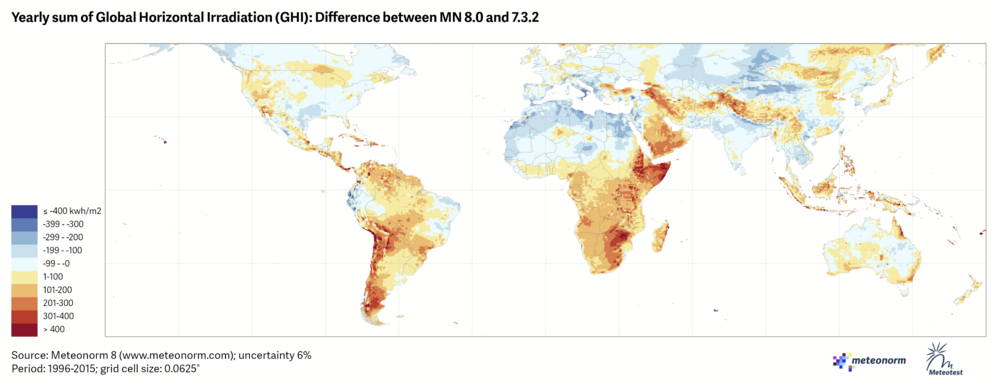
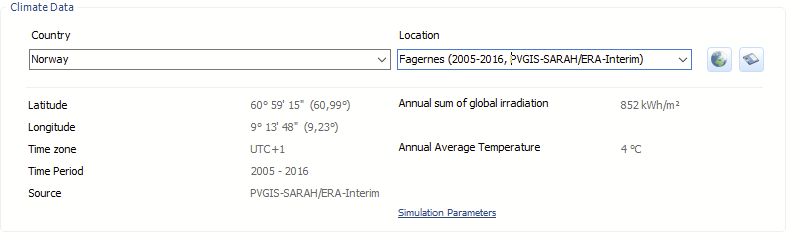
Hi Sondre, this can happen when you compare climate data from Meteonorm 7.2 with 8.1. See these difference maps for reference, which we got from Meteotest: Fagernes is just not o the map anymore, I guess, but you see the red area in south Norway in the difference map from 7.3.2 to 8.0. Unfortunately, Fagernes is not covered by the most important climate satellite for Europe (SARAH), so data have to be extrapolated into the unknown. But it is always a good idea to check with other climate data sources, for example PVGIS. They extrapolate from the available satellite data as well: The Global Solar Atlas however, usually a good source to check meteo values, doesn't even try to give an estimate for your location https://globalsolaratlas.info/map?c=60.027814,8.599548,8&s=-5.777234,-35.242767&m=site So, yes, it is not unusual to have such high differences between Meteonorm versions. But the question which value is the most suitable for your location is very difficult to answer. Hope that helps, kind regards, Martin

-
Hallo J Berends, leider kann das AC-seitige Nachladen derzeit nicht in der Simulation dargestellt werden. Wir haben diesen Feature-Wunsch bereits auf unserer Liste, ich kann aber derzeit noch nciht sagen, wann wir es werden implementieren können. Ja, tatsächlich. Wir sind uns auch bewusst, dass die Funktionalität immer öfter angefragt wird und werden das in unserer Planung berücksichtigen. Viele Grüße, Martin
-
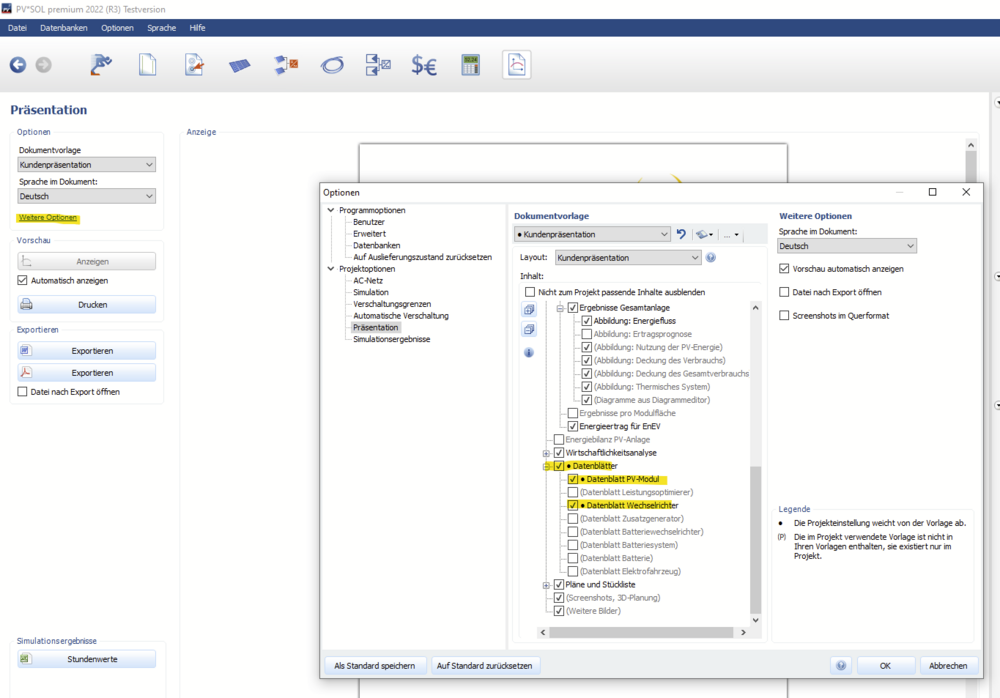
Hallo Udo, man kann einen Datensatz ausdrucken, allerdings nicht direkt aus dem Datenbank-Dialog heraus. Wenn man den Wechselrichter oder das PV-Modul in der Anlage verwendet, kann man sich die Datenblätter als Teil der Präsentation ausgeben lassen. Beste Grüße, Martin
-
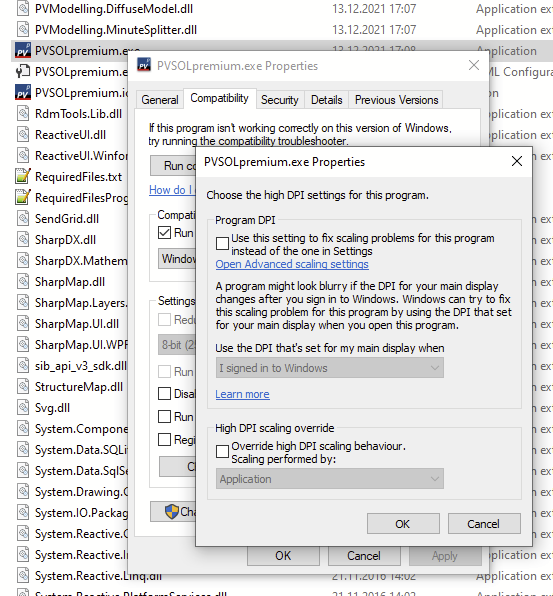
Hallo bene-solar, am besten ist es, die Einstellungen für das Überschreiben des HighDPI-Verhaltens ganz rauszunehmen: Dann PV*SOL neustarten. Das Problem mit dem verschwindenden Kontext-Menü ist uns bekannt, es liegt leider am darunter liegenden Oberflächen-Framework von Microsoft. Wir prüfen derzeit, welche Workarounds funktionieren könnten. Viele Grüße, Martin
-
-
Hallo Udo, viele liebe Grüße zurück nach Thailand! Normalerweise werden Produkte wie Wechselrichter oder PV-Module von den Herstellern in unsere Datenbank eingetragen. Am besten wäre es daher, wenn du invt kontaktierst (https://www.invt.com/contact-us), mit der Bitte, deren Wechselrichter bei uns einzutragen. Die Kontaktadresse bei uns lautet database@valentin-software.com, die zugehörige Webseite https://pvsol-database.valentin-software.com. Wir werden sie auch mal kontaktieren. Es können aber auch selbst Produkte in die Datenbank eingegeben werden. Hierzu der Link auf die Hilfeseiten: https://help.valentin-software.com/pvsol/de/datenbanken/komponenten/wechselrichter/ Das Währungssymbol wird vom Betriebssystem übernommen. Wenn es dort auf Baht umgestellt wird, arbeitet auch PV*SOL damit. Es erfolgt allerdings keine Währungsumrechnung, dh die Beträge bleiben unverändert. Beste Grüße, Martin
-
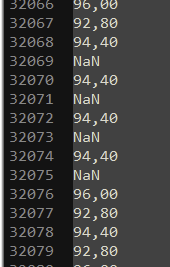
Good day Venco Gary, where do you have the data in the first table from? I didn't see it in the datasheet. The table itself is the reason for the unrealistically high value for the relative effiency. You can check that by a simple calculation. The short circuit current of a PV cell or module is (usually) proportional to the irradiance. If you have 13.83 A at 1000 W/m², you should have around 2.76 A at 200 W/m² (13.83 A * 200 / 1000). Here in the table we see 5.59 A. I would say, this is impossible. The data is erroneous. Hope that helps, kind regards, Martin
-
This is because your attachment quota is nearly full. You'll need to delete older attachments or messages in order to upload new ones.
-
Hi Jimmy, the "Maximum Feed-in Power Clipping" lets you limit the power at either the feed-in point or at the inverter output to a percentage of the installed PV power (STC). If you have PV modules with a total STC of 10 kWp installed and you set the power clipping to 70% percent at the inverter, everything above 7 kW (AC) will be cut off. Actually, if you limit the power at the inverter output, the exceeding power will not be cut off, but instead another point on the I-V characteristics of the modules is chosen so that the power limit is not hit. If you choose to clip at the feed-in point, the inverter can still output power to its own limit, say 10 kW. Then electrical appliances or a battery system or an electric vehicel can be supplied, and only after that, before feeding in the surplus PV power into the grid, we check if the power clipping limit is reached. If so, we cut the excess off. If the PV is outputting 10 kW (AC), and the consumers draw 5 kW at the same time, the grid feed-in would only be 5 kW, so no clipping would occur. If you want to limit to an AC current of 20 A, you would have to calculate the resulting power depending on the grid voltage. On a one-phase 230 V grid you can get 4.6 kW over a 20 A fuse. If you have 10 kWp of PV power installed, you would enter 46 % "Maximum Feed-in Power Clipping" at the feed-in point. Hope that helps, kind regards, Martin
-
Hi Johan, often this is caused by the file names of the textures. Be sure that there are only letters and numbers in them. If it doesn't work, feel free to send your obj file to hotline@valentin-software.com, together with a link to this thread. Hope that helps, kind regards, Martin
-
-
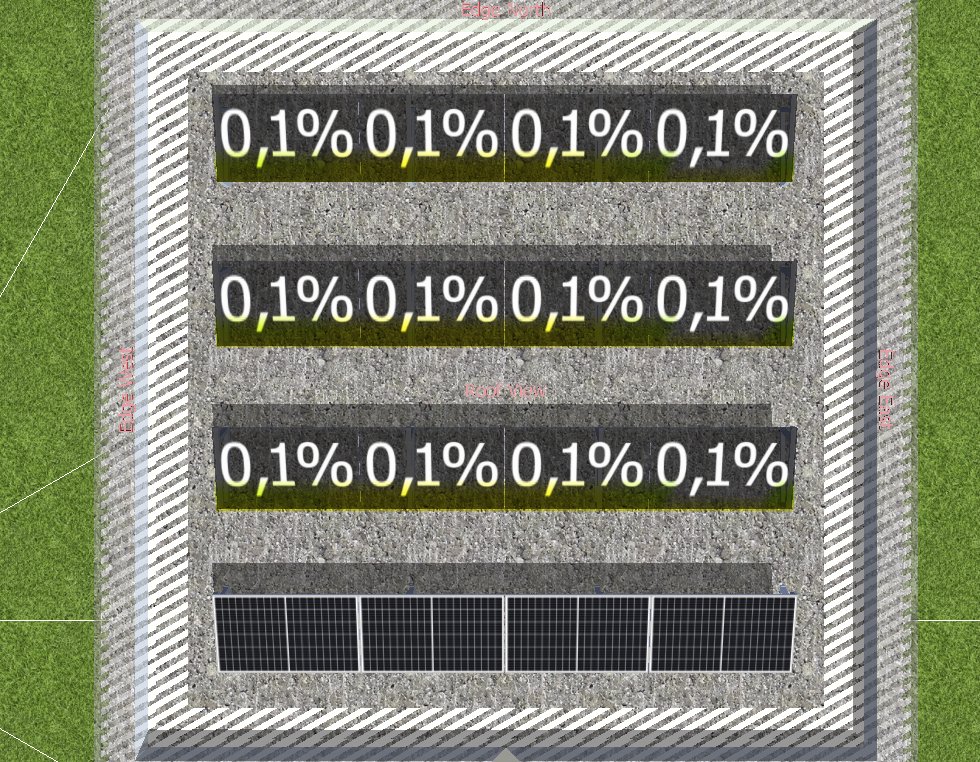
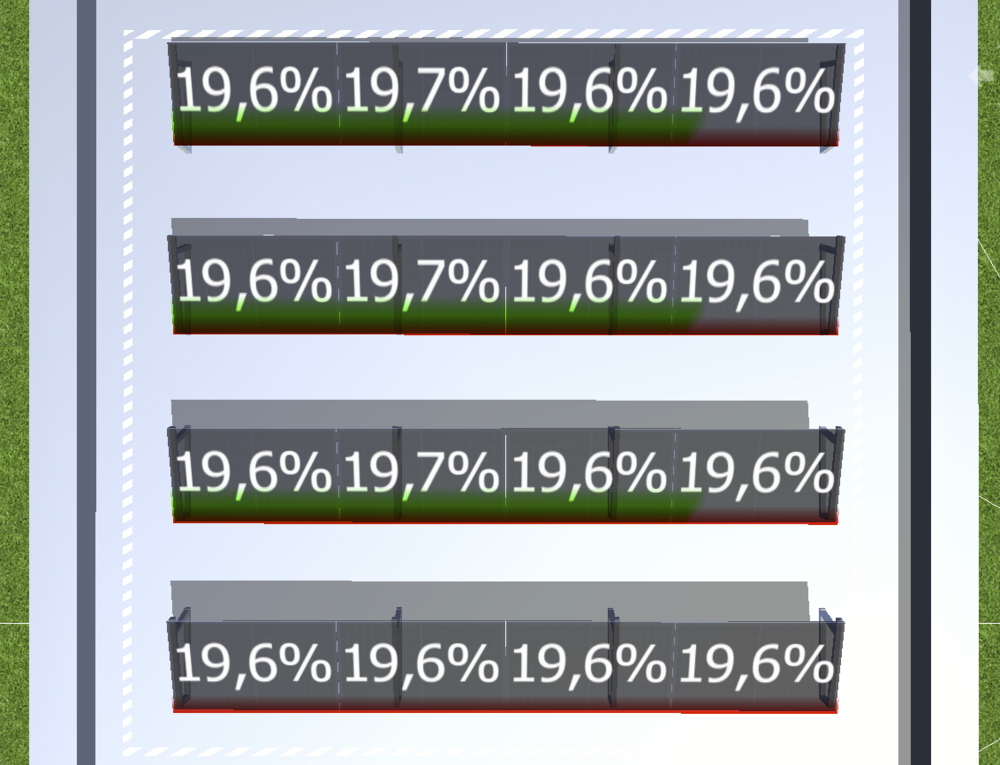
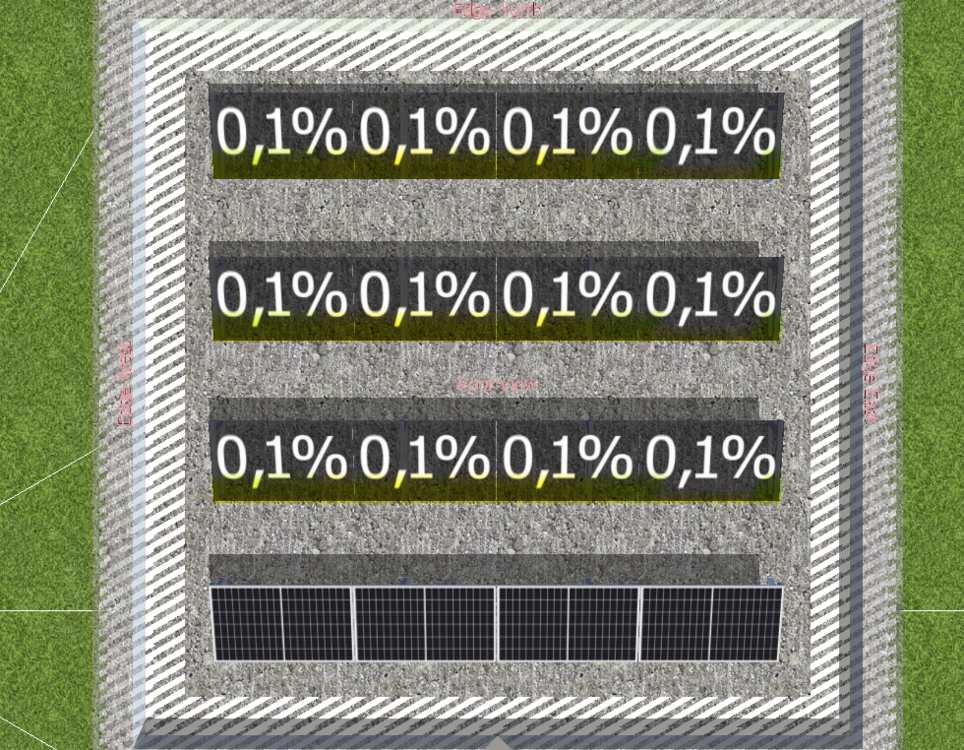
Hallo Max, schönes Vergleichsprojekt! Hierbei handelt es sich um den "Attika"-Fehler beim Import von 3D-Objekten. Wenn man die Schattenhäufigkeiten vergleicht, wird der Unterschied sehr deutlich: Der Fehler wird verursacht durch geschlossene Attikas bei importierten 3D-Modellen. Abhilfe kann geschaffen werden, indem man die Attika an einer Stelle unterbricht. Ich hoffe, das hilft weiter. Beste Grüße, Martin
-
Hi Pablo, I am very sorry for the late answer, somehow we oversaw the question. The BIM is very interesting for us and we follow its development and adaptation in the market closely. However we can't give any schedule on when we will integrate it in PV*SOL at the moment. Kind regards, Martin
-
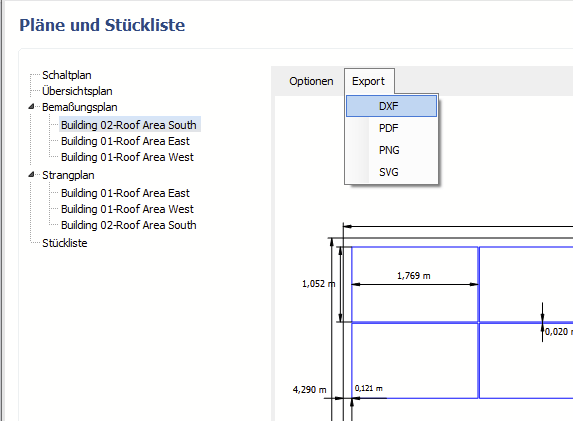
Hallo Sven, ja, es gibt einen DXF Export für die Bemaßungspläne und die Strangpläne: Viele Grüße, Martin
-
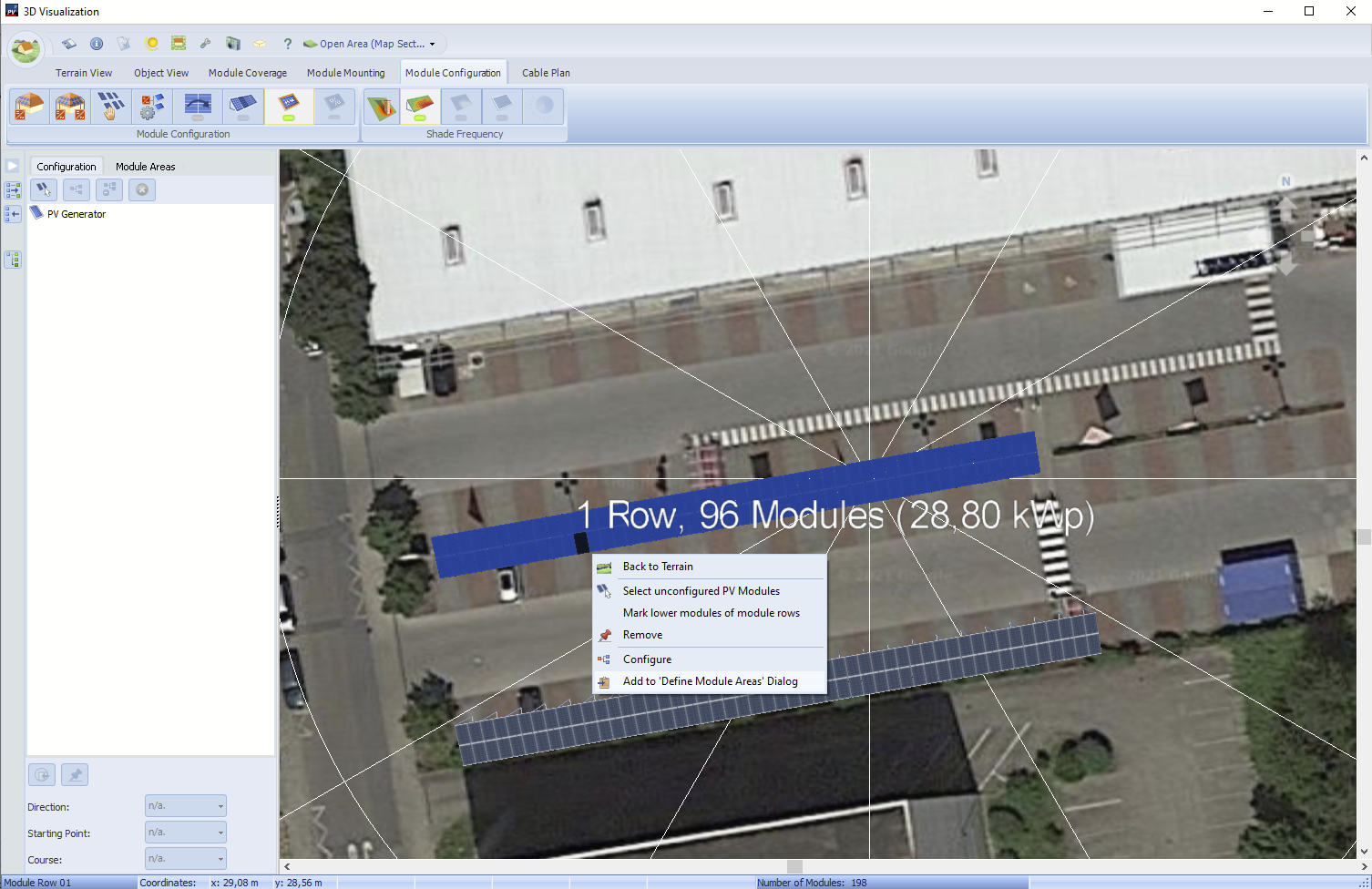
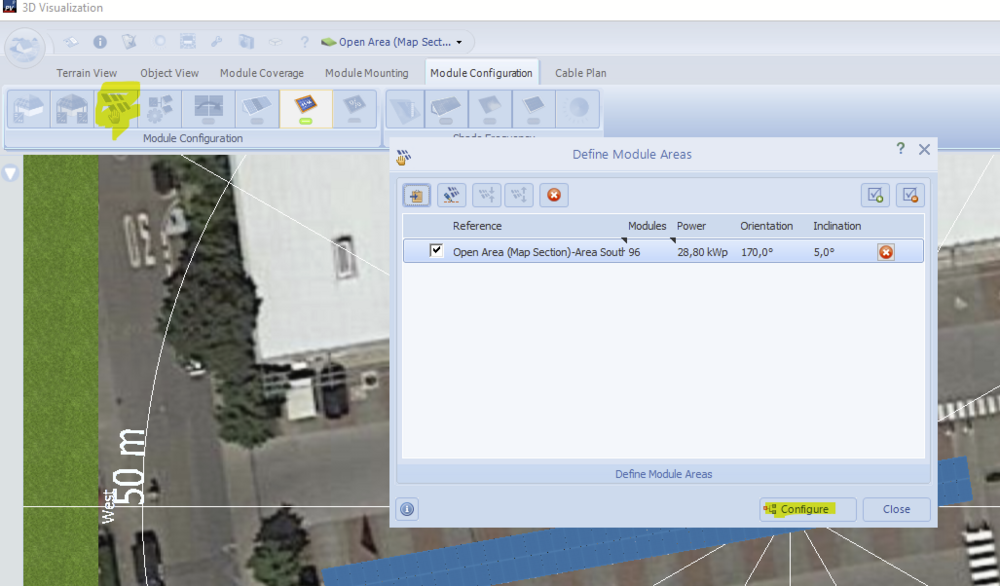
Hi Venco Gary, firstly I would recommend to delete the configuration that you have in order to start from the beginning. Then, in the module configuration tab, select the modules in area 1, right click and select "Add to 'Define Module Areas' Dialog": Then go to the "Define Module Areas" dialog and select "Configure" Like so you have configured the modules in area 1. You can proceed in the same way for area 2. Hope that helps, kind regards, Martin

-
Hi EMcSweeney, in the upcoming release PV*SOL premium 2022 R3, we will exclude the energy clipped at the feed-in point from the production cost. Hope that helps, kind regards, Martin
-
Hallo Ralf, den Fehlerbericht haben wir bekommen, danke. Leider hängt kein Projekt an, mit dem wir nachvollziehen können, was der Fehler ist. Könntest du die nicht zu öffnenden Projektdateien vielleicht hier im Forum als private Nachricht schicken? Danke. Viele Grüße, Martin
-
Hi John, this is most possibly coming up because you try to load a project file from PV*SOL premium in standard PV*SOL. Kind regards, Martin
-
Hi Alberto, Yes, exactly. You can't open project files from version 2022 in PV*SOL 2021. Kind regards, Martin
-
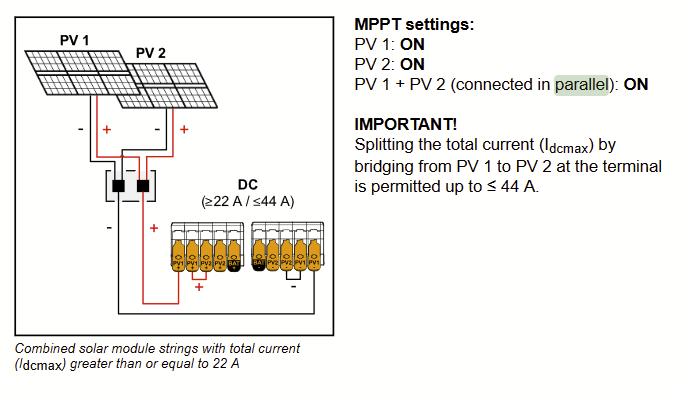
Hi Tazar, the parallel operation mode must be supported by the inverter and is defined by the installer upon installation. How exactly this is achieved will be different across inverter models, but as an example see this screenshot taken from a manual of the Fronius Gen24 inverter: Taken from here, page 63: https://www.fronius.com/~/downloads/Solar Energy/Operating Instructions/42%2C0426%2C0419%2CEN.pdf In this example, you connect your two module areas to the inverter as if they were one (only one plus and one minus cable going to the inverter, using only one DC inlet), but then, as a installer, you bridge the input on a second DC inlet. In this case, this allows for a double maximum current. Hope that clarifies the matter a bit, kind regards, Martin
-
Hi Alberto, in PV*SOL there is no concept of ownership of project files. A file that you create and send to another person should be no problem. Could you provide a screenshot of the error message? Thanks and kind regards, Martin