
developer_mh
-
Posts
1,855 -
Joined
-
Last visited
-
Days Won
173
Everything posted by developer_mh
-
Hi all, here is my reply from the other thread:
-
Dear SPsolar, yes, we have news on this. We seem to have found a fix for all those issues of high shading values, which will be released with the upcoming PV*SOL premium 2022 R5. Right now we are in the testing phase. So it would be more than helpful if you (and other users reading this) could send us the models that are causing the high shading values. The release is planned for this month already, so if you could send the files in the next days that would be really great. You can send them either here in the forum as rivate message, or to hotline@valentin-software.com, asking them to forward the files to me (Martin). Thanks a lot for your patience and help, kind regards, Martin
-
Dear xueting, simulation comparisons are really interesting, I am happy to see that you want to test PV*SOL simulation values against measurement. When looking at the details, there can be a lot of reasons why the results differ. In order to answer your question we would have to know a lot more about the two sides of the experiment: First, the measurement: How did you measure the global irradiance? Which sensor did you use? In what environment was the sensor installed? In which intervals was it cleaned? Did you measure global horizontal irradiance or tilted, i.e. in the PV module plane? How many modules do you have on your test stand? How are they connected? Do you measure the electricity on the DC or the AC side? Second, the simulation side: How did you determine the input parameters for the simulation? For example, the module data: Did you use data from our database or do you have flasher data that you were able to enter? Which models did you choose to calculate the irradiance on the tilted plane? There are really a lot of factors that influence the outcome of such a comparison. Without a lot more details on the measurement setup and the PV*SOL project file, however, we can't answer your question in a satisfying manner. Hope that helps, kind regars, Martin
-
Hallo Anja, deine Vermutung war schon korrekt, bei dachflächenübergreifenden Verschaltungen lässt sich der Kabelplan nicht manuell editieren. Daher lässt sich in diesem Fall auch keine Kabel-Durchführung setzen. Viele Grüße, Martin
-
Hi Anna, in projects with a lot of module areas, a lot of MPP trackers or a lot of inverters, we need to cut some of the more detailed results due to memory limitations and disk space. I'd guess that the project you are analysing has a lot of module areas? You can set the limit a bit higher, though, at your own risk Close PV*SOL, then open the PVSOL.ini file in a text editor. You can find it here: C:\Users\USERNAME\Documents\Valentin EnergieSoftware\PVSOL premium 2022\PVSOL.ini Locate the attribute MaxNumberOfModuleAreasForResults and change the value to your liking. You can also play around with MaxNumberOfInvertersForResults and MaxNumberOfMppsForResults. Save the file and start PV*SOL again. Then force a new simulation under Options -> Force simulation. Then the module area results should show up. Kind regards, Martin
-

Dimensioning fields for buildings/windows etc malfunction
developer_mh replied to Lukas Bernhard's topic in PV*SOL
Hi Lukas, to me this looks like an issue with your decimal separator (comma vs point). Check your settings in the regional settings of Windows, perhaps you have a point there, but you enter the numbers with a comma? Kind regards, Martin -
Hi Tomasz, could you provide the project file as private message, please? Thanks and kind regards, Martin
-
Hallo Sascha, wenn man die untere Schwelle des Lastabwurfs auf 35 stellt, läuft die Simulation durch. Beste Grüße, Martin
-
Hallo Anja, danke für das Melden des Fehlers, und auch danke fürs Senden des Absturz-Berichts. Es scheint in diesem Fall an OneDrive zu liegen, in der Log-File steht "Der Clouddateianbieter wird nicht ausgeführt." Beste Grüße, Martin
-
Hallo babylon05, das ist ein sehr interessanter Fehlerfall für uns. Könntest du mir das Projekt, bei dem der Fehler "Visual3D.dll" kommt, bitte hier im Forum als private Nachricht schicken? Die Log-Files bräuchten wir auch, die findest du unter C:\ProgramData\Valentin EnergieSoftware\log die mit pvsolpremium und Wow6432 im Namen sind interessant für uns. Vielen Dank und beste Grüße, Martin
-
Fehlermeldung Folgende Module sind nicht in der Datenbank vorhanden
developer_mh replied to bene-solar's topic in PV*SOL
Hallo bene-solar, vielen Dank für das Projekt. Es stammt scheinbar aus der Zeit vor der Einführung der Online-Datenbanken, die erste gelistete Programmversion ist die 2019 R14. Daher können die seinerzeit selbst angelegten Module nicht in der Datenbank gefunden werden. Eine Lösung wäre, diese Module in der neuen Datenbank (verfügbar seit PV*SOL premium 2020 R1) erneut einzugeben und die jetzt im Projekt existerenden dann damit zu ersetzen. Beste Grüße, Martin -
Hallo D.Hajrizi, welchen Verbrauch man wählt, hängt ganz davon ab, wie die Begebenheiten vor Ort sind. Wenn der Anlagenbetreiber, also euer Betrieb, für den gesamten Verbrauch des Werkes zu zahlen hat (was der Normalfall ist), dann ist auch dieser gesamte Verbrauch anzugeben. Wenn es aber zum Beispiel ein Subunternehmen gibt, das die PV-Anlage auf der Halle betreibt und nur für die Stromkonsten aufkommen muss, die in der Halle entstehen, müsste man nur diesen Verbrauch angeben. Wichtig ist, dass es bei PV-Anlage und Verbrauch nicht um einen lokalen Zusammenhang geht, sondern um einen wirtschaftlichen. Solange Verbrauch und Erzeugung in einem räumlichen Zusammenhang stehen, wie es bei einem solchen Werk ja immer der Fall ist, kann man von Eigenverbrauch im Sinne vom EEG ausgehen. Beste Grüße, Martin
-
Fehlermeldung Folgende Module sind nicht in der Datenbank vorhanden
developer_mh replied to bene-solar's topic in PV*SOL
Hallo bene-solar, könntest du mir das Projekt zukommen lassen? Gerne hier im Forum als private Nachricht. Danke und beste Grüße, Martin -
Hallo Klauss, hallo masp, Üblicherweise kommt diese Meldung, wenn PV*SOL Projekte, die in einer neueren Version gespeichert wurden, in einer ältern Version von PV*SOL wieder geladen werden sollen. Beste Grüße, Martin
-
Hi Carlos, hi Jimmy, exactly, the EnEV results are relevant for Germany only. They should only appear for PV systems with location in Germany. Kind regards, Martin
-
Cargar perfiles de consumo (a partir de los valores medidos)
developer_mh replied to GdE's topic in PV*SOL
Hi again, this bug will be fixed in the upcoming release PV*SOL premium 2022 R5. Thanks again for reporting! Martin -
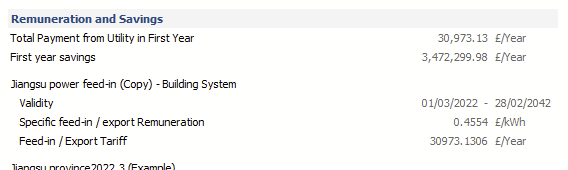
Hi Venco Gary, in your feed-in tariff, you have the share of remunerated energy set to 0%. You should set it to 100% if all of the energy that is fed into the grid is remunerated. Then you'll get non-NaN values: Your project has a lot module areas (nice project by the way!). In order to save memory, we restrict the results per module area on projects with less than 20. You can change that setting, on your own risk. Close PV*SOL, then open the PVSOL.ini file in a text editor. You can find it here: C:\Users\USERNAME\Documents\Valentin EnergieSoftware\PVSOL premium 2022\PVSOL.ini Locate the attribute MaxNumberOfModuleAreasForResults and change the value to more than 31, as your project as 31 module areas. Save the file and start PV*SOL again. Then force a new simulation under Options -> Force simulation. Then the module area results should show up. Hope that helps, kind regards, Martin
-
Cargar perfiles de consumo (a partir de los valores medidos)
developer_mh replied to GdE's topic in PV*SOL
Hi, thanks for reprting this. We will be looking into it. Kind regards, Martin -
Hi Jakub, there is no such app that I know of. But I have to admit that I haven't done any research on that topic recently. There is a device that we recommend to catch horizon lines on site: https://www.solmetric.com/buy210.html You can see roughly how it works on our help pages, in section "Recording horizon lines": https://help.valentin-software.com/pvsol/en/pages/pv-modules/shading/#horizon-line Hope that helps, Martin
-
Belegung gemeinsamer Fassadenfläche und Problem mit Verschiebung der Tiefe
developer_mh replied to Lukas615's topic in PV*SOL
Hallo Lukas, beim Zeichnen von Polygonen kann man die genauen Koordinaten der Punkte angeben, indem man einen Rechtsklick darauf macht und dann "Bearbeiten" wählt. Vielleicht hilft das weiter. Das mit den 4m Verschiebungstiefe versuche ich mal in Erfahrung zu bringen. Beste Grüße, Martin -
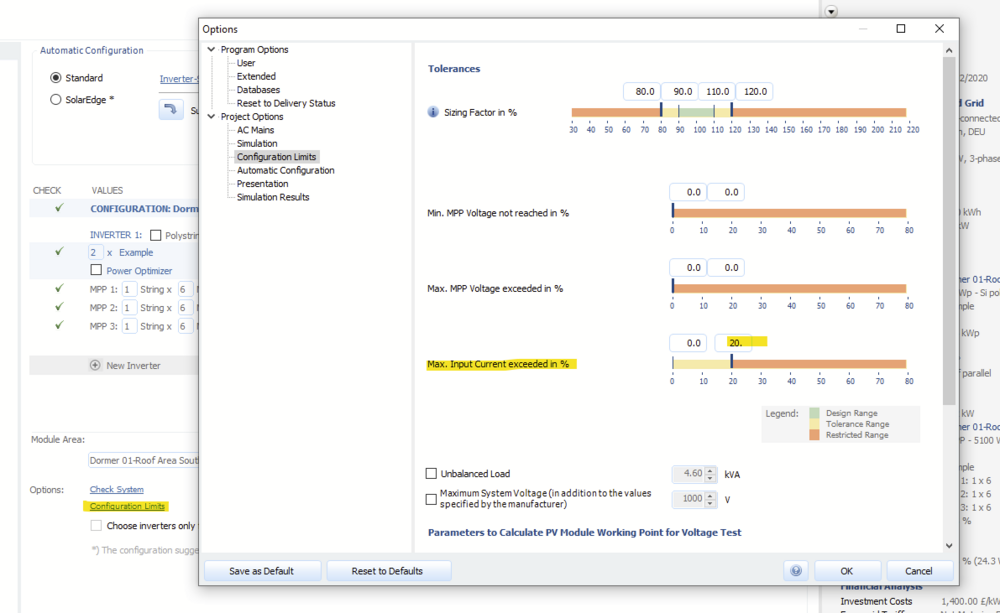
Hi Codrin, in addition to what Jimmy wrote, you can set the maximum allowed exceedance of the input current in the configuration limits dialog: Hope that helps, kind regards, Martin
-
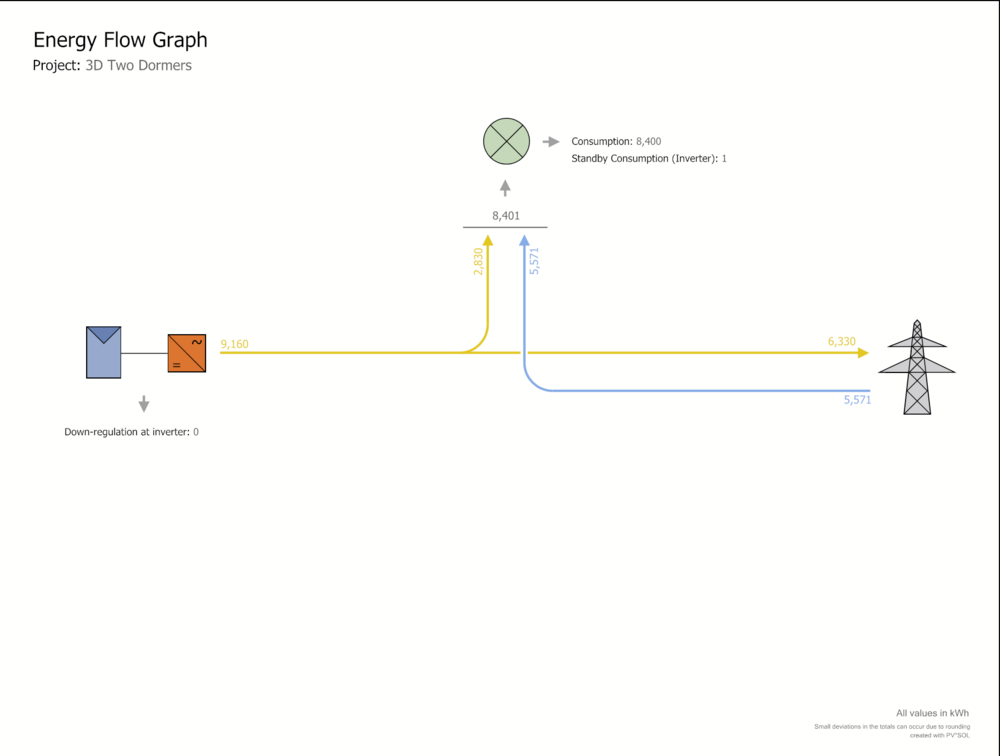
Hello Luai, in order to explain the direct use, grid feed-in and so on, let me copy a energy flow diagram from PV*SOL here: Direct own use is the fraction of the PV energy that is used directly to cover the loads, in this case 2830 kWh. The own power consumption ratio would be 2830 kWh / 9160 kWh = 30,9 %. The solar fraction is the amount of the consumption that can be covered directly by the PV. So in this example it would be 2830 kWh / 8401 kWh = 33.7 %. Concerning your second question, it would be very helpful if you could send me over the project file (here in the forum as private message). Kind regards, Martin
-
PV*SOL Google map data is older than the Google map data in browser
developer_mh replied to Jimmy's topic in PV*SOL
Hi Jimmy, we are sorry that you are experiencing this flaw with the outdated maps more often now. It seems that Google is updating its map material region-wise, and most probably you are planning a lot in a region where Google is currently updating. We do not have a release date for R5 yet, I am afraid. It will be released in the coming weeks, but when exactly is not yet decided. Kind regards, Martin -
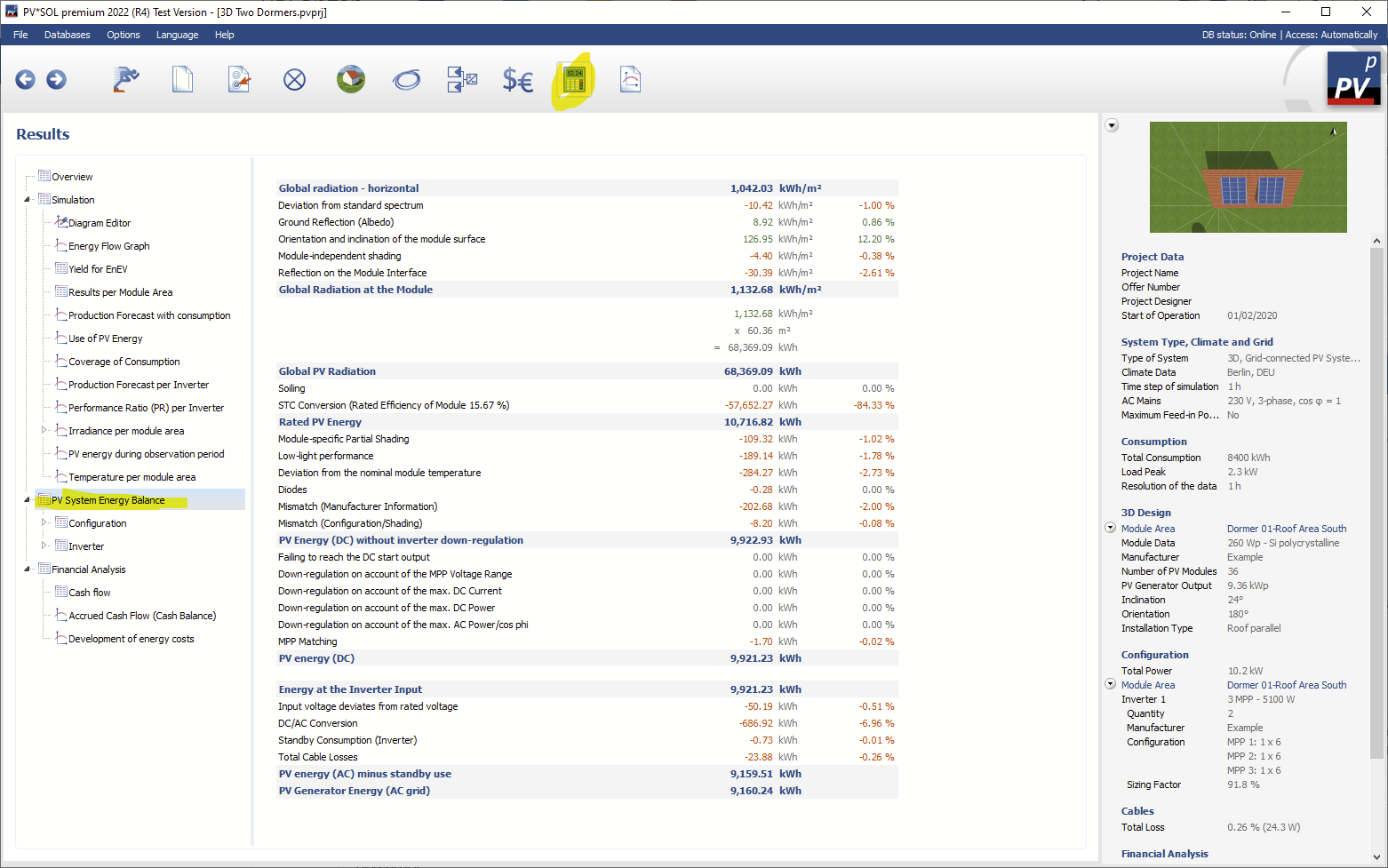
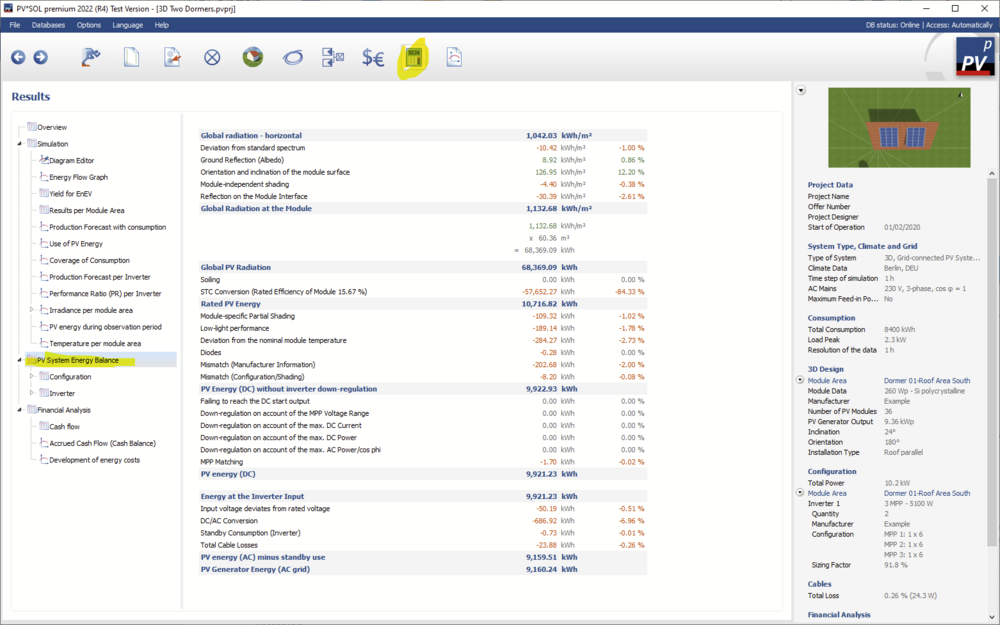
Hi M4KROS, the specific annual yield is the annual yield of the PV system (in kWh, AC) divided by the installed DC power in kWp. This means that literally everything from the solar irradiation and ambient temperature, over module inclination, orientation, shading, soiling, electrical configuration, inverter performance, cable losses and so on is taken into account. If you need to know in detail how a PV plant performs, a good start is always to check the energy balance in the results section: Then, also, if you need to investigate some losses more in detail, you can go to the diagram editor, choose time series or carpet plots to analyse single data series. You can also export them to Excel or LibreOffice Calc if you wish. Hope that helps, kind regards, Martin
- 1 reply
-
- 1
-

-
Design with DC combiner on 1 MPPT inverter with 2 string input
developer_mh replied to Paul's topic in PV*SOL
Hi Paul, you'll have to activate the polystring option in the configuration dialog. Then you can combine the strings and modules as you wish, in series or parallel. Hope that helps, kind regards, Martin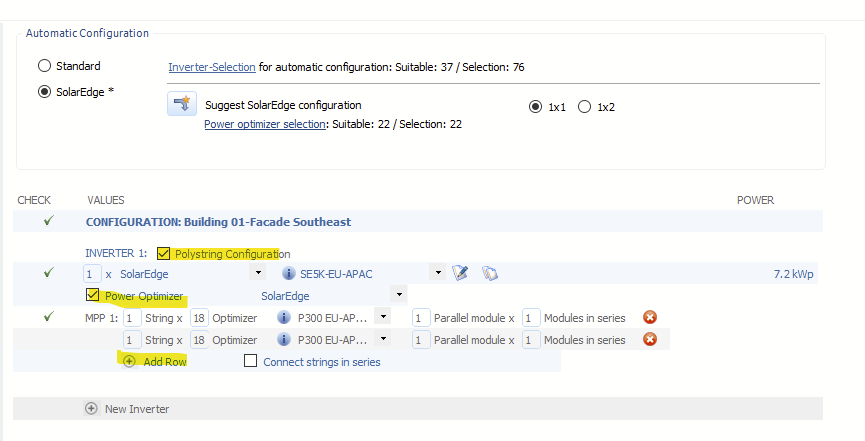
- 1 reply
-
- 1
-