developer_mh
Administrators
-
Joined
-
Last visited
Everything posted by developer_mh
-
Hi Alain, yes, "tax refund" should be translated to "remboursement d'impôt". I will forward this to my colleagues, thank you for reporting. Kind regards, Martin
-
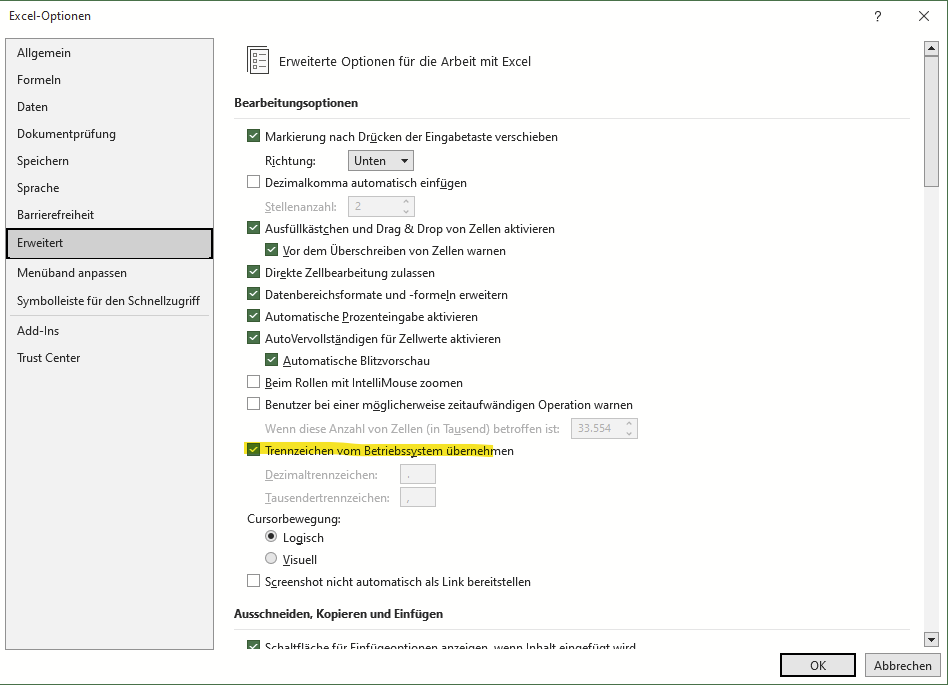
Dear DrupoNduz, Frederik is on vacation right now, but I am happy to help out. Could you send the csv file to me as well? Could it be some issue with the decimal separator? Try closing the csv file in Excel, then switch the decimal separator in Excel under Options -> Advanced -> decimal separator from operating system (sorry, my screenshot is in German): Then re-open the csv file and see if it worked. Kind regards, Martin
-
Dear Rodrigo. C, no, this is not possible, I am afraid. The P90 values of the irradiance for example are not available in the form of time series, so no csv export possible. Kind regards, Martin
-
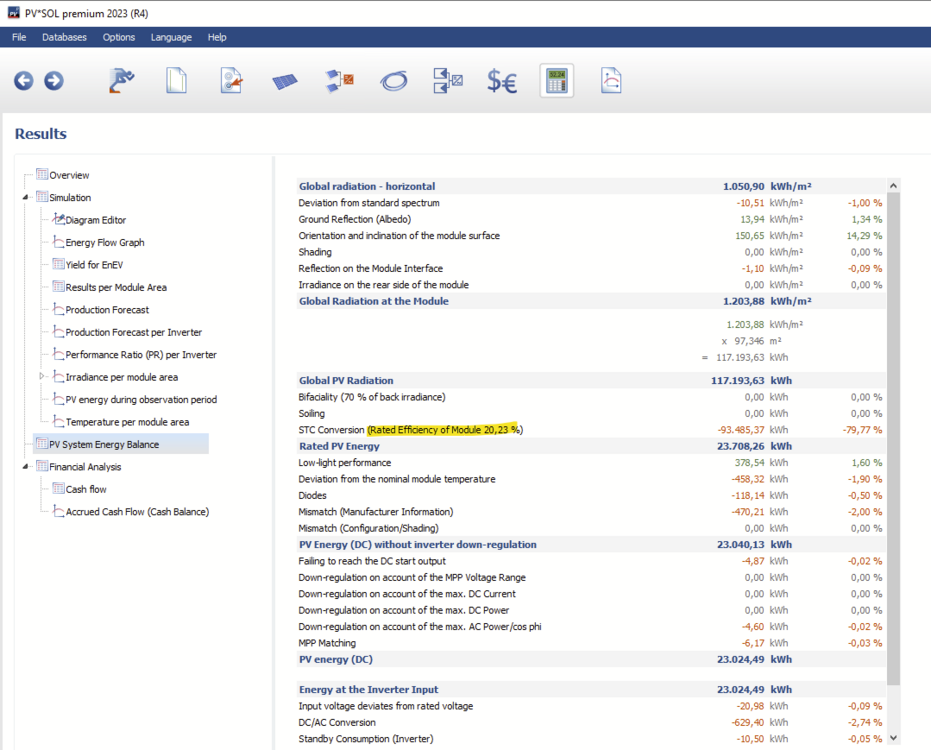
Hi Jon Legaspi, the efficiency of 0.1681 (16.81%) is just the STC efficiency of that module in that example. It is also listed in the energy balance (now for another example): In general, you can find all information on the PV module in the PV module dialog: https://help.valentin-software.com/pvsol/en/databases/components/pv-modules/ Hope that helps, kind regards, Martin
-
Yes, we will make that clearer in the upcoming release in order to avoid PV systems with that kind of confusing (or wrong) connection. In order to have that exact system that you were trying to simulate, it will take us some more measures, since there are performance algorithms involved that we don't like to destroy by accident Kind regards, Martin
-
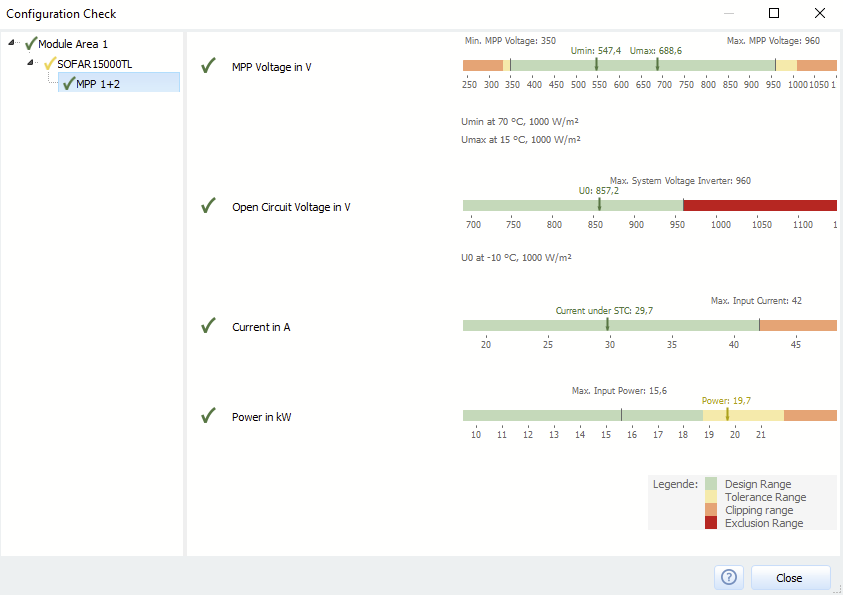
Hi Elektroinstalator, here is the deepl.com translation of your inquiry: I am not sure if I can help with this problem as it seems hardware related. But voltage wise, 16 modules of around 40 V (= 640 V) should be enough to get the inverter running. The MPP voltage range of the 15000TL is between 350 and 960 V, so from that perspective everything looks fine. Here is an example configuration check for 3 x 16 Trina TSM-410-DEG15MC.20 modules: Hope that helps, kind regards, Martin
-
Hallo Philipp, wie Frederik schon sagte, für die korrekte Simulation ist es ausreichend, die Dachfläche wie ein normales Haus zu extrudieren. Wenn das nciht gewünscht ist, müsste das 3D Modell vorher in einem anderen 3D Programm (z.B. Sketchup oder Blender oä) erstellt und dann in PV*SOL importiert werden. Beste Grüße, Martin
-
Hallo enick, könntest du Screenshots von dem Problem posten? Ich kann mir leider gerade nicht vorstellen, was genau das Problem ist. Danke und beste Grüße, Martin
-
Hallo Liambru, das Schattenmanagement wird automatisch berücksichtigt, es muss nicht aktiviert werden. Beste Grüße, Martin
-
Hallo Willy, eine pauschale Antwort auf diese Frage ist leider nicht möglich. Letzten Endes hilft da wahrscheinlich nur die Erfahrung weiter. Interessant für die Simulation ist ein verschattendes Objekt ja nur, wenn es innerhalb eines Jahres auch tatsächlich in mindestens einer Stunde auch Schatten auf die PV-Anlage wirft. Um herauszufinden, ob ein Baum oder ein Haus in der Nähe noch verschattet, ist es hilfreich, in der 3D Umgebung einfach ein solches Objekt zu erstellen und dann die Schattenhäufigkeit auf den PV-Modulen berechnen zu lassen. Auch das Sonnenstandstool oben in der Menü-Leiste kann hilfreich sein. Beste Grüße, Martin
-
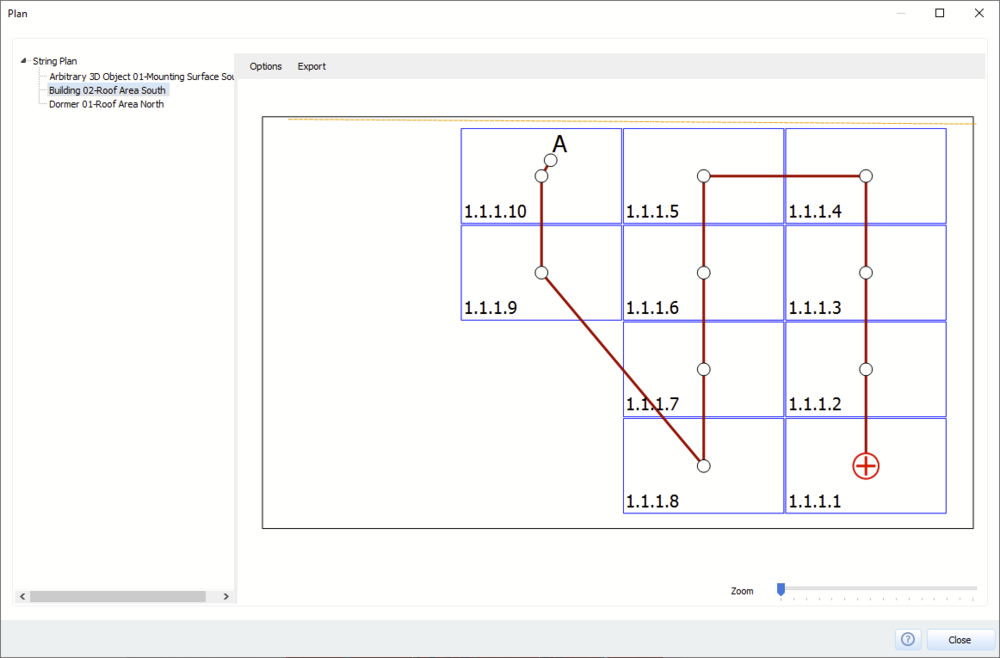
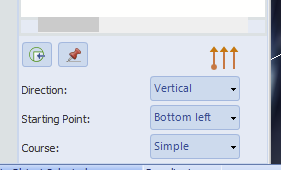
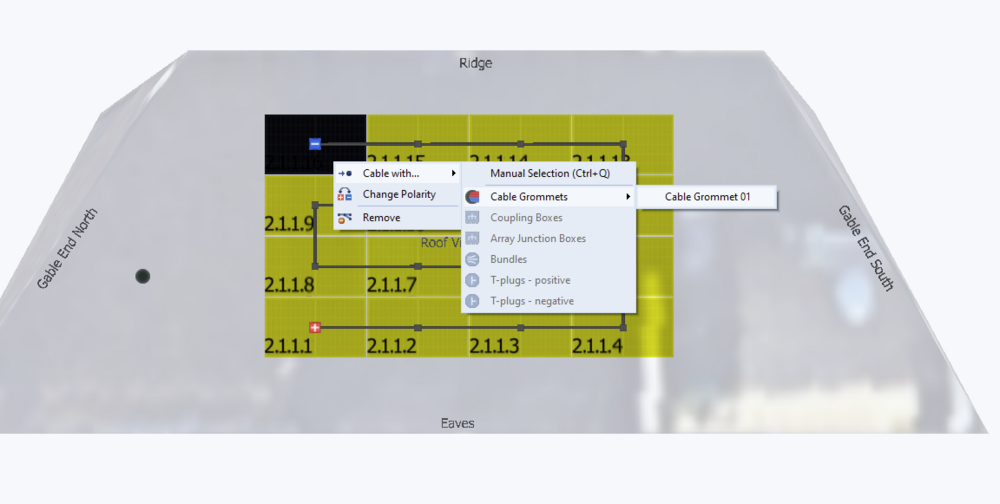
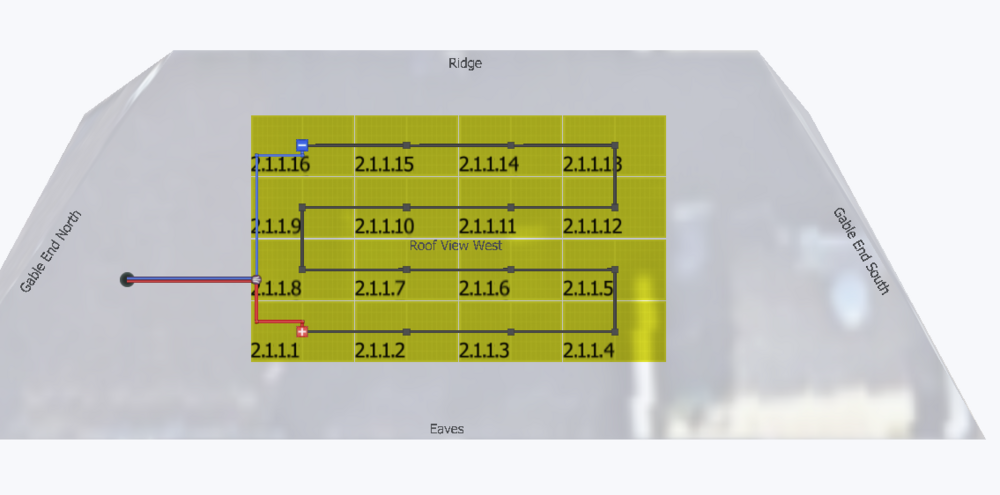
Hallo mustafoe, die Verkabelung erfolgt in der Reihenfolge der Modulnummerierung. Hier ein Beispiel: Die Reihenfolge und Sortierung kann mit diesen Optionen hier ganz gut voreingestellt werden: Wenn dann einzelnen Module nicht da einsortiert werden, wo es gewünscht ist, kann man sie einfach per drag n drop dorthin ziehen, wo sie sein sollen. Und man kann zwar nicht den Wechselrichter relativ zum Dach platzieren, aber man kann z.B. Kabeldurchführungen platzieren, mit denen man dann verkabeln kann. Beste Grüße, Martin


-
Hallo bernhard, wenn die Horizont-Linie so in PV*SOL eingelesen wird, wird der etwas spätere Sonnenaufgang automatisch berücksichtigt. https://help.valentin-software.com/pvsol/de/navigationsseiten/pv-module/verschattung/ Beste Grüße, Martin
-
Dear Zuher, please never post your personal information like email address or serial number here in the forums. Like the rest of the internet, it is full of malicious bots and agents that you don't want to get access to your personal data. Please contact our sales team at sales@valentin-software.com with your inquiry. Kind regards, Martin
-
Dear Johan thank you for the project file. In this case, the display of the connection of the DC intermediate circuit coupling of the battery system in PV*SOL is a bit misleading. In the 3D environment, there are 4 inverters, all of the same type and with the same configuration layout (2 x 15 on each MPP tracker). So, in the PV*SOL main software, these 4 inverters are displayed as one group (4x inverter xy). The DC battery system, which consists of 4 units, appears to be connected to the group of 4 inverters (one battery system on one PV inverter). But, unfortunately, our simulation core realizes that the shadows on the PV modules over the 4 inverters are not the same and calculates each inverter separately. The DC battery system, scaled by factor 4, then is only connected to the first of the 4 inverters. So, in the simulation, the battery system only sees the PV energy from inverter one, which is far less than the load profile, and this is the reason why the battery system is never charged. We will make that clearer in the upcoming release in order to avoid PV systems with that kind of confusing (or wrong) connection. Hope that helps, kind regards, Martin
-
Dear all, Thanks to the project files Jan sent me, we were able to find the bug. It will be fixed in the next release. In the meantime, you can use the Force Simulation command from the Options menu as a workaround if the simulation gets stuck. This will only happen on 3D projects that you have already simulated, if you go back to 3D, change the shading objects (and nothing else) and then simulate. Hope that helps, kind regards, Martin

-
-
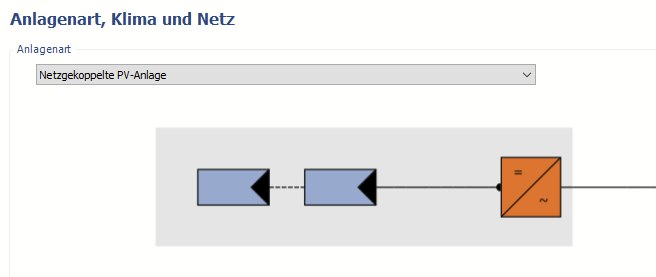
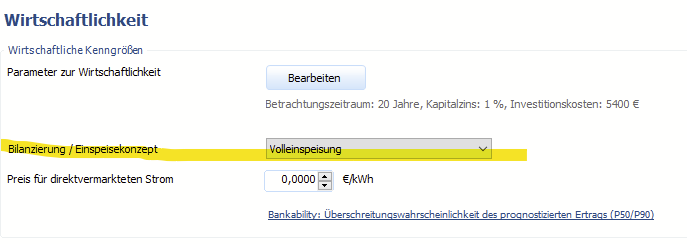
Hallo Marc2356, ja, richtig, beim Tarif „EEG 2023 (Volleinspeisung) - Gebäudeanlagen" darf es keinen Eigenverbrauch geben. Dazu bitte bei der Anlagenart auf "Netzgekoppelte Anlage" wechseln: Dann ändert sich die Bilanzierung auf Volleinspeisung: Beste Grüße, Martin
-
Hallo BeKa, dabei handelt es sich um einen Darstellungsfehler bei Bildschirmen mit einer Skalierung von über 100%. Das kommt auf manchen Rechner immer wieder vor. Im Forum gibt es einige Tipps und Tricks, um das Problem zu beheben. Z.B. hier: Viele Grüße, Martin
-
Hallo Calin, könntest du mir das Projekt zukommen lassen? Gerne hier im Forum als private Nachricht, danke. Viele Grüße, Martin
-
Hallo Stefa, ich kenne zwar die genaue csv nicht, die man vom DWD bekommt, aber wenn die Diffus- und Direktstrahlung auf die Horizontale enthalten sind, kann man diese ganz einfach zur Globalstrahlung auf die Horizontale addieren. Wichtig ist eben, dass es sich um die Strahlung auf die Horizontale handelt. Beste Grüße, Martin
-
Hi Hamza, PV*SOL only runs on Windows, I am afraid. But no worries, even if your Mac only has 8 GB of RAM, you can set up a virtual machine with 3 to 4 GB, that should be sufficient to run Windows and PV*SOL. Kind regards, Martin
-
Dear Michail_Volt, this should be no problem, just contact our sales team at sales@valentin-software.com with your inquiry. Kind regards, Martin
-
-
Dear liszo, the tilt of the model should be corrected in the software that you use to create the obj file. In PV*SOL, you can only flip or rotate imported 3D models by 90°. Hope that helps, kind regards, Martin
-
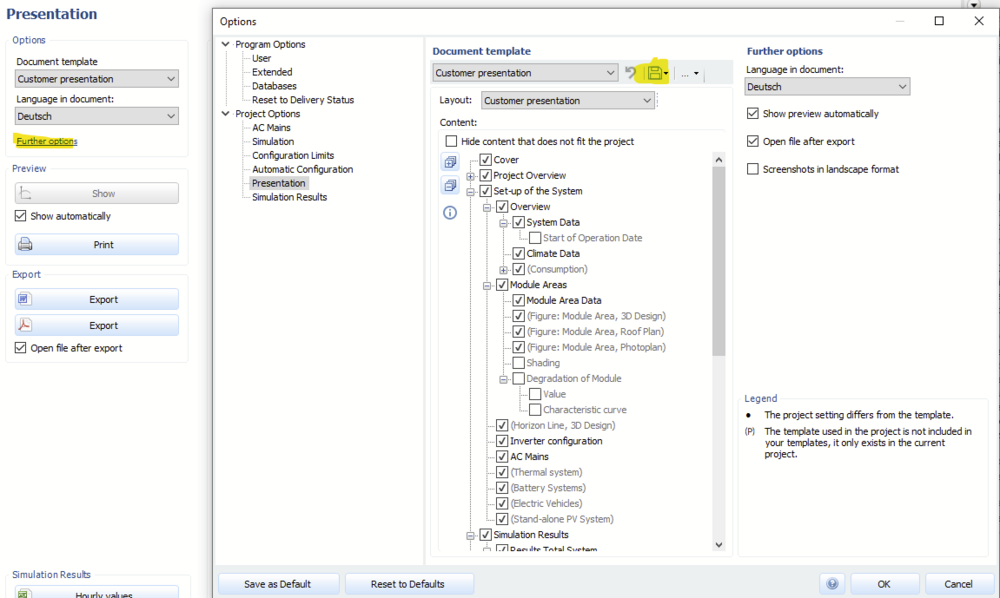
Hi Solar Designer, do you mean a template for the project report? You can use your own company logo and also modify and save the project report configuration, if that is what you mean: Kind regards, Martin