
developer_mh
-
Posts
1,859 -
Joined
-
Last visited
-
Days Won
173
Everything posted by developer_mh
-

Defining A Valid System In 3D Visualization
developer_mh replied to tommasocapietti@gmail.com's topic in PV*SOL
Hi Tommaso, when you first open PV*SOL premium, there is no PV system planned yet. You will have to design your system first, and then you can run simulations. If you'd like to load a predefined system first, you can go to the first page of the program where you can find some example projects to explore. If you don't want to design your system in 3D, you can go to page "System type, climate and grid" and uncheck the option "Use 3D Design". Good luck with your first PV system! Martin -
Simulation With 3D Shading Not Running For Full Year
developer_mh replied to ndiorio's topic in PV*SOL
Hi Nick, thanks a lot for the project file. The reason for the simulation to stop is a bug that is already fixed and will be released in the next bug fix release, 2016 R5. The bug (actually a rounding error) was in the calcution of the two-diode model which we use to model the electrical behaviour of the pv modules. It happened only at extreme low light conditions, for diffuse irradiance values below 1 W/m², and only if the global irradiance was above 1 W/m². Thus a really, really, rare case that you encountered there Sorry for the inconvenience caused, and thanks for bringing this up to us. So you'd have to wait for the R5 version of PV*SOL premium 2016 to be able to model your pv module with the two diode model. In the meanwhile you could replace the two-diode model with another low light model (we call it PV*SOL model since it was invented here at Valentin). I prepared a project for you where I did just that: RunningShort PV Module Copy.pvprj Funny pv module that you have there, by the way... Hope that helps and sorry again for this bug, Martin -
Hi it.teated, for this use case you would need a network license. Please contact our sales team for details at sales@valentin-software.com Thanks a lot, Martin
-
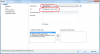
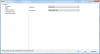
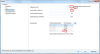
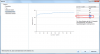
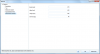
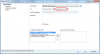
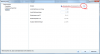
Hallo 2000Miles, für das Eintragen der Speichersysteme sind die jeweiligen Hersteller verantwortlich. Daher würden wir uns freuen, wenn Sie sich an den Support für die MB Energiespeicher wenden und sie bitten würden, ihre Systeme bei uns einzutragen. Auf diese Weise haben auch die anderen Nutzer was davon. Auf dieser Seite hier finden Sie die Kontaktdaten der Deutschen Accumotive (die Batterie-Tochter von Mercedes Benz). Oder Sie schreiben direkt an sales@accumotive.com. Leider gibt es auf dem Datenblatt des Speichers so wenige Angaben, dass es schwierig ist, daraus den Speicher korrekt abzubilden. Deswegen sollten das auch immer die Hersteller machen. Aber es ist in unserem Programm sehr wohl möglich (und auch gar nicht so schwierig, eigene Batteriesysteme anzulegen). Ich gehe das mal am Beispiel der kleinsten Variante durch, also 2.5kWh. In PV*SOL gehen Sie also oben im Menü auf Datenbanken -> Batterien und legen eine neue Batterie an. Tragen Sie den Herstellernamen und den der Batterie ein: Auf der nächsten Seite wählen Sie als Batterietyp Lithiumionen und als Aktivmaterial Lithium-Nickel-Oxid (dem Datenblatt von Mercedes kann man entnehmen, dass es sich im Lithium-Nickel-Mangan-Cobalt Zellen handelt) Bei den elektrischen Daten tragen Sie als Zellspannung 3,6 V ein. Das ist die Zellspannung von Li-NMC Zellen, siehe auch hier. Da die Betriebsspannung der Batterie laut Datenblatt irgendwo zwischen 39,7 V und 54 V liegt, wählen Sie die Anzahl der Zellen so, dass Sie etwa in der Mitte landen. Ich habe hier mal 14 genommen, das macht 50,4V Batteriespannung. Innenwiderstand und Selbstentladung können Sie lassen, wie Sie sind. Bei den Entladezyklen tragen Sie unten beim DOD vpn 80% die 8000 aus dem Datenblatt ein. Alle anderen Werte setzen Sie auf -1. Dann klicken Sie den Button neben der Tabelle "Automatische Zyklenzahlberechnung", der Ihnen die Tabelle auffüllt. Zur Seite "Kapazitätskennlinie". Hier wirds jetzt etwas komplizierter Wir wissen, dass die Speicherenergie 2500 kWh beträgt. Bei unserer Batteriespannung von 50,4 V macht das also eine Kapazität von 2500 Wh / 50,4 V = 49,6 Ah. Das ist die Nennkapazität der Batterie, also C_10. Um von der C_10 auf die anderen Werte zu kommen, muss ein bisschen mit der Peukert-Gleichung gerechnet werden. Dazu wird ein Peukert-Exponent von 1,05 angenommen, standardmäßig fü Li-Ionen. Genauer kennen den natürlich nur die Hersteller. Auf der Seite "Mechanische Größen" tragen Sie einfach die Maße des Speichers ein wie auf dem Datenblatt angegeben. Fertig ist die Batterie! Den Dialog mit ok schließen, dann den Datenbank-Dialog schließen. Jetzt müssen Sie nur noch die Batterien an einen Batteriewechselrichter knüppern. Auf dem Datenblatt steht, dass die Batterien mit den Sunny Islands von SMA funktionieren. Also gehen Sie in die Datenbank -> Batteriesysteme (netzgekoppelt), wählen in der Baumansicht links den Hersteller SMA aus und kopieren ein beliebiges System, sagen wir mit einem Sunny Island 4.4M, also zB das System mit der akasol neeoQube. Also auswählen, dann oben auf "Kopieren" und dann öffnet sich der Dialog zum Editieren: Einfach den Namen des Systems ändern Der Batteriewechselrichter bleibt, wie er ist Bei der Batterie dann einfach die von Mercedes Benz auswählen, die Sie vorher angelegt haben Fertig! Jetzt können Sie das System in Ihr Projekt integrieren, indem Sie auf der Seite Batteriesysteme als Hersteller zuerst SMA und unter Modell das von Ihnen erstellte wählen. Als Beispiel hier eine Projektdatei mit dem System: SMA Sunny Island 4.4M + Mercedes-Benz Speicher 2.5kWh.pvprj Also, Sie sehen, es ist möglich, eigene Batteriesysteme anzulegen. Aber Sie sollten sich auf jeden Fall an die Hersteller wenden, da nur diese über alle Informationen verfügen, um die Daten ordentlich einzugeben. Insofern ist auch mein Projekt hier mit Vorsicht zu genießen. Beste Grüße und viel Spaß mit den Speichern, Martin
-
Simulation With 3D Shading Not Running For Full Year
developer_mh replied to ndiorio's topic in PV*SOL
Hi ndiorio, Does your system contain battery storage or are you simulating an offgrid system? That could be a reason as the simulation stops automatically if the batteries are below a certain state of charge too long. But then you should see corresponding messages after the simulation. Other then that, there are actually no reasons for the simulation to stop before day 365. So, if you use batteries in your system, check for the charging parameters, especially SOC min and the three preservation mode levels (for offgrid). If you are not using batteries, it is hard to say what causes this behaviour, which is why we would be glad if you could send us the project file (post it here, or send it via pm if it contains confidential data) Kind regards, Martin -
Thanks, that is nice to hear
-
Hi Bernard, yes, you are right, the azimuth values in the hor file only need to go from -180 to 179. If you provide a value for 180°, it will be ignored. Thanks for the correction! Also, you don't necessarily have to provide all data points from -180 to 179, you can also just provide some arbitrary value pairs in between that range. This for example would also be a valid hor file: # comment line This is also a comment line -180 0 -133 13 -117 6 a comment somewhere else -94 2 -17 4 19 7 62 7 101 1 144 7 171 6 And your remark about the horizon line captured by the SunEye is absolutely correct, of course. Near shading objects need to be excluded, if you are in 3D mode of PV*SOL premium, since you will place those near objects there. Thanks for pointing that out and for providing the link to the user guide.
-
Hi again, yes, all hor files use azimuth values from -180 to 180. It is kind of a standard, since horizon tools like the SunEye also use this definition. And you can have comments wherever you want, lines that don't contain a valid value pair are just ignored. When you think, PV*SOL Expert 6.0 had amazing abilities, we appreciate that, but you should really take a look at the new PV*SOL premium 2016 The Expert version 6.0 is three years old now, and we made huge improvements since then. See our changelogs and feature descriptions here: http://www.valentin-software.com/en/products/photovoltaics/57/pvsol-premium You can also try the new versions for free. Kind regards, Martin
-
Dear Bernard, unfortunately this is not directly possible, no. But you could do the following: copy the data of the horizon line table to the clipboard, paste it in Excel subtract 180 from the azimuth values copy both azimuth and height values to a text file use space as a value separator save the file as *.hor Of course this would only include the horizon line and no near objects. May I ask the use case for the hor-export function? Perhaps we should consider implementing it in the future. Thanks, Martin
-
Hi Boris, if you're able to extract the information of the horizon as azimuth-elevation pairs, you could write your own *.hor-file and import that into PV*SOL. You can also manually type those values in the provided data table of the horizon dialog. Could you tell me how the horizon line from Google Earth looks like? Kind regards, Martin
-
Dear Bernard, thank you for your interesting question. The hor files only contain the horizon line value pairs. That is, those values only apply for shading objects that are far away from your pv system (=horizon or very distant houses or the like). The horizon line always has a transmittance of 0%. For near shading objects like trees you should not use hor files, but real 3D objects instead. In the 3D planning environment in PV*SOL premium you can choose from several objects like chimneys, walls and said trees. Those trees can have custom transmission factors. The difference between the shading by the horizon line and the near shading objects is that if the sun is behind the horizon line, there is only diffuse irradiance. There is also no shadow caused by direct sunlight since there is no direct sunlight anymore. Near shading objects however can cast a hard shadow on the pv system, depending on the sun's position and the geometries of the object and the pv systems. Those shadows can lead to important changes to the I-V characteristics when parts of the pv system receive full irradiance and others only the diffuse fraction (as described here: https://help.valentin-software.com/pvsol/2018/calculation/pv-field/ ). Hope that helps, Martin
-
Hi Low Carbon Exchange, thanks for the hint! We will repair that in the next release. Kind regards, Martin
-
Dear Marco Antuna, from the stack trace you send us I suppose that there are issues with file permissions on your system. You see, in the first line of the error report (second picture), you get an UnauthorizedAccessException. This means, your system is blocking access to folders that our Software needs. There are several things you can try: If you have a anti-virus software, try to stop it for a while or exclude the folders C:\Windows\Temp and C:\Users\[Your username]\AppData\Local\Temp\Valentin EnergieSoftware Try to delete all unnecessary files in C:\Windows\Temp and C:\Users\[Your username]\AppData\Local\Temp\Valentin EnergieSoftware If you have other software running, that might influence access on these folders, stop them and test again. Hope that helps and you get your database working again. Kind regards, Martin
-
Hi LCX, I moved your question to the english forum, I hope that's alright. You can right click all diagrams in PV*SOL (not only those of the diagram editor) and copy them to the clipboard. Then you can paste them wherever you want, e.g. in 'Paint' and save them. Right now it is not possible to include them in the report. Kind regards, Martin
-
Hallo Steven, Danke nochmal für die Erläuterungen. Wie gesagt, in Bezug auf die Rückgängig-Funktion arbeiten wir an einer Idee bzw. an der Umsetzung derselben. Die soll dann auf jeden Fall auch praktisch sein. Wir haben das gestern intern besprochen und beschlossen, dieses Verhalten der Software wesentlich komfortabler zu machen. Guter Kritikpunkt! Ist auch notiert. Momentan sind wir Entwickler ziemlich ausgelastet, aber es steht jetzt auf unserer Todo-Liste, da etwas mehr Komfort zu bieten in Zukunft. Ok, da warten wir dann auf die PN. Tja, manchmal ist das ärgerlicherweise auch bei uns so (und nicht nur in unserer Software), dass ein Fehler einmal auftritt, sich aber dann nicht mehr reproduzieren lässt. Sie können ja, wenn er nochmal zufällig auftreten sollte, uns ein paar Screenshots schicken, nach Möglichkeit die Projektdatei und eine kurze Beschreibung, welche Aktionen sie vorher ausgeführt hatten. Den Punkt gab es in Ihrer anfänglichen Aufzählung nicht, leider weiß ich daher jetzt nicht genau, warum es geht. Beste Grüße nochmal, Martin
-
Hi penthon, I tried to simulate both your projects with PV*SOL 2016 R3 and R4, and it all works well. I'll send you the project files with proper simulation results via pm, perhaps you can then go on with your work. Otherwise you might consider updating to R4. Hope that helps, kind regards, Martin
-
Hi, I sent you a PM for the mail address. A little workaround for a project file being too big - NOTE: this is only an option if your simulation results are messed up anyway: Open the *.pvprj with a zip program like 7zip oder WinZip In there you will find a file called SimResults.xml Delete that file Save the file again as *.pvprj Kind regards, Martin
-
Hard to say what happened there. If it is possible for you, please send us the project, so that we can have a look. You can post it here in the forum, send it via pm or send it by mail. Thanks a lot and sorry for any inconvenience caused, Martin
-
Hallo lieber Otschkun, vielen Dank für Ihre Kritik (und den schönen Titel Ihres Posts ). Wir nehmen uns das gerne zu Herzen. Für uns ist es wichtig, eng im Kontakt mit den Anwendern zu sein, um eben solche Ärgernisse zu vermeiden, wie Sie bei Ihnen aufgetreten sind. Daher würde ich gerne kurz zu Ihren Kritikpunkten rückfragen/kommentieren: Ja, das ist verständlich. Eine Rückgängig-Funktion ist in Arbeit (bzw. haben wir uns für eine Art History-Funktion entschieden, die auf dem Autosave beruht). Wird aller Voraussicht nach im nächsten großen Release drin sein (für Herbst 2016 geplant). Darauf passt wirklich der Titel Ihres Posts - 'is it a bug or a feature'. In diesem Fall sehen wir (und viele andere Nutzer) das als Feature. Eine Lösung wäre vielleicht, dieses Verhalten optional ausschaltbar zu machen. Danke für die Rückmeldung! Da es für Lastprofile dermaßen viele mögliche Formate gibt, haben wir uns entschieden, einfach vorzugeben, wie die Datei aussehen muss. Klar, es ist kein großer Aufwand, Import-Skripte für ein gegebenes Format zu schreiben. Aber da es eben beliebig viele davon gibt, wäre das ein Fass ohne Boden. Auf der anderen Seite glauben wir eben auch, dass es für den Nutzer einen vertretbaren Aufwand darstellt, die Daten in die von uns vorgegebene Struktur zu bringen. Vielleicht könnten Sie hier mal so eine csv/txt-Datei posten, bei der der Import umständlich ist, so dass wir ein Gefühl dafür kriegen, wo die Nöte liegen. Das wäre nett, danke. Das ist interessant! Wie Sie sich vorstellen können, haben wir solche Performance-Abstürze bei uns nicht. Daher wäre es toll, wenn Sie näher beschrieben könnten: a. was für einen Rechner benutzen Sie? b. welche Version von PV*SOL? c. bei was für einem Projekt kommen die Abstürze (anhängen nach Möglichkeit)? d. bei welchen Aktionen treten die Abstürze auf? e. Wenn Abstürze auftreten, ist es für uns immer hilfreich, wenn Sie den automatischen Fehlerbericht absenden. Auch hier wäre es interessant zu wissen, wo und wie genau das auftritt. Wenn Sie sich da die Mühe machen könnten, das genauer zu beschreiben, wären wir Ihnen sehr dankbar. Es freut uns natürlich zu hören, dass Sie nun seit mehr als 10 Jahren Kunde bei uns sind - und wir hoffen sehr, dass Sie das auch bleiben. Wenn Sie weitere Fehler/Bugs/Features haben, mit denen Sie unzufrieden sind, lassen Sie es uns bitte wissen. Aber ist ja auch nicht so, dass wir in den letzten Jahren untätig gewesen wären. Wenn Sie sich unsere Release Notes anschauen, haben wir neben vielen neuen Features in jeder Version schon auch immer viele Fehler rausgemacht: http://www.valentin-software.com/support-service/kundenservice/release-notes/pvsol-premium Beste Grüße und danke nochmal für die Rückmeldung, Martin
-
Dear sunlightfuture, you're absolutely right that it gets more and more important to calculate with flexible consumption tariffs. Right now, we are working on an implementation of that, so it will be available in the next major release (which is due in autumn this year). In PV*SOL premium you can import/export custom tariff or consumption profiles only via projects. That's the same procedure for all database entries by the way: You plan your project with your custom databse entries on one machine Save the project. Now, when you open that project on another machine, all new/custom database entries are automatically imported to the databases of the other machine. Hope that helps! Martin
-
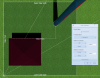
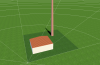
Dear Bartłomiej, what you could do is the following: Design and place all your buildings and obstacles without rotation on an 'open area' which you can find under 'Terrain View'. After you have placed all your objects and buildings, you can just rotate the open area and all your measures will remain correct. See here, a smokestack that is placed 5m to the right and 5m to the top from the upper corner of the building: View from south: In the next step, you just rotate the open area (right clik on it -> Edit) Hope that will do the trick, Martin

-
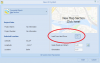
Dear Tormod, a direct import of DWF files is not yet possible, unfortunately, but you could export your DWG files as images (bmp, png or jpg) and then import them into PV*SOL, just like map images. Then you see the footprint of your buildings as textures on the floor and you can more easily place your objects and obstacles. Hope that helps, Martin
-
Dear Penthon, what happens if you click the simulation button on the presentation page? Kind regards, Martin
-
And for your last question: This would be a typical import file for 15min data that works fine with PV*SOL: pvsol load import 15min.txt
-
Dear dandillion, the number format and unit (W, kW or so) just has to correspond with the data format in your text file. For example, if my text file contains the load profile measured in Watts and looks like this: 61.7 2382.3 1984.8 2432.6 953.8 772.2 1571.8 2525.4 ... I'll have to choose the ####.## format since my decimals are separated with a point. In Germany we would mostly have files that look like this: 61,7 2382,3 1984,8 2432,6 953,8 772,2 1571,8 2525,4 So, in that case we would have to choose ####,## as number format. The option you have to choose for the unit depends on your measurement data. If the data you have is in Watts, just choose W. If it is in kW, choose kWm and so on. Hope that helps, Martin