developer_mh
Administrators
-
Joined
-
Last visited
Everything posted by developer_mh
-
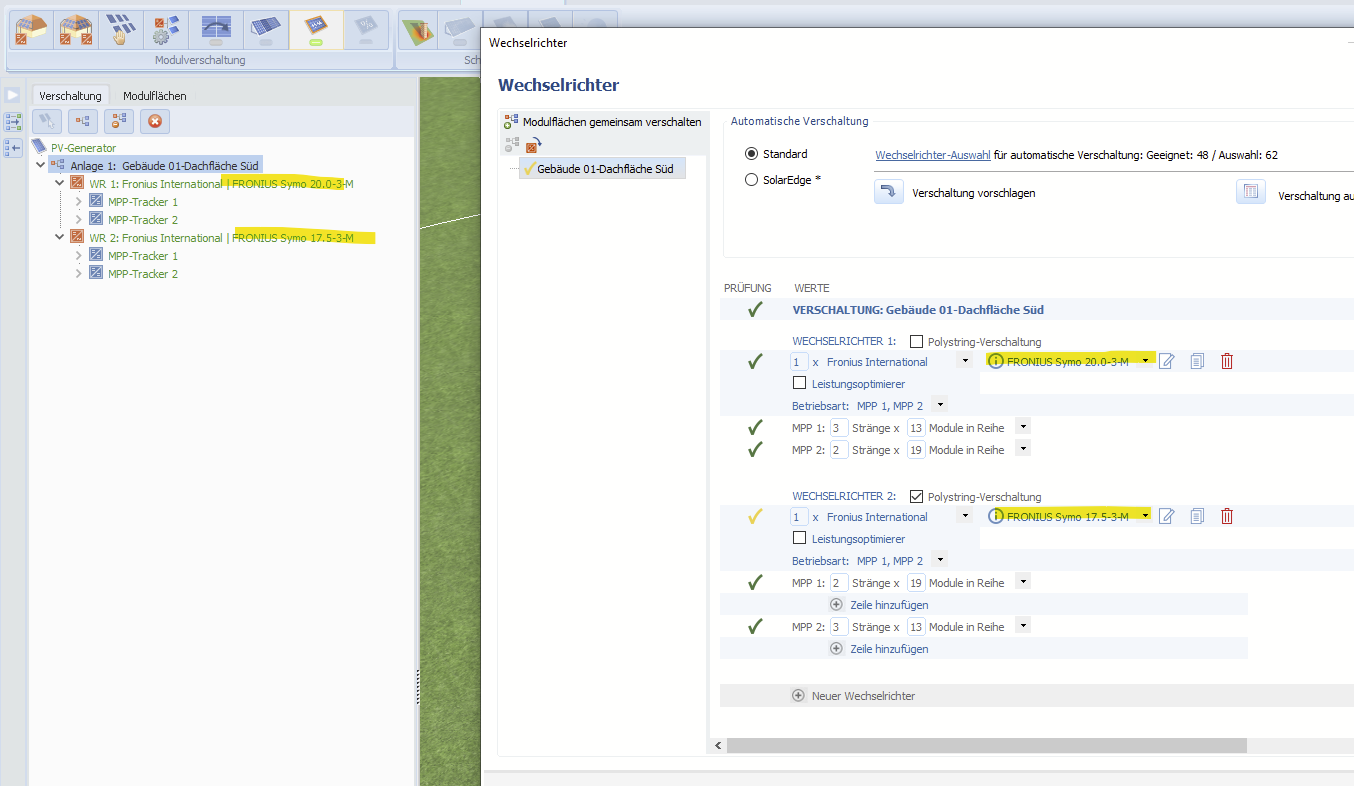
Hallo bene-solar, das ist richtig, die Daten für den Symo 17.5 scheinen nicht aktuell zu sein. Ich werde das unserem Datenbank-Team weiterleiten, vielen Dank fürs Melden. Nein, das läuft etwas anders. Mehr dazu hier: https://help.valentin-software.com/pvsol/de/navigationsseiten/wechselrichter/anlagenpruefung/ Beste Grüße, Martin
-
Hi Alain, yes, the module degradation can be edited by the user: https://help.valentin-software.com/pvsol/en/pages/pv-modules/module-degradation/ Kind regards, Martin
-
Hallo Jons, könntest du mir das Projekt mal schicken, bitte? Gerne hier im Forum als private Nachricht, danke. Beste Grüße, Martin
-
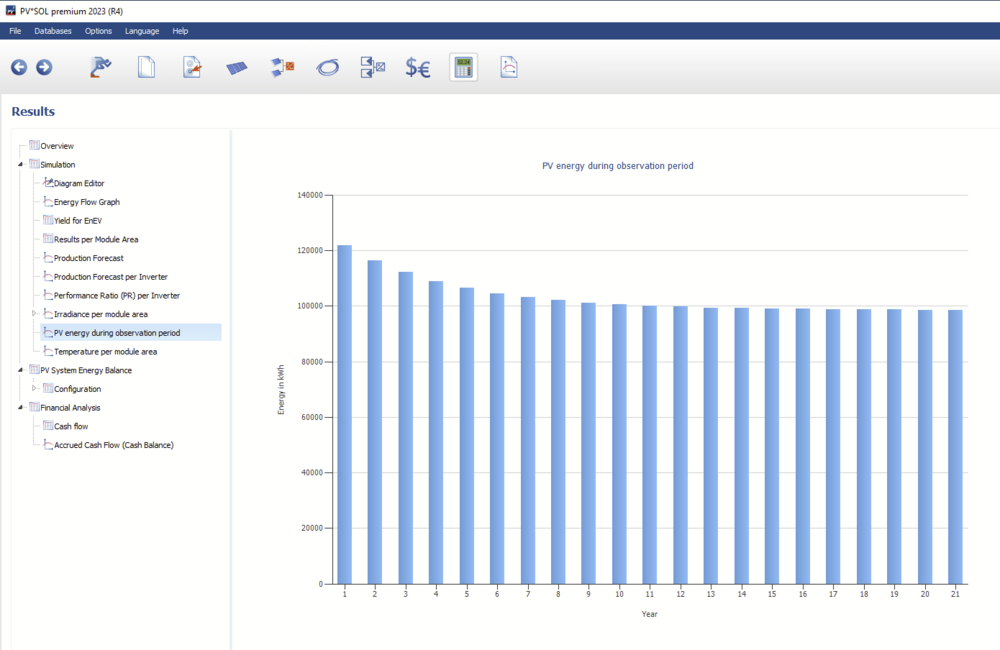
Hi brownb, you can see a chart of the total generation per year here: You can also export the numbers by right clicking on the chart. Hope that helps, kind regards, Martin
-
Hi Alain, the module ageing losses (=degradation) are taken into account in the economic calculation only. The energy yield simulation is conducted for the first year only, without module ageing losses. You can refer to the energy balance after the simulation in order to see which losses are accounted for: https://help.valentin-software.com/pvsol/en/pages/results/energy-balance/ Hope that helps, kind regards, Martin
-
Hi CodrinSomesan, no, this is not possible, I am afraid. However, you can edit the Word file after exporting it. Kind regards, Martin
-
Hi CodrinSomesan, the same answer as in your previous post applies here: Kind regards, Martin
-
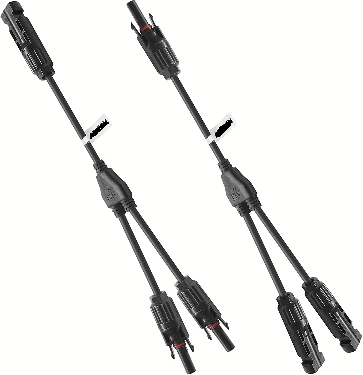
Hi CodrinSomesan, the number of DC inputs is not checked in the configuration section, since it is possible to combine strings before the DC input. You can use DC combiner boxes or Y connector cables or the like Hope that helps, kind regards, Martin
-
Hallo enick, vielen Dank für die Screenshots. Ich leite das mal in die 3D-Abteilung weiter. Beste Grüße, Martin
-
Hi Rodrigo, please see my response to your other post: Kind regards, Martin
-
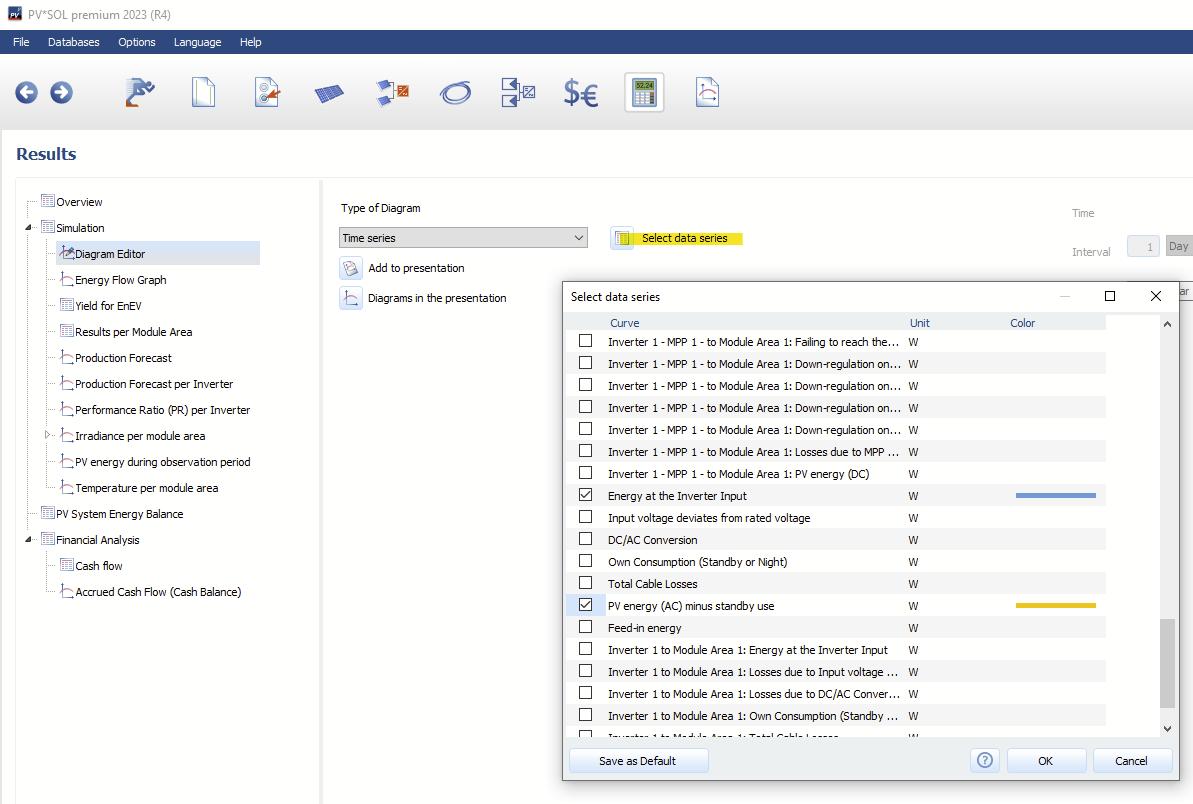
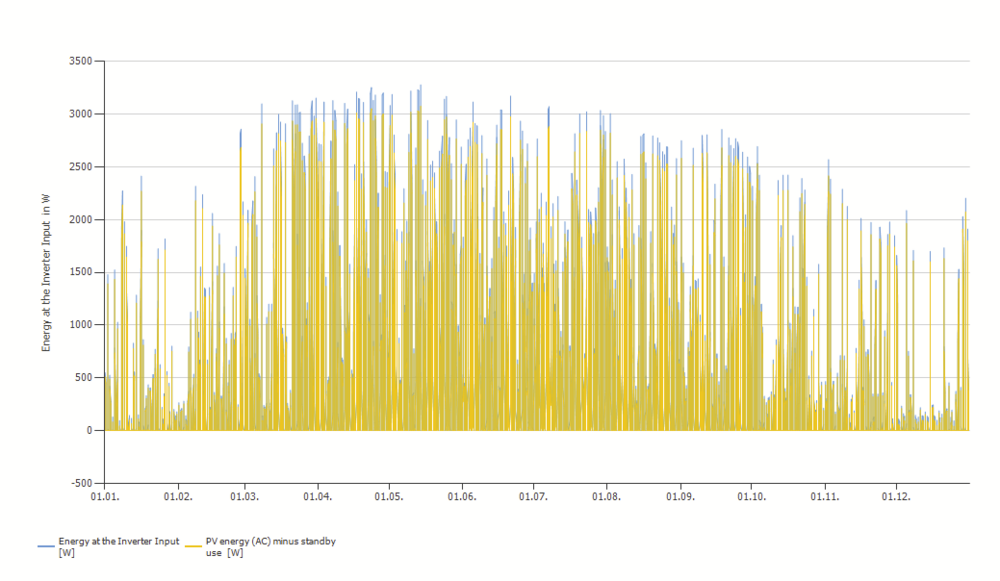
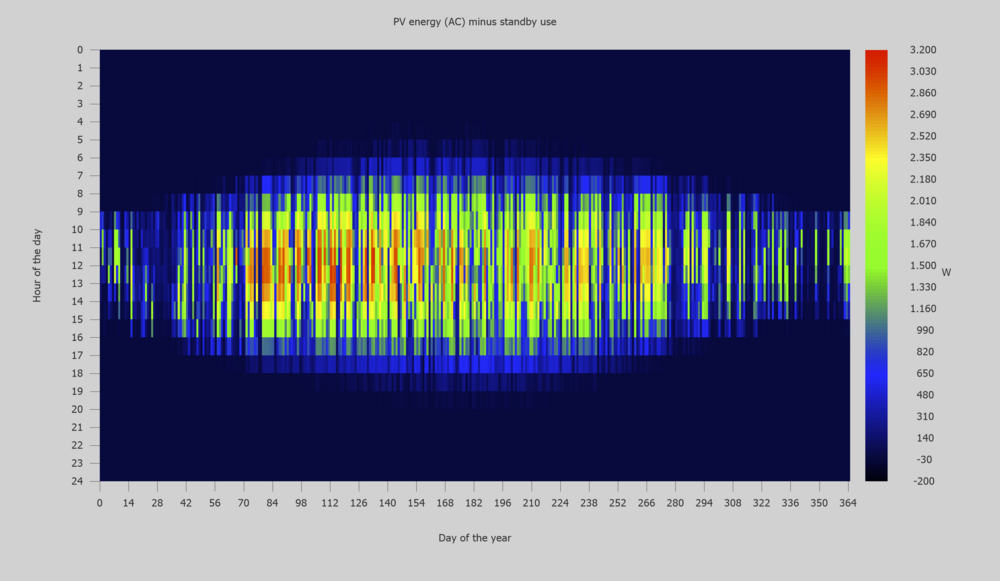
Hi Kristoffer, sorry for the late reply, we somehow overlooked your question. The real output of your system really depends on a lot of factors. You can see the resulting output power over time om the results page, section "diagram editor", then time series or Carpet Plot. Just choose the series you want to see, e.g. "Energy at Inverter Input" and "PV energy (AC) minus standby use" (don't be irritated by the wording, the word "energy" is used because we use the texts mainly for results where energy values are displayed): You then get a time series plot like this: Or for the whole year: Or, as a CarpetPlot: Hope that helps, kind regards, Martin


-
Hi RachelEnergy, the field "Created by" is filled with the value of the Project Designer: "Approved by" and "Part number" can't be set from within PV*SOL, but only after you exported it. Best regards, Martin

-
Hi DrupoNduz, no, it has nothing to do with the version of PV*SOL, not with the license or anything else. It is really only related to the settings on your machine, I am afraid. Best regards, Martin
-
Hi Pierre, we had this issue a lot in previous versions of PV*SOL and had hopes that the problem would be solved. But then came Windows 11... we are still not sure why this happens even on unscaled screens. But in order to get the menu bar back, you can try the work-around from this post here: Hope that helps, kind regards, Martin
-
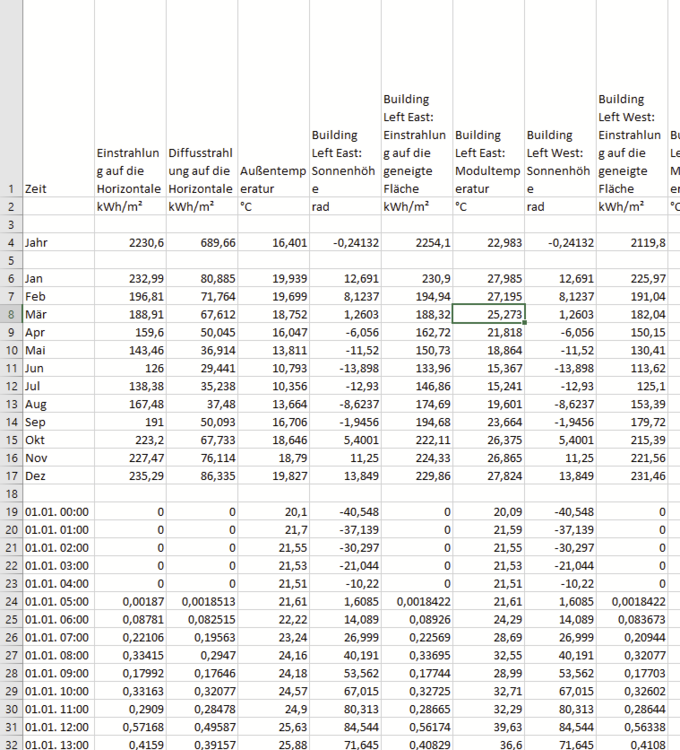
Dear DrupoNduz, yes, of course, I can export and see the csv export properly: Make sure your decimal separator and list separator of your system are exactly like on the computers of your colleague. Also make sure that the decimal separator setting in Excel is the same like your colleague's. Also the export settings in PV*SOL need to be the same. Then export the file again and open it in Excel. I wish you all the best for figuring it out! Martin
-
Hi juhaina, sorry for the late reply. Currently we have a very high volume of requests. Could you provide a project file, please? You can send it to me via private message here in the forum, thank you. Kind regards, Martin
-
Hallo Saj, diese Meldung kommt, wenn man verschaltet hat, aber eben nicht alle Details im Kabelplan eingegeben hat. Die Meldung kann ignoriert werden, wenn der Kabelplan so ausreicht, wie man ihn sieht. Beste Grüße, Martin
-
Hallo Andreas, das ist ein Bug, der uns bereits bekannt ist und für die nächste Version (premium 2023 R4) auch schon behoben wurde. Als Work-Around jetzt kann man die gesamte Simulation mit Strg+F5 neu anstoßen, dann klappt es. Beste Grüße, Martin
-
Hallo Jons, nein, leider gibt es diese Möglichkeit (noch) nicht. Wir haben diesen Feature-Wunsch aber bereits auf der Liste. Jetzt aktuell kann ich nur auf das Online-Tool für Wirtschaflichkeitsberechnungen der DGS Franken verweisen, die auch das Mieterstrom-Modell können: https://www.pv-now.de/ Viele Grüße, Martin
-
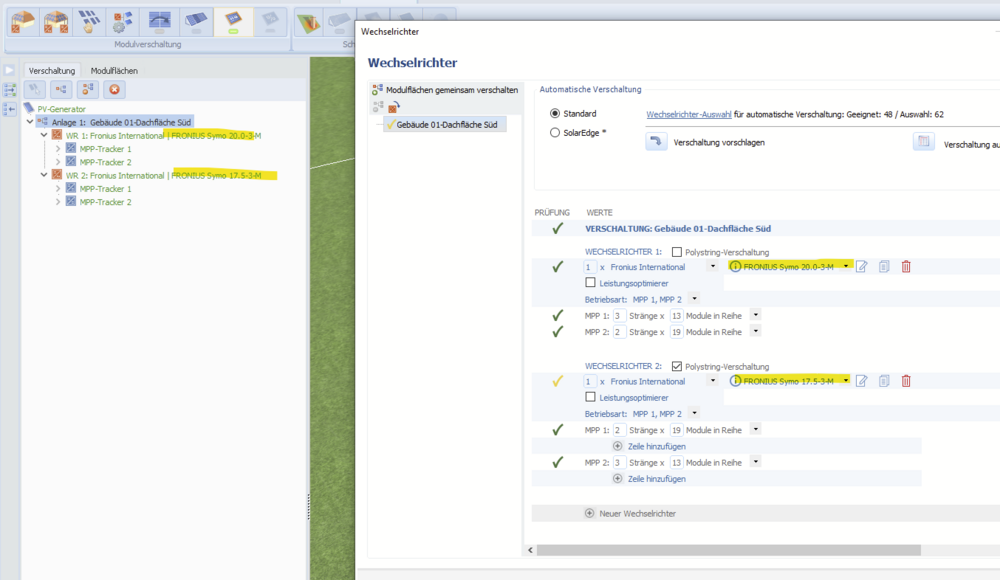
Hallo Jons, die Nummerierung der Wechselrichter ergibt sich aus der Reihenfolge im Verschaltungsdialog, damit bekommt man meist die gewünschte Reihenfolge hin: Beste Grüße, Martin
-
Hallo OGen, vielen Dank für die Anfrage. Wir simulieren nur das erste Jahr, und nur diese Werte sind im csv-Export enthalten. Die Werte der Degradation fließen nur in die Wirtschaftlichkeitsberechnung mit ein. Um abzuschätzen, wie sich die PV im Zusammenspiel mit dem Batteriespeicher verhält, müsste man eine Kopie des PV-Moduls anlegen und die Werte für Strom und Spannung gemäß der Degradation ändern. Der Einfachheit halber kann man dabei annehmen, dass nur der Strom des Moduls degradiert. Wenn das Modul also laut Datenblatt in 10 Jahren um 5% degradiert, müsste man in der Kopie des PV-Moduls alle Strom- und Leistungswerte um 5% reduzieren und dann damit simulieren. Beste Grüße, Martin
-
Salut Alain, you are right, if the tax refund is negative, it is equal to a tax payment. On other hand, if the name would be just "tax", we would have the same problem the other way 'round, since a negative tax is in fact a tax refund. So a renaming of the term would change a lot in our opinion. Kind regards, Martin
-
Hi DrupoNduz, No, this is just an Excel issue. In Excel, it depends on your regional settings of Windows how csv files are treated. Please compare the Windows regional settings with the ones of your colleagues, then it should work. Hope that helps, kind regards, Martin

-
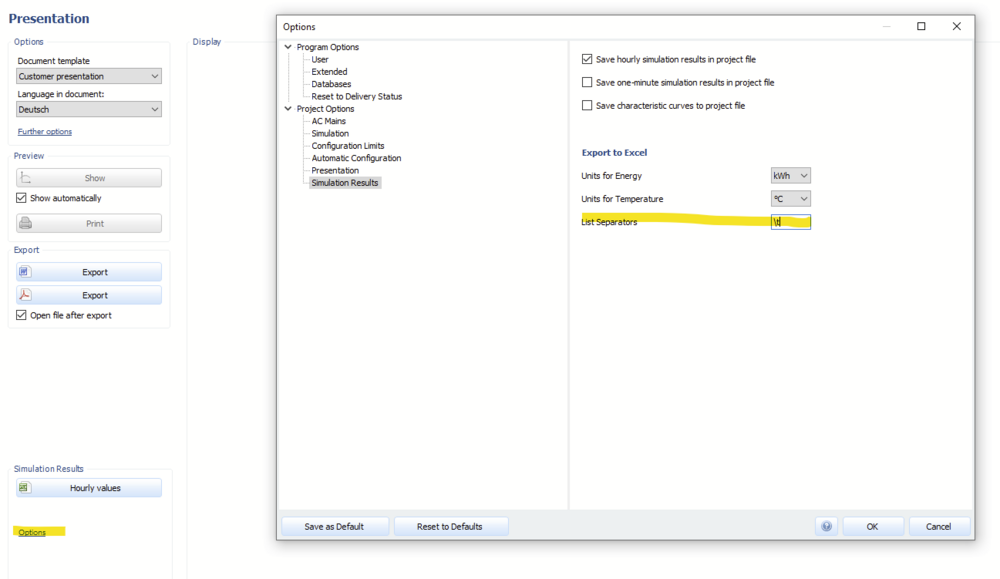
Hi DrupoNduz, thank you for the files. What happened there is that your decimal separator was the same as the list separator, both commata (,). Please change the list separator by clicking on options next to the export button. A tab (enter \t in the field) is a good list separator value when working with Excel. Kind regards, Martin
-
Yes, please, along with the csv file, thank you