
hotline_oh
-
Posts
727 -
Joined
-
Last visited
-
Days Won
43
Everything posted by hotline_oh
-

Automatische Phasenumschaltung erhöht Netzbezug für E Auto
hotline_oh replied to t3e2q's topic in PV*SOL
Hallo t3e2q, danke für deine Anfrage. Vermutlich liegt dies an der unterschiedlichen Anschlussleistung. Bitte teste mal die Variante ohne automatische Phasenumschaltung mit einer Mindestladeleistung von 33% (1,37kW). Falls die Ergebnisse weiterhin nicht plausibel sind, sende uns bitte beide Projektdateien an hotline@valentin-software.com, dann sehen wir uns das mal an. (Falls die Dateien zu groß sind, nutze WeTransfer o.ä.). -
Dear CarlSEL, Thank you for your inquiry. In 3D, a limit value of 10,000 modules applies for roof-parallel systems and a limit value of 7,500 modules for elevated systems. These values cannot be exceeded. You can try to plan the system in 2D. Here you can define any number of module areas, each with 100,000 modules. In order to take into account the mutual shading of the mounted systems, which is not possible in 2D as the reference point for all shading simulations in 2D is the centre of the entire PV field, you can simulate a small ‘reference’ part of the system in 3D, just a few sample rows. After the simulation, you will receive a percentage of the yield reduction due to shading on the results page. If you then plan the system with all modules in 2D, you can enter the percentage value of the yield reduction in the Shading section on the PV modules page.
-
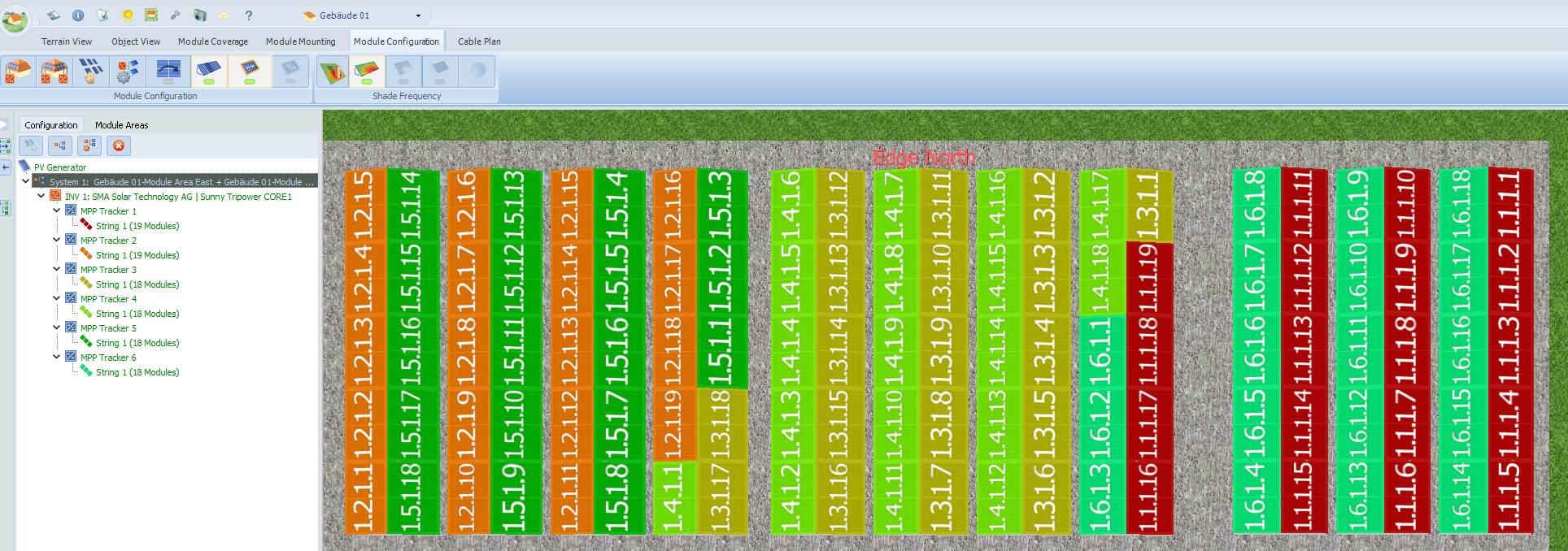
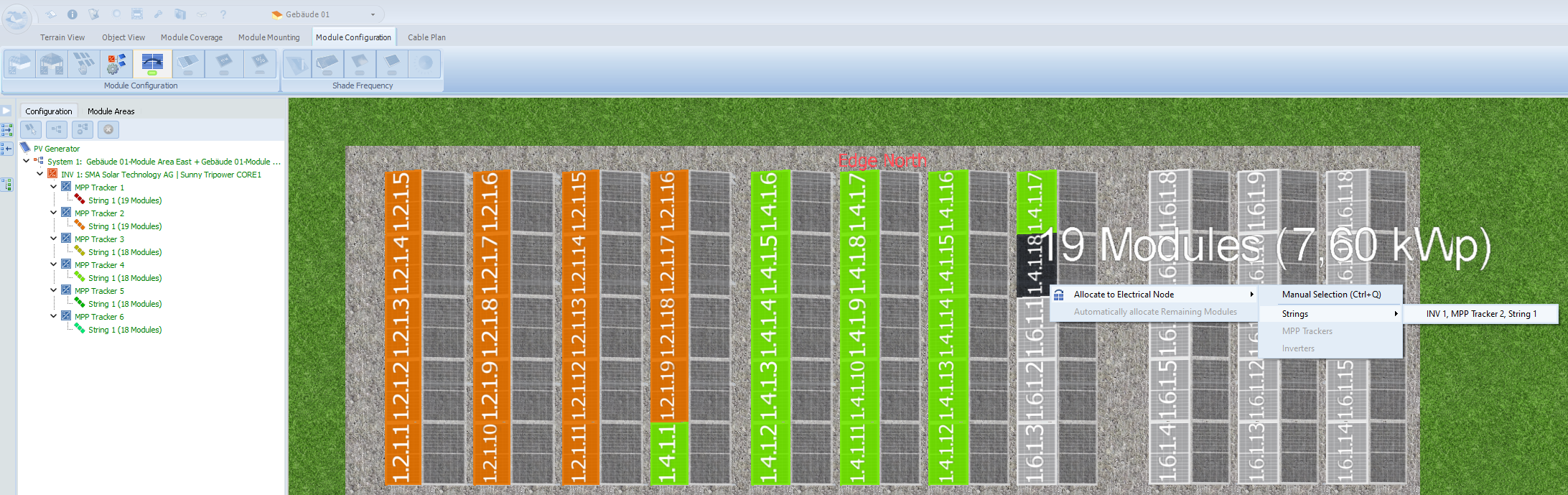
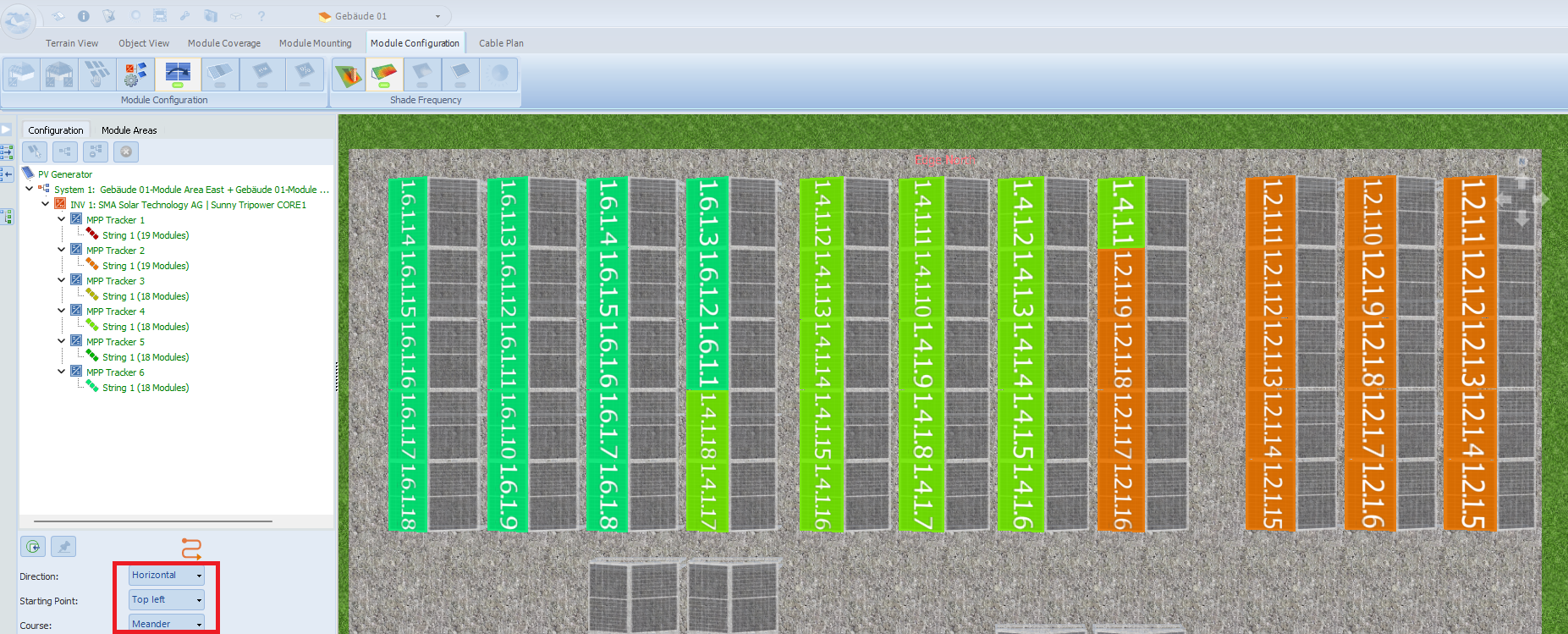
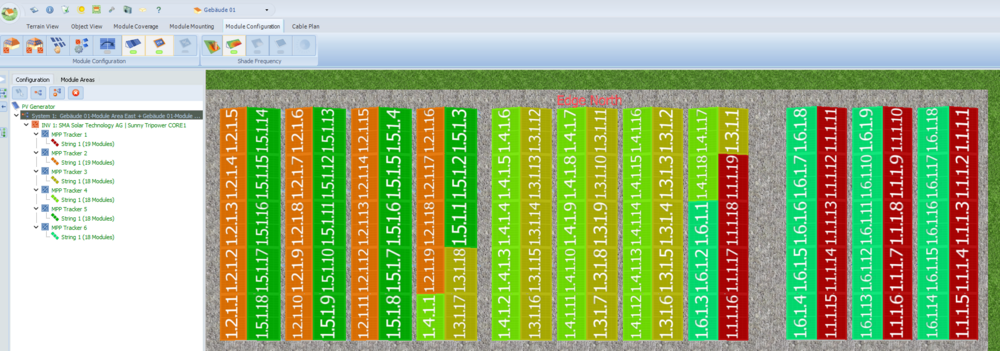
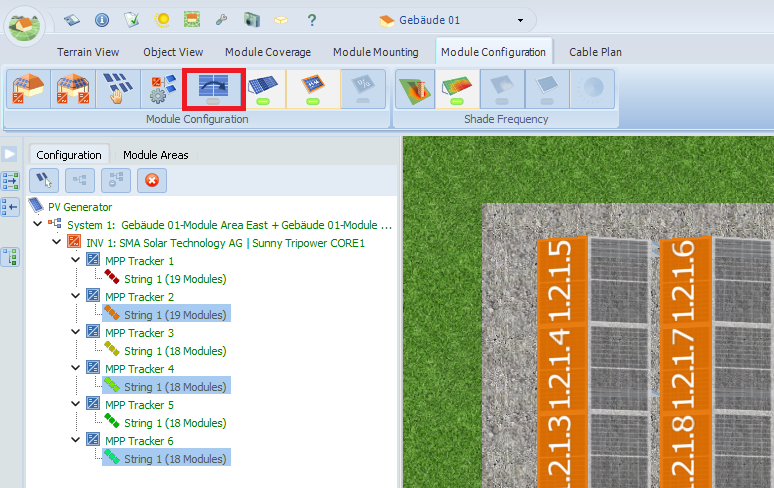
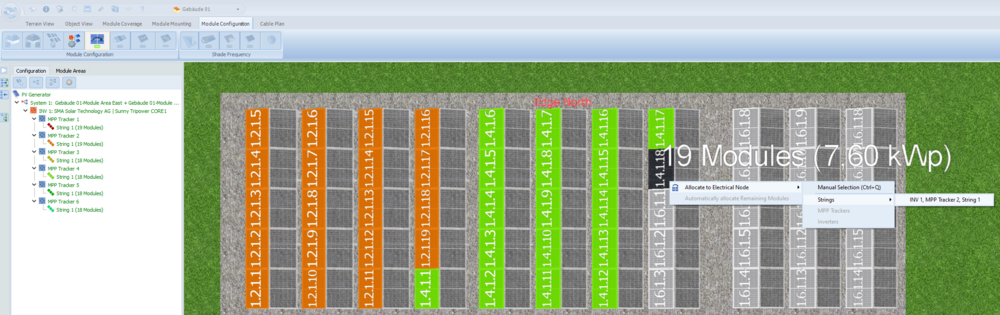
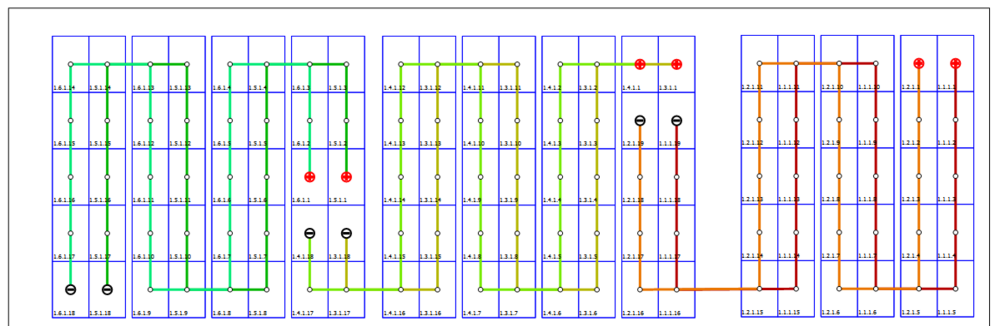
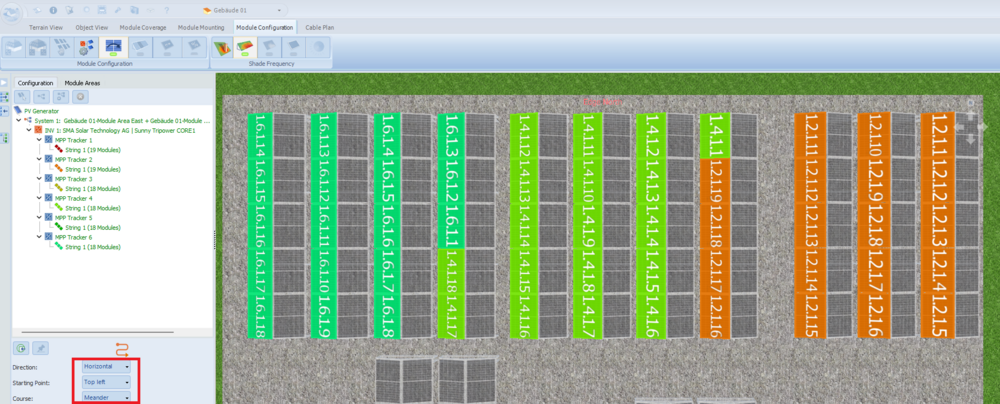
Dear Miro, Thank you for your inquiry. We agree with you that the automatic arrangement of strings is not always useful. In your case, strings 1, 3 and 5 are arranged correctly, but strings 2, 4 and 6 are arranged incorrectly. Select the West module area and click on the ‘Edit Module Allocations’ button: Select the 19 modules for string 2 and assign them (right-click) to MPPT 2. Repeat the step for strings 4 and 6: Then select "Horizontal", "Top left" and "Meander": The cable plan should now be correct:
-
Hallo PH2, danke für deine Nachfrage. Einblick in die Datenbank hast du auch ohne Testversion: https://pvsol-database.valentin-software.com/ Der S500B ist leider noch nicht verfügbar.
-
Hallo Elia Marino, vielen Dank für deine Anfrage. Bitte lade die *.dat-Datei hier hoch oder sende sie uns an hotline@valentin-software.com, dann sehen wir uns das mal an.
-
Hallo Roman, danke für deine Anfrage. Die Kombination aus Batteriesystem und Heizstab kannst du derzeit leider noch nicht simulieren, dies wird aber mit einem der nächsten Software-Updates (voraussichtlich im Frühjahr 2025) möglich sein. Folgender Workaround ist möglich: Simulation des PV-Systems mit Batteriespeicher (ohne Heizstab) und Excel-Export der Stundenwerte des PV-Überschusses/der Netzeinspeisung Simulation des PV-Systems mit Heizstab (ohne Batteriespeicher) und Excel-Export der Stundenwerte des Heizstabbedarfs Berechnung des Heizstabbetriebs durch PV-Überschuss als Stundenwerte in Excel Import des Lastprofils des Heizstabbetriebs als zusätzlichem Verbraucher Simulation des PV-Systems mit Batteriespeicher und Heizstab (als zusätzlichem Verbraucher)
-
Dear Sven, Thank you for your inquiry. The PV*SOL software is written for Windows systems only and unfortunately there are currently no plans to release PV*SOL for MacOS. Some customers use a virtual machine, but we do not test our programmes on Mac and cannot guarantee that it will work.
-
Hallo Matthias, vielen Dank für deine Rückmeldung. Wir arbeiten an der Lösung. Das Problem wird voraussichtlich mit dem nächsten Software-Update behoben sein.
-
Probleme mit Darstellung von Sperrflächen im Übersichtsplan
hotline_oh replied to Steven's topic in PV*SOL
Hallo Steven, vielen Dank für deine Anfrage. Bedauerlicherweise werden im Übersichtsplan nicht alle – sondern nur die für die PV-Übersicht notwendigen – Sperrflächen angezeigt. Du hast die Möglichkeit, den Übersichtsplan zu exportieren und die übrigen Sperrflächen in einem anderen Programm einzuzeichnen. -
Hello Adam, Yes, it is possible to design an offgrid 300 kW system in PV*SOL. Please let us know which Huawei battery inverter should be added to our database. If available, please send the data sheet to database@valentin-software.com, thank you! You can also create new data records for battery inverters yourself. We recommend copying an existing data record and overwriting the data. You can find instructions in our help section.
-
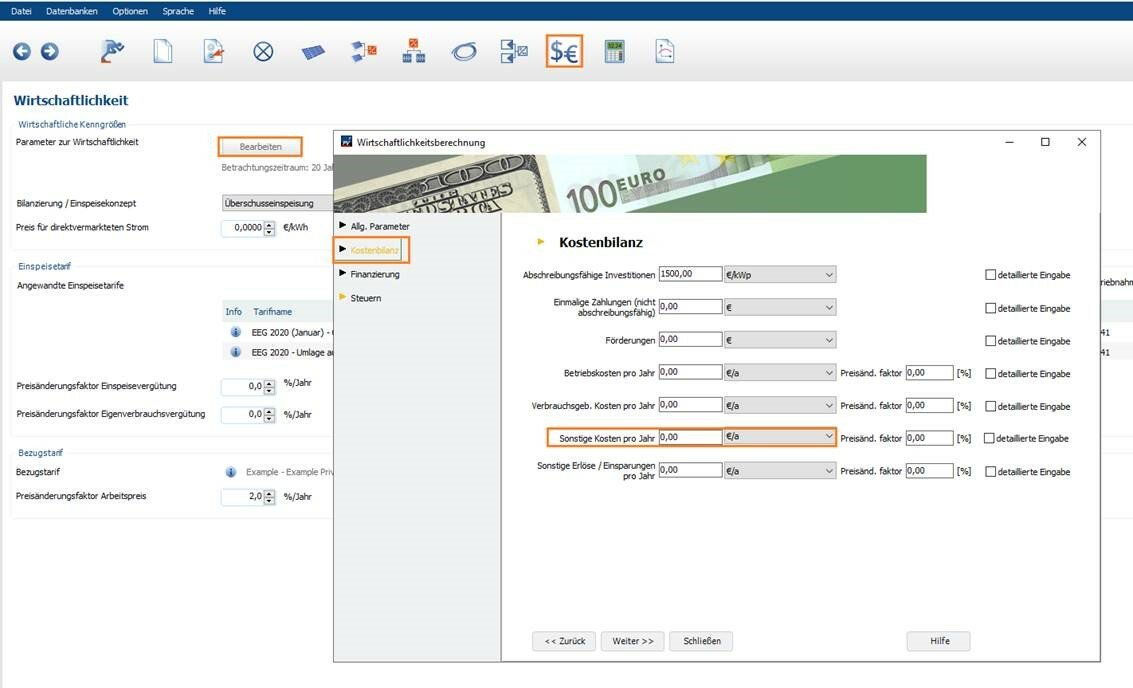
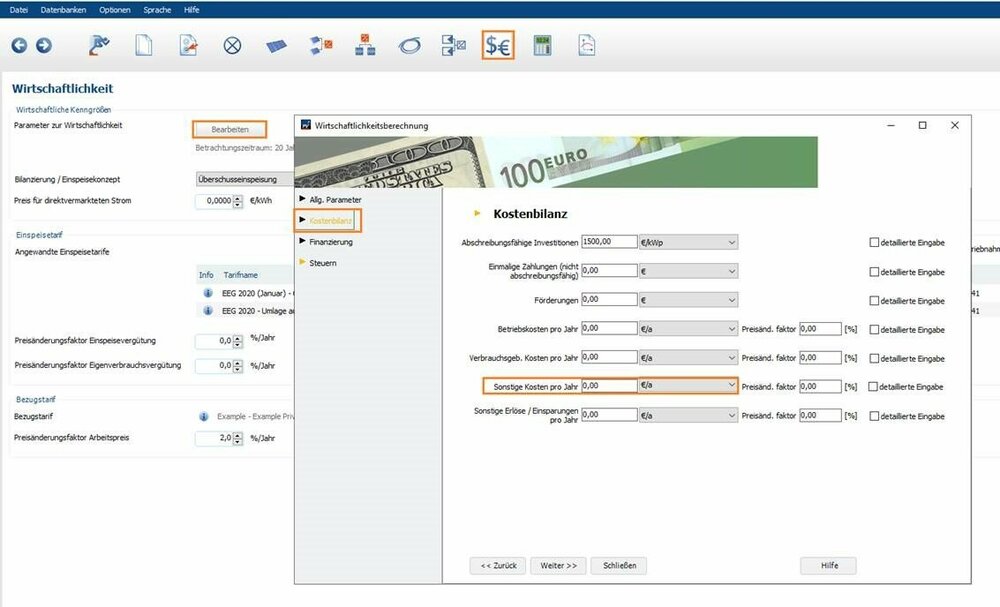
Hallo Chris, vielen Dank für deine Anfrage. Das Mieterstrommodell ist leider nicht als Bilanzierung/Einspeisekonzept auswählbar und muss individuell eingegeben/angepasst werden. Unter der Voraussetzung, dass das Bedarfsprofil den Verbrauch der Mieter darstellt, entspricht der Eigenverbrauch dem Verkauf an die Mieter. Dieser kann über die Einsparungen berücksichtigt werden, indem du einen Bezugstarif definierst, der dem Verkaufspreis an die Mieter entspricht. Der eingespeiste Strom wird nach dem EEG vergütet. Da der Betreiber evtl. gleichzeitig Versorgungssicherheit gewährleisten muss, kann es sein, dass die erzeugte PV-Energie nicht ausreicht, den Bedarf der Mieter zu decken. In diesem Fall muss Strom aus dem Netz vom Energieversorger dazu gekauft werden. Um das zu berücksichtigen, müssen Sie die gekaufte Menge Strom mit dem Preis je kWh des Energieversorgers multiplizieren und auf der Seite Wirtschaftlichkeit in den Parametern zur Wirtschaftlichkeit --> Kostenbilanz unter sonstige Kosten eingeben:
-
Dear Tom54, Thank you for your inquiry. Currently, only PV systems with up to 7,500 elevated or up to 10,000 roof-parallel modules can be simulated in the 3D environment. The maximum number of modules also depends on the number of shading 3D objects, such as trees, superstructures, module row formations, etc. Does this answer your question?
-
Dear Yannis279, Make sure you have selected the ‘Grid-connected PV System with Electrical Appliances’ option on the ‘System type, Climate and Grid’ page:

-
Hello klb, Under ‘Options’ --> ‘Project Options’ --> ‘Simulation’ you can define more losses (e.g. losses due to deviation from standard spectrum, power losses resulting from a drop in voltage at the bypass diodes, power losses resulting from mismatching or reduced yield, output losses due to soiling):

-
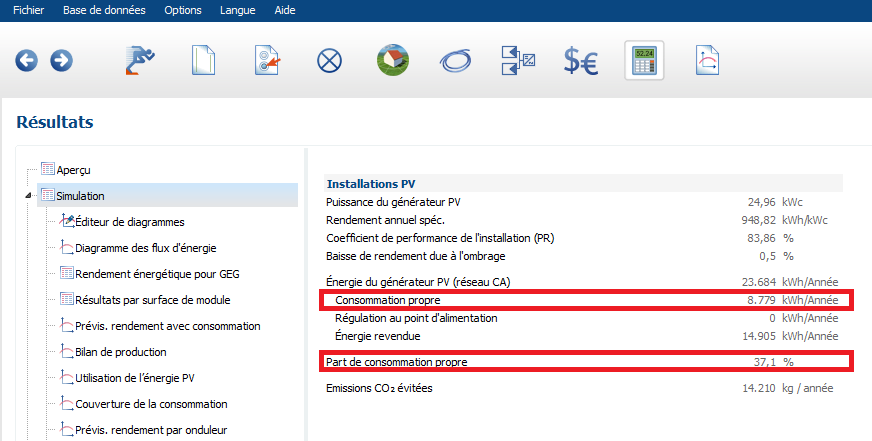
Dear Yannis279, Thank you for your inquiry. Self-consumption can be viewed on the results page:
-
Hallo Max, danke für deine Anfrage. Die wesentlichen Daten sind im Datenblatt zu finden. Falls dir etwas fehlt, müsstest du den Hersteller kontaktieren. Wir haben derzeit noch keine Mikrospeicher in unserer Datenbank. Eine Anleitung zum Erstellen eines neuen Datensatzes findest du in unserer Online-Hilfe.
-
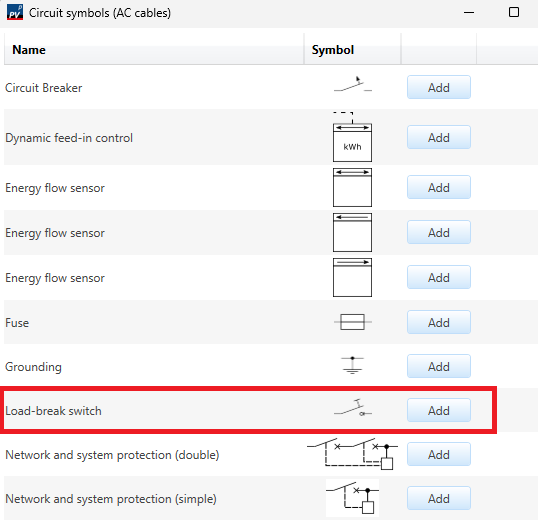
Dear CarlSEL, On the Cables page, add another circuit symbol, the load-break switch, in the AC cable area. Then change the order of the circuit symbols using the arrow buttons.

-
Hello klb, Thank you for your inquiry. Unfortunately, the bankability option is only available for the full feed-in concept.
-
Hallo mdeniz17, danke für deine Anfrage. Der Eigenverbrauchsanteil der PV-Anlage ohne Batteriespeicher ist mit 85 Prozent schon sehr hoch. Er kann durch den Einsatz des Batteriespeichers zwar noch geringfügig erhöht werden, aber die 7.000 kWh, die die Batterie beiträgt, sind sehr gering. Dadurch fallen die Batterieverluste ins Gewicht - und sind für die geringeren vermiedenen CO2-Emissionen verantwortlich.
-
Änderungen an Gebäudenamen im 3D Plan werden nicht übernommen
hotline_oh replied to th_green2045.de's topic in PV*SOL
Hallo th_green2045.de, danke für deine Anfrage. Im unteren Screenshot handelt es sich nicht um die Gebäudenamen, sondern um die Bezeichnung der Modulflächen. Diese kannst du in der Wechselrichterkonfiguration umbenennen: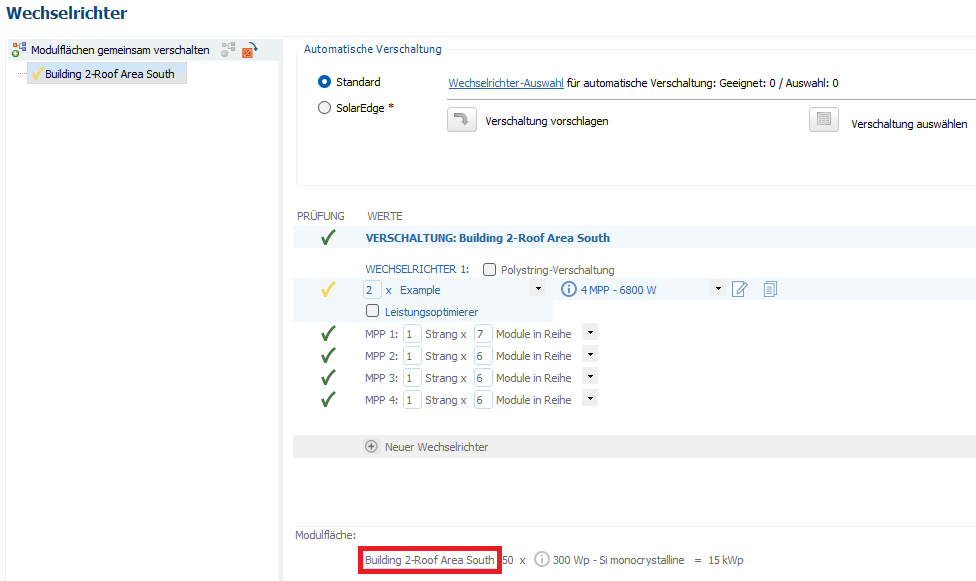
-
How to Add Multiple Diesel Generators in PV*SOL: Questions and Solutions
hotline_oh replied to licurgo's topic in PV*SOL
Dear licurgo, Thank you for your inquiry. Unfortunately, it is not possible to select more than one auxiliary generator. However, you do have the option of creating your own data records. (You can find instructions on how to do this in our help section.) If you want to map several auxiliary generators, create a data record with the total output. -
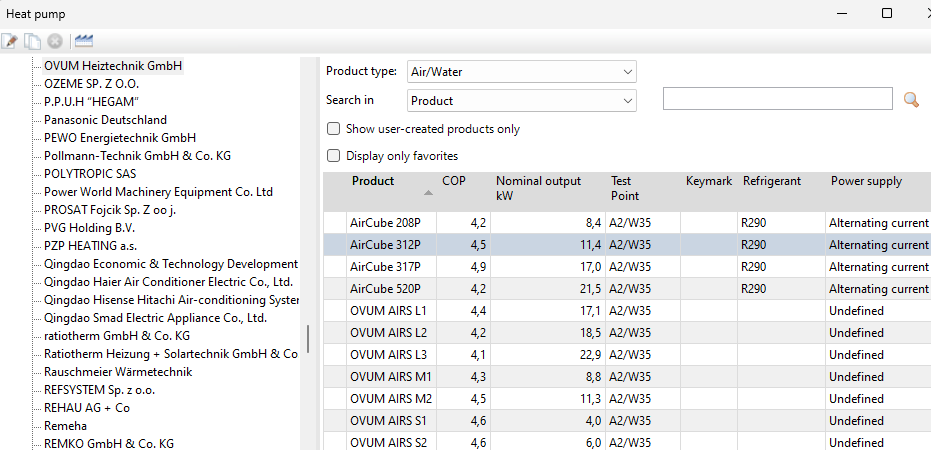
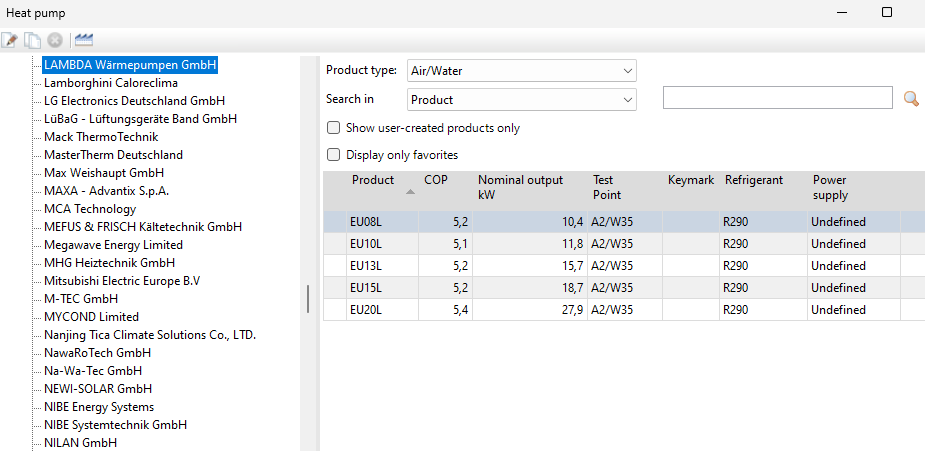
Hello Markus, Ovum and Lambda heat pumps data is available:
-
Hello Markus, Thank you for your message. Missing products can be added as a database update. We will add the missing heat pumps. If you are missing any other products, please send the manufacturer, product type and data sheet to database@valentin-software.com. You can also create data records for heat pumps yourself. You can find instructions for this in our help section. Hallo Markus, vielen Dank für deine Nachricht. Fehlende Produkte können als Datenbank-Update nachgereicht werden. Wir werden die fehlenden Wärmepumpen nachtragen. Sollten dir weitere Produkte fehlen, sende Hersteller, Produkttyp und Datenblatt an database@valentin-software.com. Du kannst Datensätze für Wärmepumpen auch selbst anlegen. Eine Anleitung dazu findest du in unserer Online-Hilfe.
-
108 cell module texture problem while rotating to horizontal
hotline_oh replied to Petr's topic in PV*SOL
Dear Petr, As mentioned via email: The problem is the frame width. If you set the frame width to 30mm, the texture is displayed correctly. -
108 cell module texture problem while rotating to horizontal
hotline_oh replied to Petr's topic in PV*SOL
Dear Petr, Thank you for your inquiry. Please send the corresponding project file (*.pvprj) to hotline@valentin-software.com, so that we can take a closer look at it.