hotline_oh
Administrators
-
Joined
-
Last visited
Everything posted by hotline_oh
-
Guten Tag Josué Marion, vielen Dank für Ihre Anfrage. Wir können den Fehler nicht reproduzieren und es gibt auch keine Hinweise von anderen Kunden zu Problemen. Für welchen Standort kann die Horizontlinie nicht erstellt werden? Bitte senden Sie uns die Projektdatei an hotline@valentin-software.com, dann sehen wir uns das mal an.
-
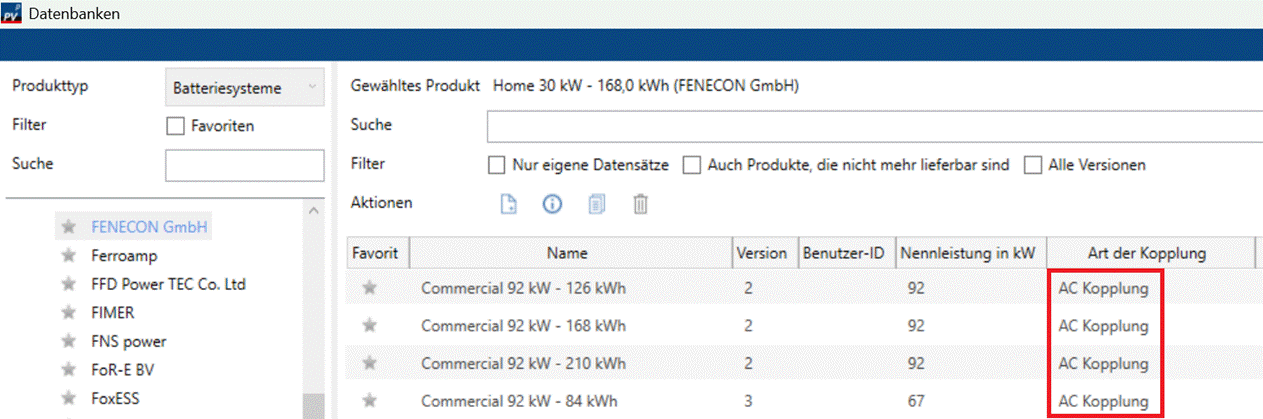
Dear Nirmal Saggurthi, Thank you for your inquiry. Which program version are you using? The desired battery systems have been available in our database since September 2025:

-
Dear Miro, Thank you for your inquiry. For elevated module rows, the radiation on the rear side of the module consists of the radiation reflected from the ground, the radiation reflected from adjacent modules and the proportion of diffuse and direct radiation that can directly reach the rear side of the module, see here for more information. With an east-west orientation with a 20-degree inclination, as you selected, no backside radiation can reach the modules. Therefore, no PV power on the back of the module is calculated. The bifaciality of the modules cannot be taken into account.
-
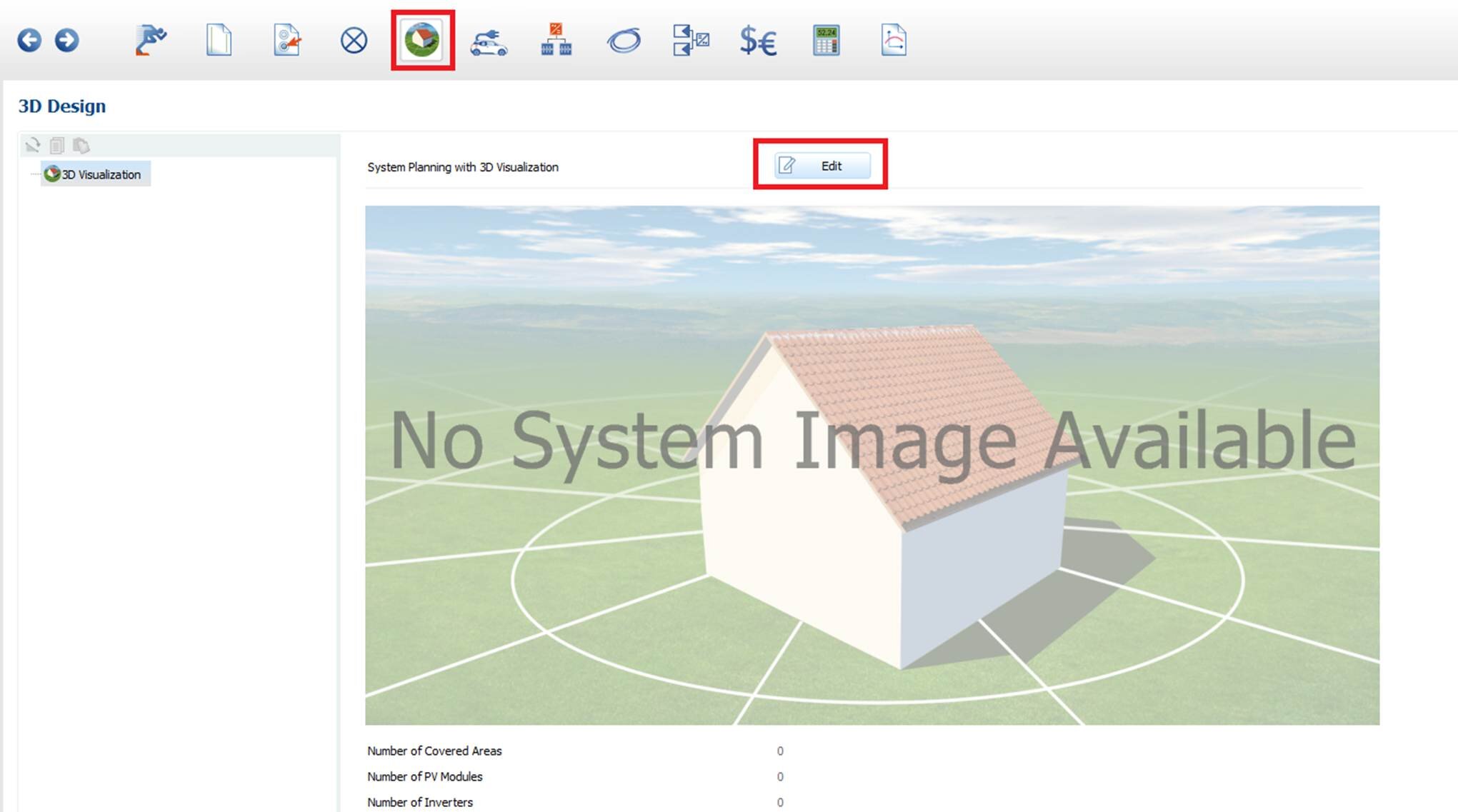
Dear Anders, Thank you for your inquiry. You have to define a pv system in the 3D part of the software: You can watch our webinar recordings (in English). In the first part, we show 2D planning and go through the entire programme: selection/generation of climate data, load profile import as well as economics and the results. The second part shows the various options for 3D planning: module assignment and use of mounting systems, planning with Bing or Google map sections and the import of 3D models. 2D: https://downloads.valentin.de/webinar/PV_SOL_premium_2D_planning.wmv 3D: https://downloads.valentin.de/webinar/PV_SOL_premium_3D_planning.wmv Our free webinars offer you the opportunity to ask questions. You can find more tutorials on our YouTube channel: www.youtube.com/user/valentinsoftware/videos In addition, you can find more information in our online help: https://help.valentin-software.com/pvsol/en/

-
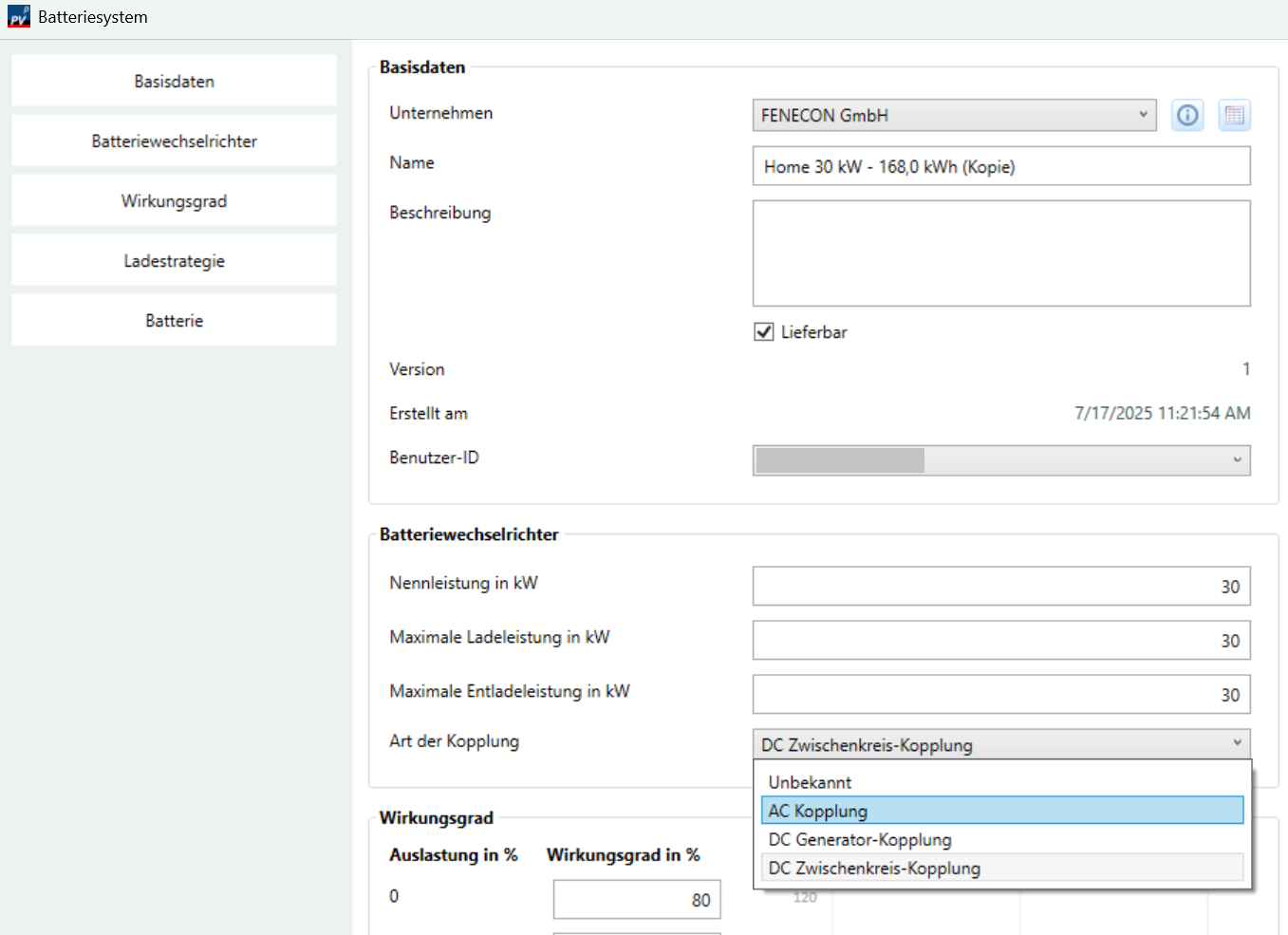
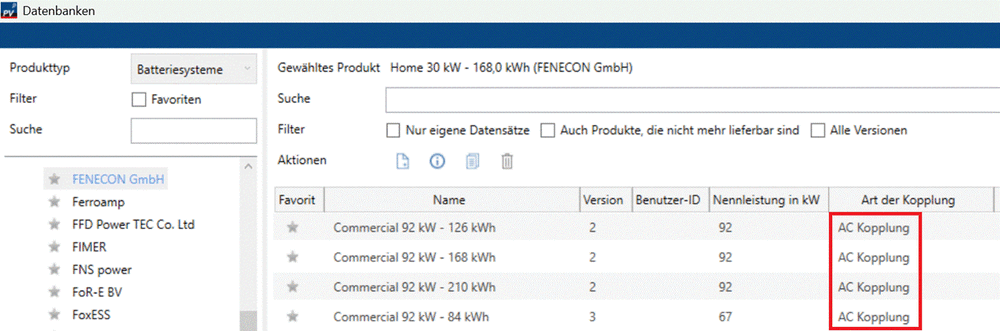
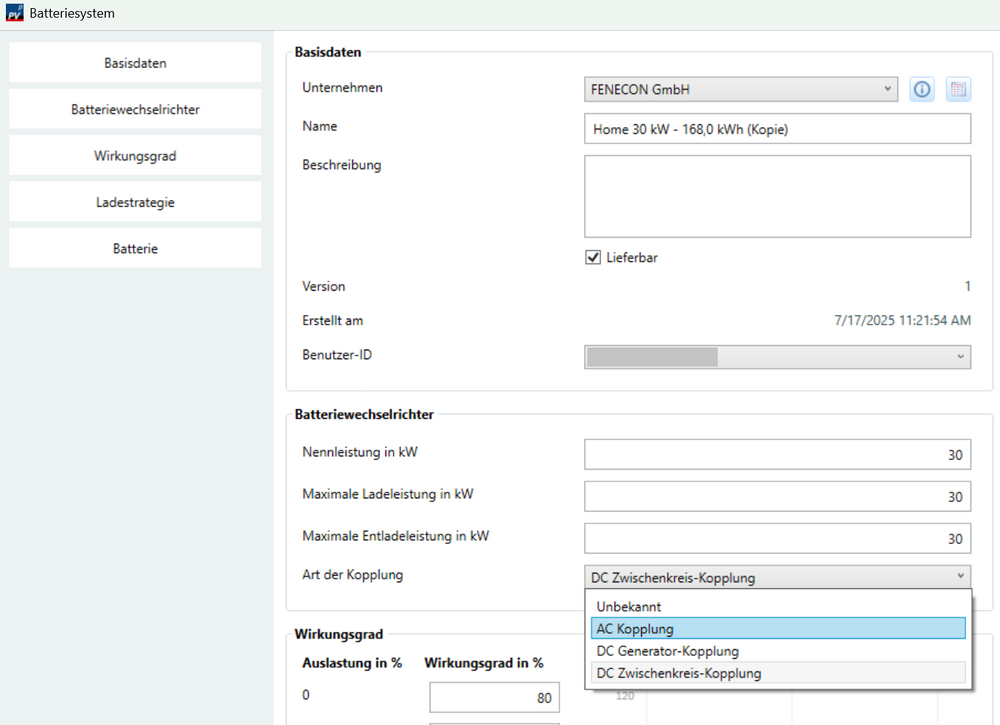
Guten Tag Günther Maier, vielen Dank für Ihre Anfrage. Sie haben vermutlich ein Batteriesystem mit DC-Zwischenkreis-Kopplung ausgewählt. Der Batteriespeicher ist an einen einzigen Wechselrichter angeschlossen und kann nur von diesem einen Wechselrichter beladen werden. Die übrigen Wechselrichter können den Batteriespeicher nicht beladen. Sie haben die Möglichkeit, ein Batteriesystem mit AC-Kopplung auszuwählen. In diesem Fall kann der Batteriespeicher von allen Wechselrichtern geladen werden. Sie können auch für das von Ihnen gewählte Batteriesystem die Kopplungsart ändern. Dazu gehen Sie in die Batteriesystem-Datenbank, kopieren den aktuellen Datenbankeintrag des Batteriesystems, wählen die Kopplungsart „AC-Kopplung“ und speichern das Batteriesystem neu ab. Die Batterie kann dann von allen Wechselrichtern geladen werden.
-
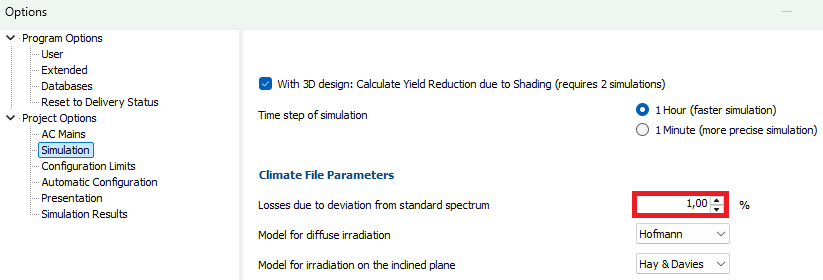
Dear PVEnergy, Thank you for your inquiry. The spectral mismatch alters the module's efficiency curve, which was measured using a standard spectrum. We assume that an annual average correction factor of 1% can be expected in Central Europe.
-
Dear PV Pro, Thank you for your message. Our newsletter provides information about our software updates. You can subscribe here.
-
Dear J. Esteban, Thank you for your inquiry and for sharing the datasheet. We will contact the manufacturer and ask them to add the missing products.
-
Dear Kavish Chetty, Thank you for your inquiry. Please check whether you can import the attached file. 18Halifax.wbv
-
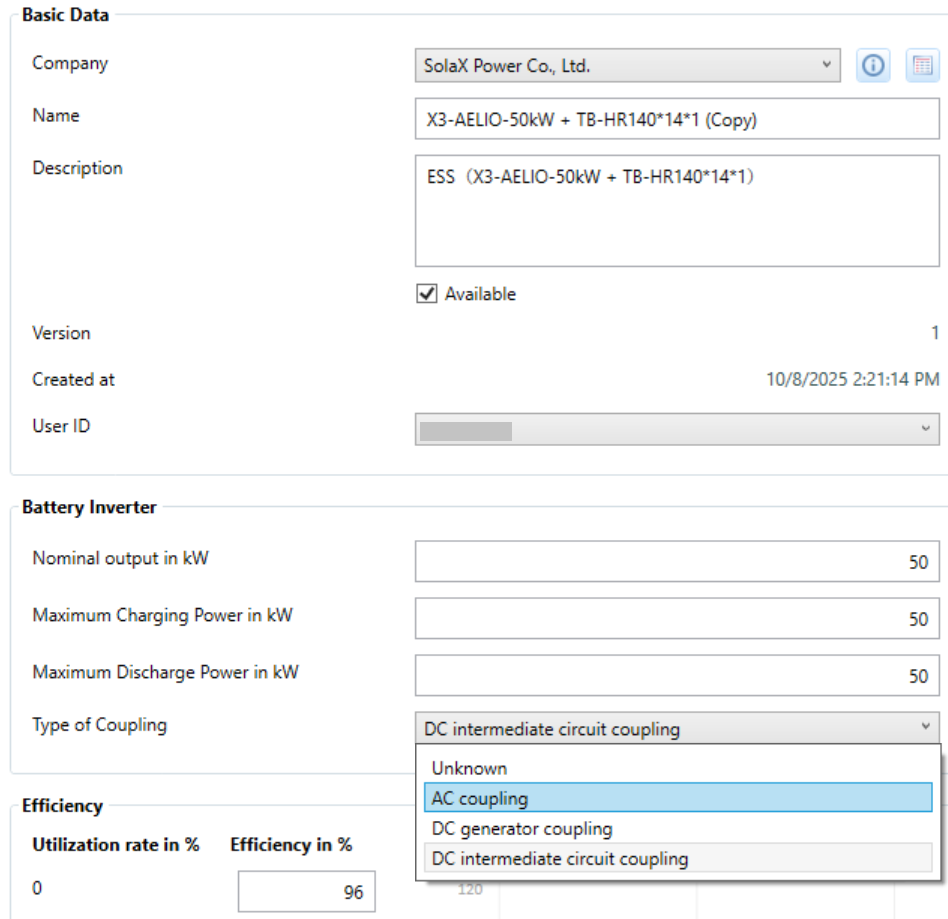
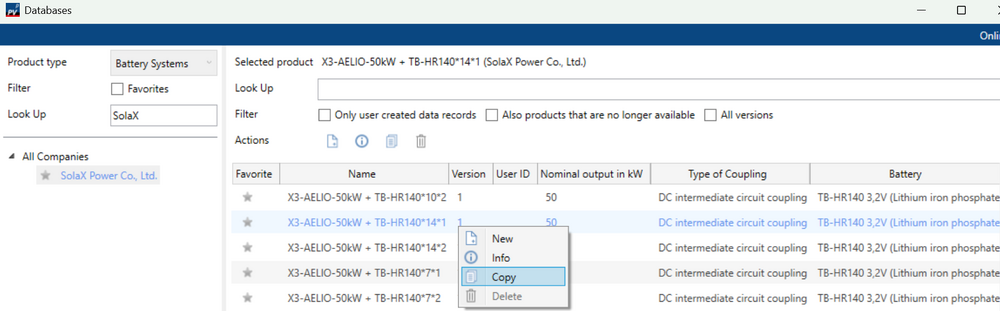
Dear PV Pro, Thank you for your message. Yes, that's possible. Another option would be to copy the battery system, change the coupling type, and run the simulation with an AC-coupled battery system.

-
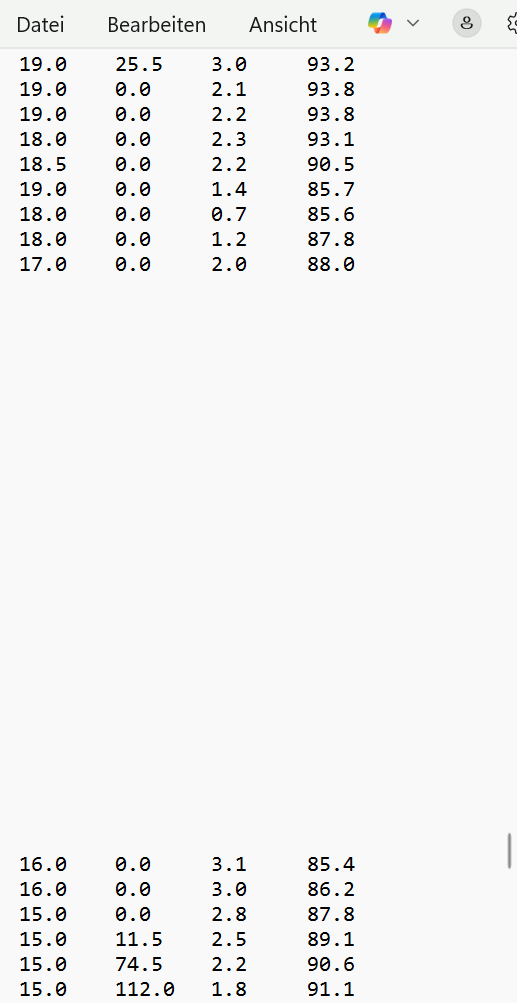
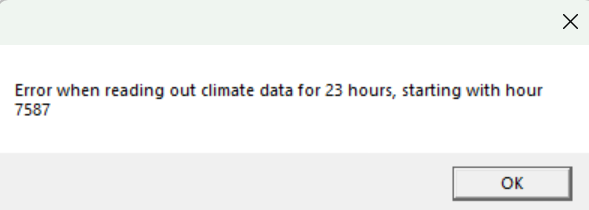
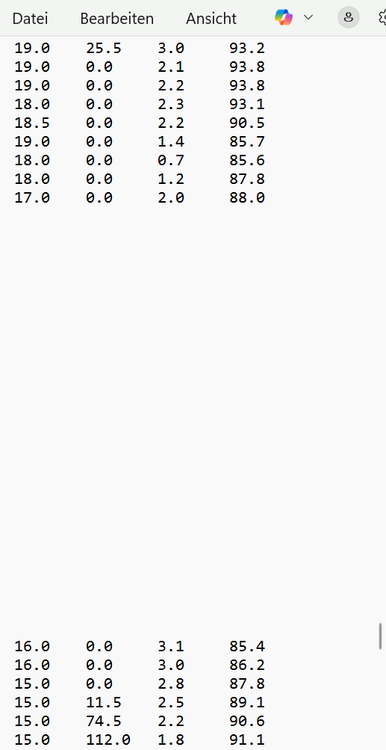
Dear Kavish Chetty, Thank you for your inquiry. When attempting to import, you receive the error message: After 7587 hours, 23 hours of climate data are missing: We copied and pasted the previous 23 hours. We also changed the country code for South Africa (ZAR --> ZAF). We were then able to import the climate data, and the set appears in the list of data for South Africa. Attached is the file we edited. pvsol_formatted_weather_VAL.dat
-
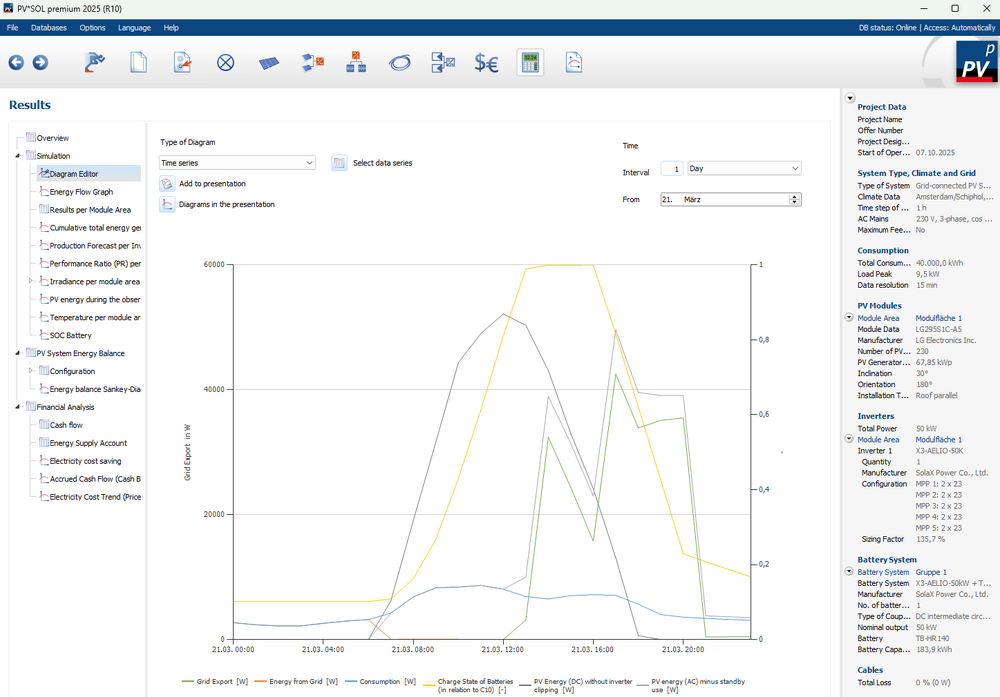
Dear PV Pro, Thank you for your inquiry. The battery discharge to the grid is shown as 0 because this is a DC-coupled battery system. In these systems, PV energy and battery energy are simulated together and not output separately. You can see in the diagram editor that battery discharge to the grid is still occurring – according to the time-controlled discharge function. On a day with high irradiation in March, the battery is fully charged at midday. Starting at 12:00 PM, grid feed-in occurs, which continuously decreases until 5:00 PM – as the PV energy decreases. From 5:00 PM onwards, grid feed-in increases again, as the battery is now being discharged to the grid. At 9:00 PM, grid feed-in/battery discharge is complete.
-
Dear PV Pro, Thank you for your inquiry. Unfortunately, dynamic tariffs and seasonal time-controlled charging and discharging cannot currently be accommodated in PV*SOL. Our development team has been informed and is working on an implementation.
-
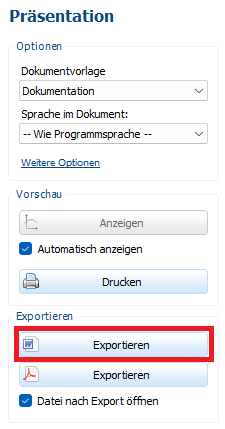
Hallo DSchwer, vielen Dank für deine Anfrage. Die Rechnungsnummer kann bisher leider nicht separat von der Angebotsnummer erfasst werden. Du hast die Möglichkeit, die Dokumentation als docx-Datei zu exportieren und in Word entweder das Wort "Angebotsnummer" durch "Rechnungsnummer" zu ersetzen oder eine weitere Zeile für die Rechnungsnummer hinzuzufügen. Wir geben deinen Wunsch an die Entwicklungsabteilung weiter und danken dir für den Hinweis.
-
Dear Gordana, Thank you for your inquiry. Unfortunately, PV*SOL is not suitable for visualising large ground-mounted installations on uneven terrain. The tool for drawing mounting surfaces is suitable for marking out building areas, but on your open space you have hardly any reference points for dividing your uneven total area into approximately level sub-areas in order to cover them with individual rows of mounting systems. Unfortunately, it is also not possible to specify a uniform module inclination. The inclination of a drawn mounting surface can only be determined by defining a mounting system and then subtracting the module inclination from the resulting inclination. This method of planning rows of mounting systems with a uniform resulting module inclination would be very time-consuming. Unfortunately, we can only recommend that you use different software for your planning.
-
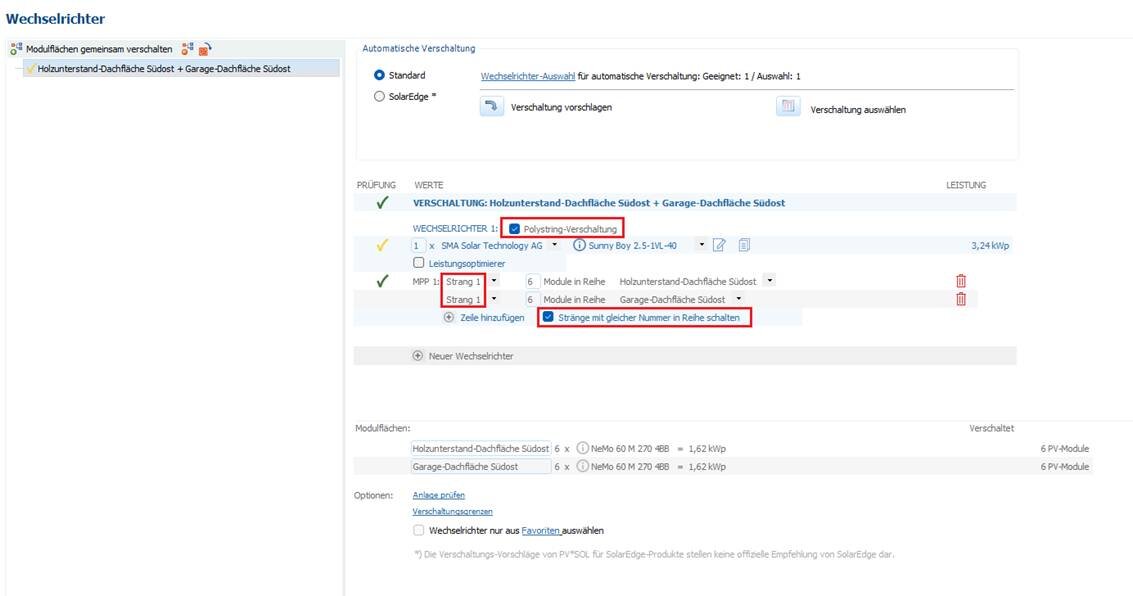
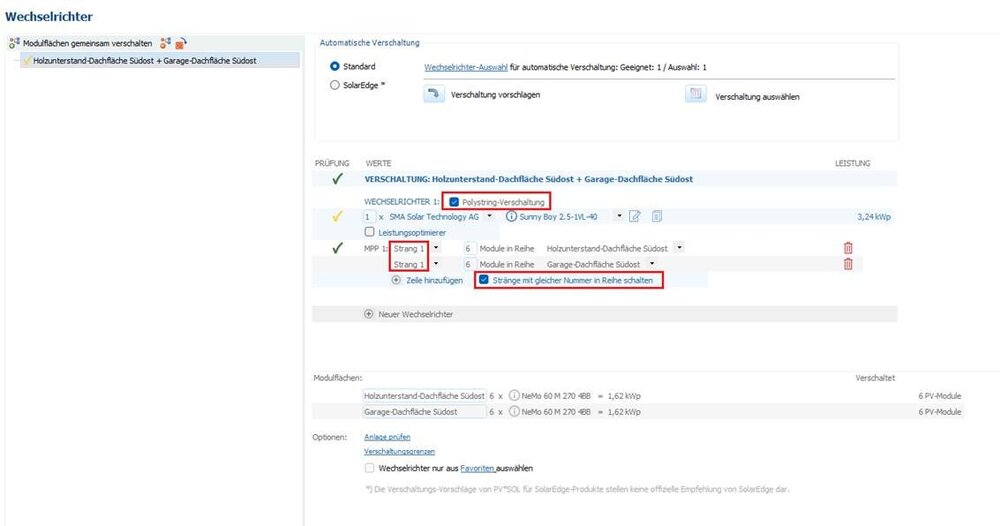
Hallo Fabi, vielen Dank für die Zusendung der Projektdatei. Wir posten hier der Vollständigkeit halber die Antwort, die du schon per Mail von uns erhalten hast: Die Ausrichtung der beiden Dachflächen unterscheidet sich um mehr als 2°, darum muss die Polystring-Verschaltung genutzt werden, um beide Dachflächen in einem MPP zu verschalten. Diese muss händisch durchgeführt werden.
-
Hallo Alexs, vielen Dank für deine Anfrage. Bedauerlicherweise gibt es noch kein Lastprofil mit Klimaanlage. Derzeit prüfen wir verschiedene Berechnungen und bitten noch um Geduld.
-
Hallo Fabi, vielen Dank für deine Anfrage. Bitte reproduziere den Fehler, sende uns den Fehlerbericht über den Button "send bug report" und teile uns die genaue Uhrzeit mit, damit wir ihn zuordnen können. Sende uns bitte außerdem die Projektdatei (*.pvprj) an hotline@valentin-software.com, damit wir uns das ansehen können.
-
Dear Gordana, Thank you for your inquiry. Yes, in PV*SOL both inclinations are added together. If your open space location already has an inclination of 27 degrees, your mounting system only needs an inclination of 3 degrees.
-
Dear Chloe, Thank you for your inquiry. We recommend using the "Define module areas for configuration" function, as described here.
-
-
Dear p4ingiv3r, Thank you for your inquiry. We have sent you a message with the download links.
-
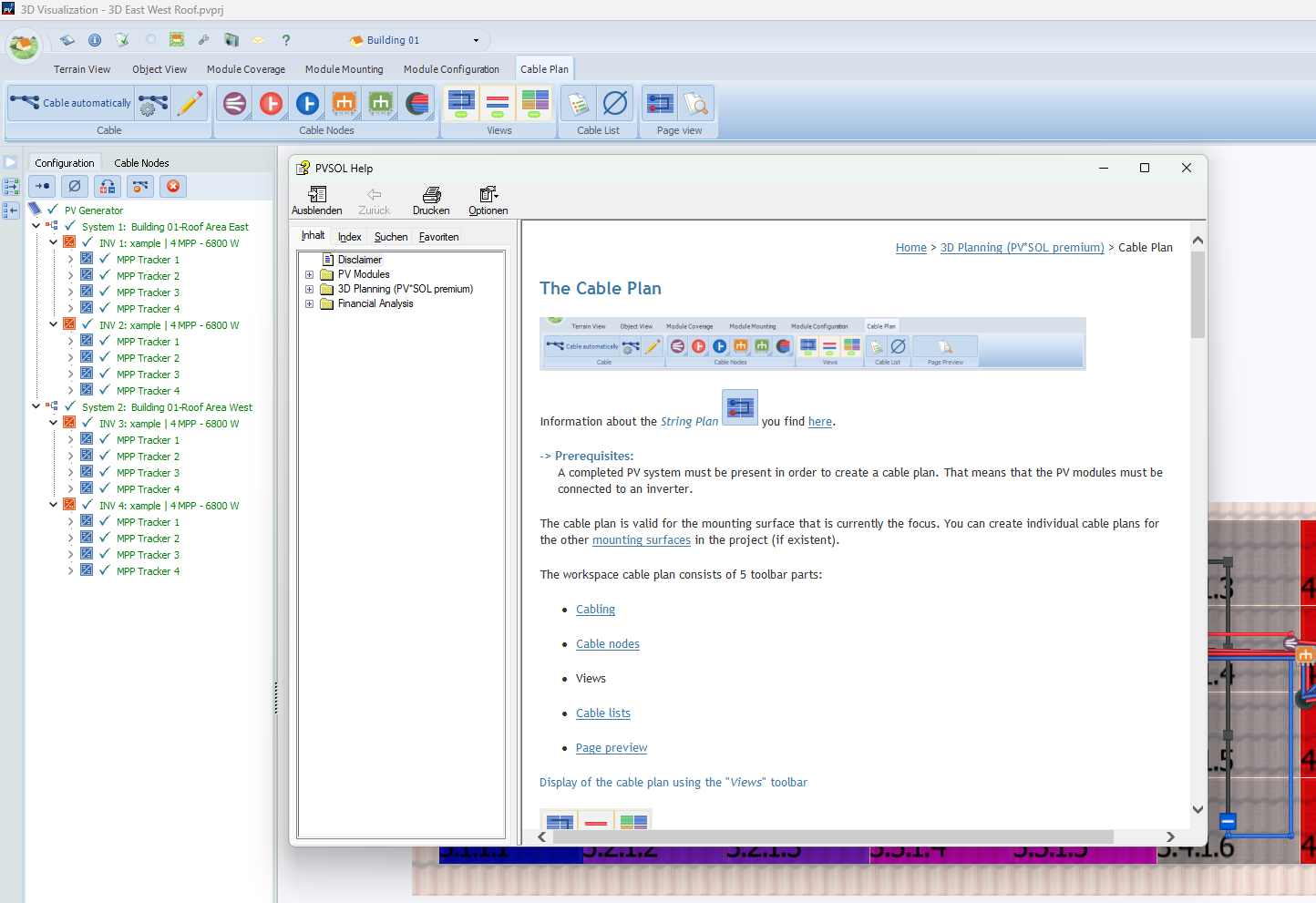
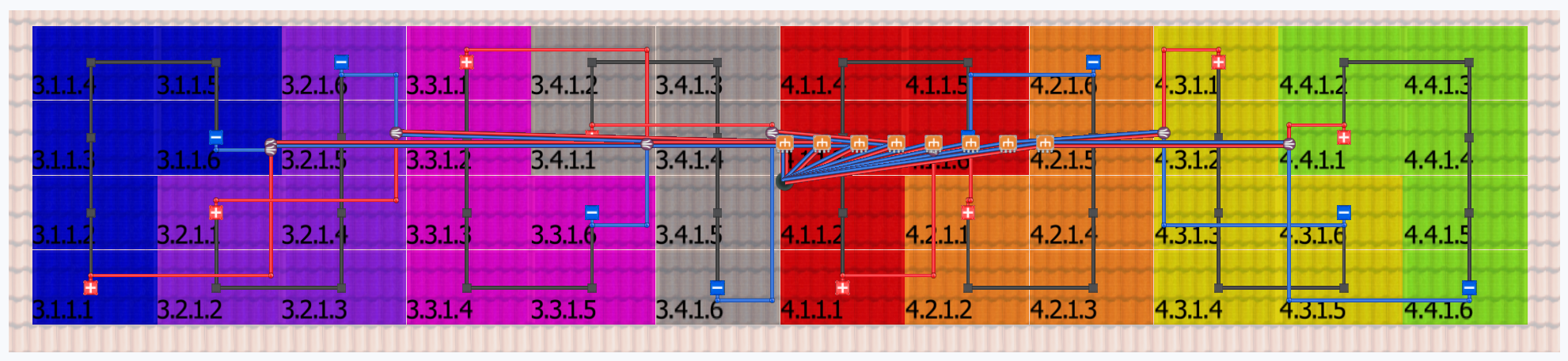
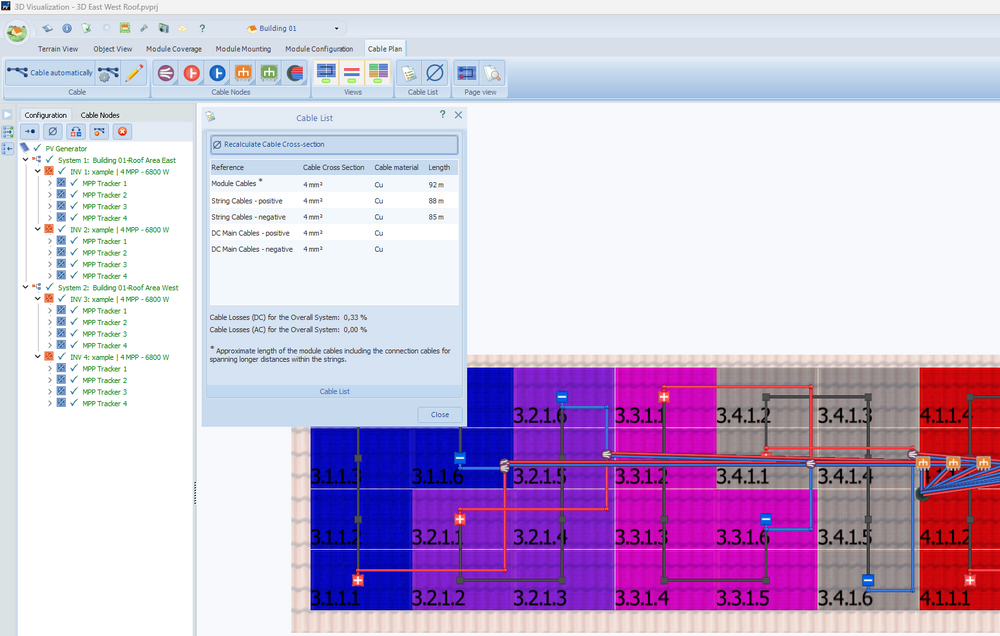
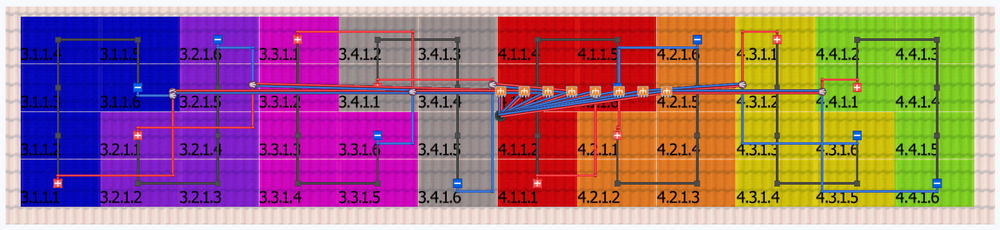
Dear J. Esteban, Thank you for your inquiry. Automatic cable dimensioning is only available for roof-parallel systems, not for elevated systems or systems with polystring connection. Cable nodes and cable grommets can be added to the cable plan using drag & drop. It is not possible to establish a reference point for where the inverters are located. The length of the DC cables is calculated from the PV modules to the cable grommets. The cable lengths are displayed in the cable list. Press the F1 key to access the help page for cable dimensioning.

-
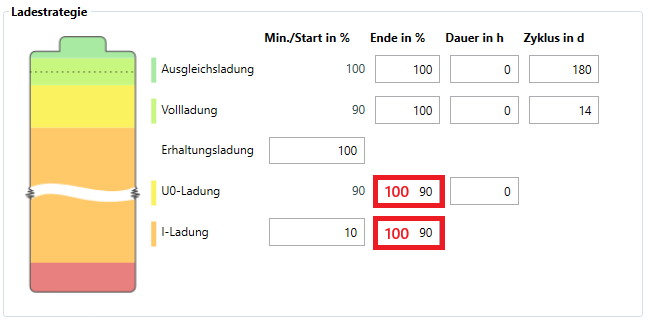
Hallo Mirza, vielen Dank für deine Anfrage. Vermutlich findet noch U0-Ladung statt. Die U0-Ladung läuft mit hoher Priorität und wird daher notfalls mit Energie aus dem Netz gefahren, sollte nicht ausreichend PV-Energie zur Verfügung stehen. Wenn du diese beiden Werte von 90 auf 100 Prozent setzt, findet nur noch I-Ladung statt. Die Energie für die I-Ladung wird ausschließlich vom PV-System genommen, nie aus dem Netz. Weitere Informationen zu den Ladestrategien findest du in unserer Hilfe. Falls das nicht hilft, sende uns bitte die Projektdatei (*.pvprj) an hotline@valentin-software.com, dann sehen wir uns das mal an.
-
Dear dvd, Thank you for your inquiry. The P90 value can only be used for financial analysis, not for energy balance. If you want the P90 value to be shown as the result in the energy balance instead of the P50 value, you would need to increase the power losses under "Options" --> "Project Options" --> "Simulation" until you approximately obtain the desired 254.860 kWh as the result in the energy balance.