
developer_mh
-
Posts
1,860 -
Joined
-
Last visited
-
Days Won
173
Everything posted by developer_mh
-
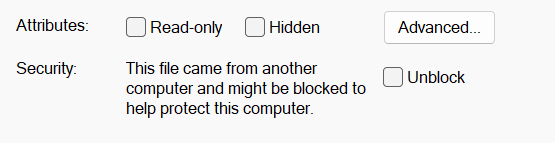
Hi Sebastien, the error message indicates that PV*SOL is not allowed to read the file. You could check the file in your file explorer by right clicking, then properties, then check the attributes at the bottom, perhaps the file is read-only. This might occur when you open files directly from Outlook for instance. Kind regards, Martin
-
Hallo Sunny-RP, man gibt beim Verbrauchsprofil den ganz normalen Jahresverbrauch ein. Was durch das E-Auto verursacht wird, wird nicht nochmal auf den Jahresverbrauch drauf gerechnet. Beste Grüße, Martin
-
Hi Abba, this is a predefined limit of the rotatable wall, not a problem with your model. Could you perhaps try and solve it with a flat roof building? There are far less strict height restrictions. Best regards, Martin
-
HI Matas, could you send the file along with your question to hotline@valentin-software.com, please? Thank you, best regards, Martin
-
Hi klb, the reason why the modules perform differently is most likely their low light behavior. Even though the current and voltage values at STC might be very similar, the module's electricity output at lower light might vary strongly. The modules in the PV*SOL database are entered by the manufacturer, so they often input more detailed data that can't be found on the datasheet. See more on that here: https://help.valentin-software.com/pvsol/en/databases/components/pv-modules/ One important thing: We don't have Panasonic modules with 620 Wp in our database. I guess the PV module in your comparison must have come from you, a colleague of yours or from a third party project file that you opened. My guess is that the values in this unofficial dataset might be incorrect. Best regards, Martin
-
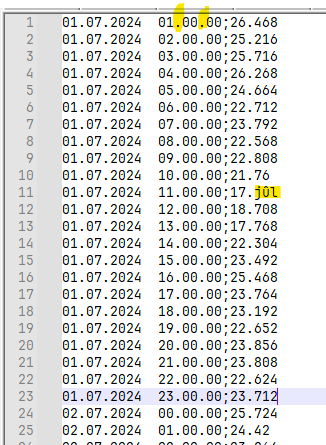
Hi Karina Suharevska, I guess the problem is that the time is in an unexpected format. Hours, minutes and seconds should be separated by a colon ":", i.e 01:00:00 instead of 01.00.00. Also make sure that no such things as in line 11 happen. Hope that helps, kind regards, Martin
-
Hi Cadmonkey, please send the csv or txt file with the consumption data to hotline@valentin-software.com, with a reference to this forum thread here. Thanks, kind regards, Martin
-
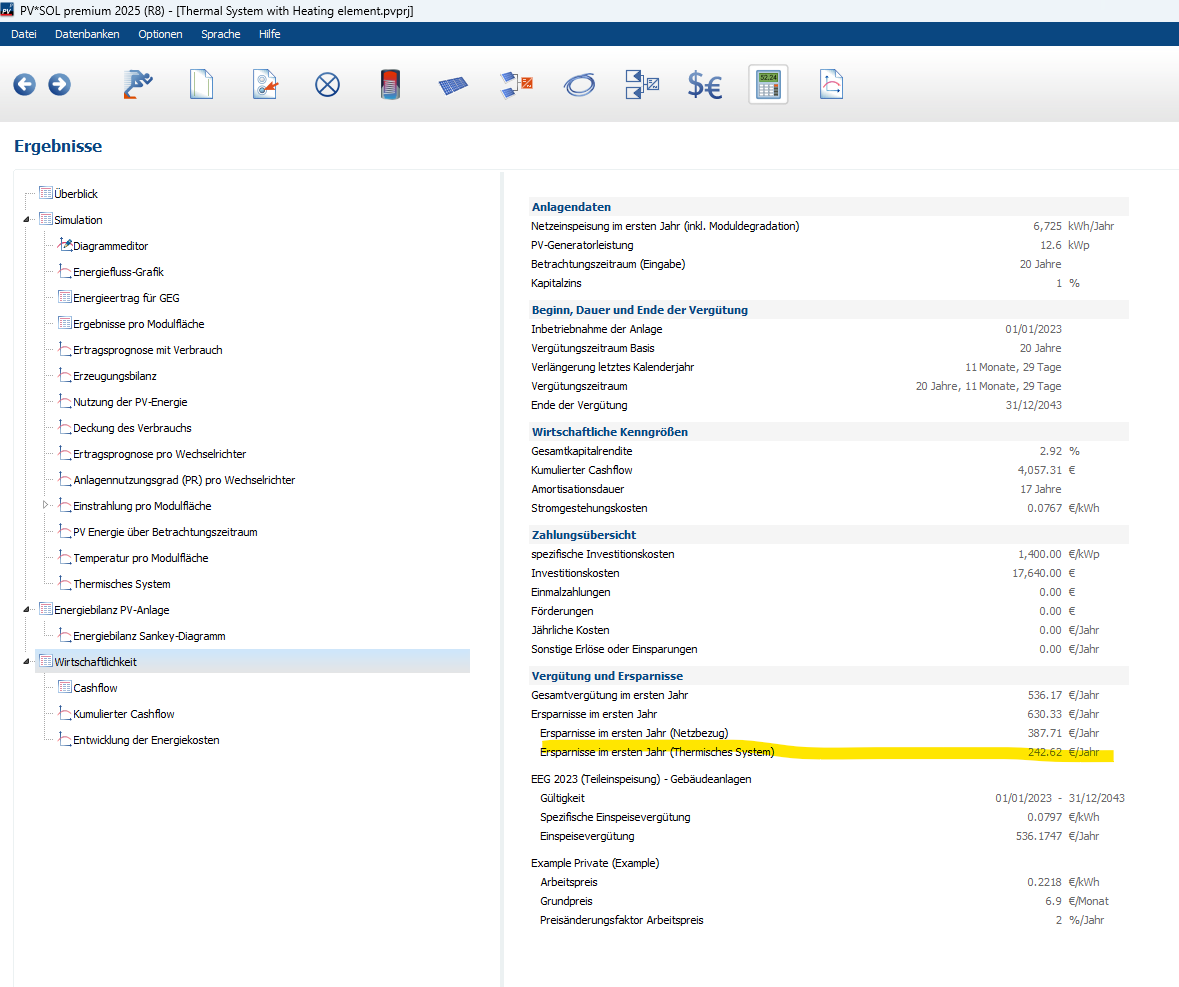
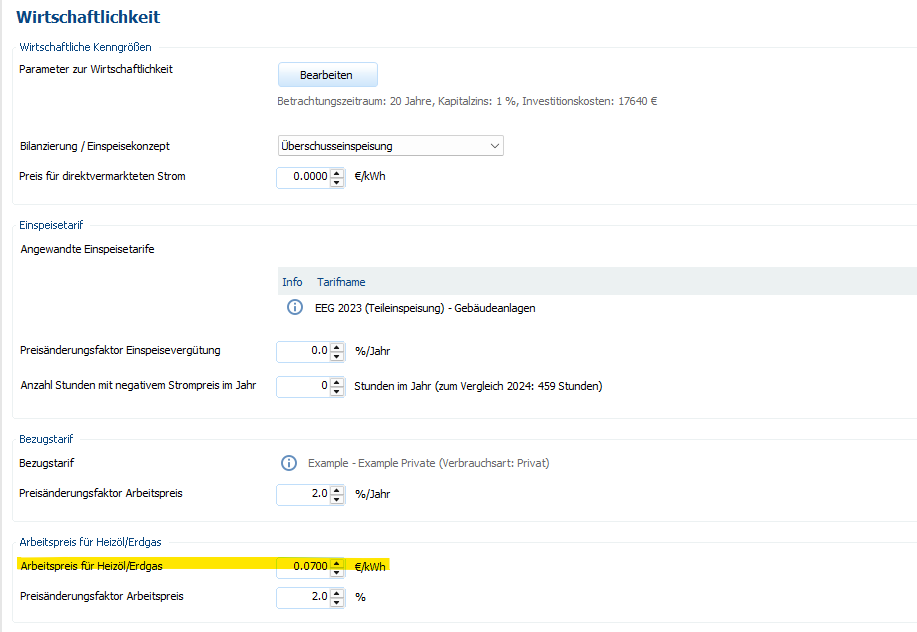
Hallo DSchwer, der Heizstab in der thermischen Simulation macht genau das - er verbraucht nur überschüssige Energie und ersetzt damit anteilig die thermische Energie, die anderweitig aufgebracht werden müsste. Diese alternative Energiequelle kann man unter "Thermisches System" -> "Zusätzliche Wärmequelle", und deren Arbeitspreis unter "Wirtschaftlichkeit" -> "Arbeitspreis für Heizöl/Erdgas" einstellen. Die resultierenden Ersparnisse bekommt man dann in den Wirtschaftlichkeits-Ergebnissen angezeigt: Beste Grüße, Martin


-
Hallo DSchwer, wir haben momentan noch nicht die Möglichkeit, Anlagenteilen unterschiedliche Tarife zuordnen zu können, tut mir leid. Wir haben das aber auf der Liste ziemlich weit oben. Momentan hilft nur, das System einmal im Status Quo und einmal nach der Erweiterung zu rechnen, so wie du das ja auch schon gemacht hast. Beste Grüße, Martin
-
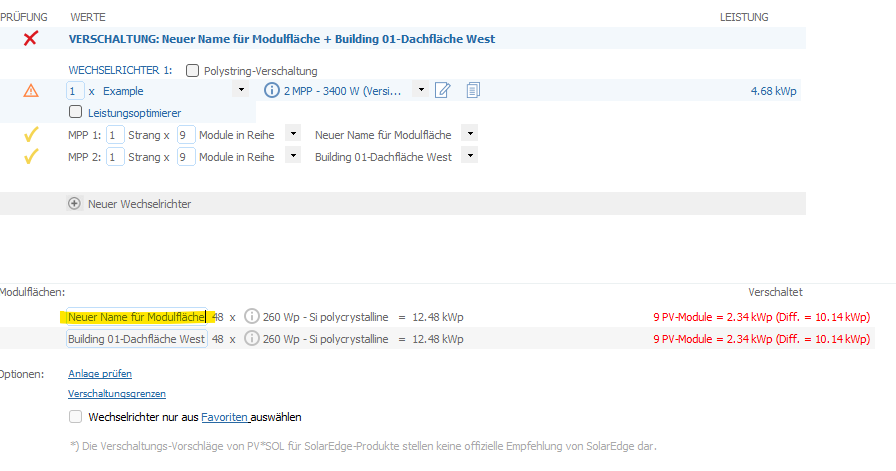
Hallo DSchwer, an sich ist es besser, für jedes Thema einen eigenen Thread aufzumachen, damit man bei komplizierteren Themen nicht den Überblick verliert. Kleinere Fragen kann man aber auch schnell zusammenfassen, klar. 1) Es gibt Umstände, unter denen die Modulflächennamen zurückgesetzt werden, z.B. wenn die Verschaltung gelöscht wurde. Man kann aber einfach unten im Verschaltungsdialog den Modulflächen-Namen anpassen: 2) Dafür hätte ich gerne eine Projektdatei, gerne an hotline@valentin-software.com, mit Verweis auf diesen Foren-Beitrag hier 3) Ja, stimmt, danke. Steht auch schon auf der Liste, wir bemühen uns 4) Auch hier hätte ich gerne das Projekt 5) Danke für das Feedback 6) Ja, wir nehmen es mit auf die Liste auf 7) a) das sollte kein Problem sein b) das müssen wir mal diskutieren Danke und viele Grüße, Martin
-
Hallo DSchwer, könntest du uns das Projekt zukommen lassen, bitte? Gerne an hotline@valentin-software.com, mit Verweis auf diesen Beitrag hier im Forum, danke. Beste Grüße, Martin
-
Hi Gordana, in order to be able to place modules or mounting structure onto the terrain, you'll need to add mounting surfaces first. These mounting surfaces are flat (two-dimensional) and adapt to the inclination of the terrain. However, you can only place modules inside the boundary of such a mounting surface. Also, the mounting posts will be perpendicular to the mounting surfaces, so really not vertical. Here is a quick draft of what you can achieve if you choose to go that way. If you just want to have a shading analysis and the yield simulation, you can surely go this way. If you need to have the exact length and position of the mounting structure, or mounting structures without gaps in between, or anything more advanced, you can not use PV*SOL for that, I am afraid. Hope that helps, kind regards, Martin

-
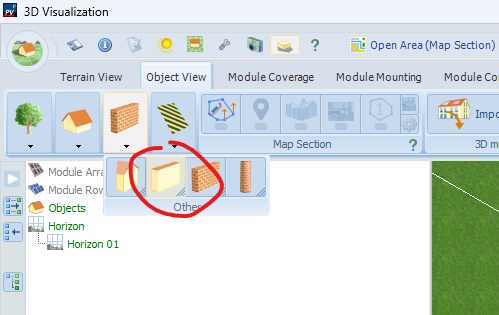
Hi Martijn, if you select the WALL function in: tab OBJECT VIEW then the 3rd icon WALL, then the 2nd icon WALL, you can rotate it. It is the rotable wall Kind regards, Martin
-
 Hi dianafeier000, here is your question in English: The cable plan options are restricted for PV systems with polystring and with mounting systems. There are no restrictions in our 30 day test version (except that you can't export the project report in the end). Kind regards, Martin
- 1 reply
-
- 1
-

-
- pv*sol
- pv*sol premium
- (and 2 more)
-
Hi Will Yang, in PV*SOL the manufacturers enter the data for the components like PV modules themselves. Please feel free to contact our database team via database@valentin-software.com, they can create a login for you. This is the site where you can enter the data once you have a login: https://pvsol-database.valentin-software.com/ Best regards, Martin
-
Hi Vitor, I will notify our database team so that they can include the data in one of the next updates. Kind regards, Martin
-
Hi Jordan, you can enter the limits for the voltage and current limit calculations in the options: https://help.valentin-software.com/pvsol/en/pages/inverters/configuration-limits/ For the open circuit voltage we use the simple equation with the temperature coefficient alpha_U, see formula 11 here on this page: https://help.valentin-software.com/pvsol/en/calculation/pv-modules/characteristic-curve-models/ Hope that helps, kind regards, Martin
-
Hi Gordana, you can import 3D models in PV*SOL, no problem. You can also import terrain data via the Google Solar API. But the design of real large scale solar plants on uneven terrain is not what PV*SOL is made for. Best regards, Martin
-
3D Planungssoftware Aktualisierung
developer_mh replied to Projektentwicklung_1PUNKT5's topic in PV*SOL
Hallo Rieke, ja, wir sind nach wie vor an einer Aktualisierung der 3D-Umgebung, und tatsächlich nach wie vor mit Hochdruck. Wir sind uns der Tatsache bewusst, dass das nach außen etwas komisch wirken muss, dass wir so lange an dieser Neu-Entwicklung arbeiten. Es ist eine Großbaustelle, die wie alle Großbaustellen viele Resourcen bindet, viel Nerven und Zeit kostet, mit vielen Höhen und Tiefen, aber wir sind zuversichtlich, dass wir auf einem guten Weg sind. Ich kann aber leider keine Info darüber geben, wann es soweit sein könnte, dass wir releasen können. So leid es mir tut. Wir sind überaus dankbar für unsere vielen Kunden, die uns trotzdem treu sind, und versuchen in der Zwischenzeit, die bestehende 3D-Umgebung auch noch weiter mit Updates zu versorgen (siehe z.B. die Integration der Google Solar API, oder jetzt gerade in 2025 R6 die Schnittstelle zum Renusol PV Configurator). Es freut uns natürlich zu hören, dass so viele gerne unsere Software nutzen, und umso mehr würden wir uns wünschen, ihnen endlich die Neu-Entwicklung vorstellen zu können. Aber da müssen wir uns leider noch etwas in Geduld üben. Beste Grüße, Martin -
Hi BAR, in PV*SOL there is no such parameter as the loss due to the unavailability of the plant. Do you refer to inverter or grid failures or similar? Best regards, Martin
-
Hi Ryan, in addition to the two methods you already mentioned (predefining the sort order in the small menu on the bottom left and manually sorting them by dragging), you can draw the cables with a pen in the cable plan section. Aufzeichnung 2025-05-06 144413.mp4 I made a small screen cast to show what I mean. If that is not what you are looking for, please feel free to ask. Kind regards, Martin
-
Akku gibt über verschiedene Zeiträume nicht volle Leistung ab
developer_mh replied to Raffael PV's topic in PV*SOL
Hallo Raffael, ich konnte mir dein Projekt jetzt anschauen. Da ist wohl leider ein Bug in der Ermittlung der maximalen Entladeleistung reingekommen. Es wird hier tatsächlich unter Umständen der in der Zeitsteuerung eingetragene Maximal-Wert genommen, auch wenn das zeitgesteuerte Entladen deaktiviert ist. Den Fehler werden wir mit dem nächsten Release beheben. Als Workaround bis dahin kannst du einfach den Wert bei der zeitgesteuerten Entladung entsprechend hochsetzen (und dann die Funktion wieder deaktivieren), dann sollte das auch funktionieren. Entschuldigung und vielen Dank fürs Melden! Martin -
Hi Tade, I can confirm this error. It will be fixed in the next release. Thank you for reporting this! Kind regards, Martin
-
New release, can't save PV*Sol file, reason unknown.
developer_mh replied to Nils Torbjørn's topic in PV*SOL
I thought it was a file that you already had from a previous version of PV*SOL premium. If it is a fresh file created in R4, then try disabling the option to save the characteristics in the options: We are really sorry for the inconvenience caused by this. We had to replace a zipping library in our code, and apparently the new one behaves odd in various ways that we didn't see in our tests. Best regards, Martin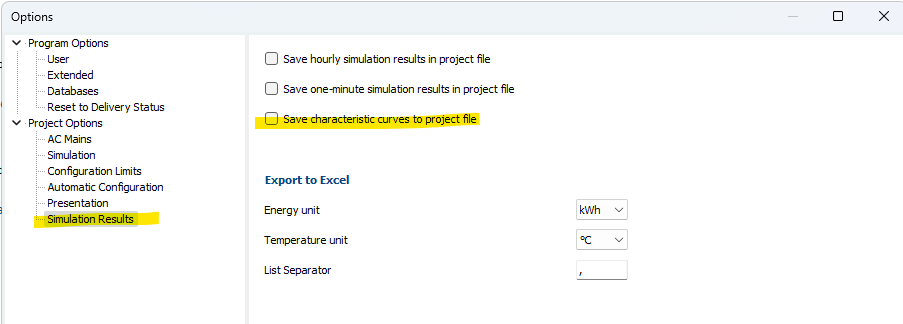
-
New release, can't save PV*Sol file, reason unknown.
developer_mh replied to Nils Torbjørn's topic in PV*SOL
Hi hom, could you send us the project file that you are unable to save in R4, please? You can send it here by private message or to hotline@valentin-software.com (then with a hint to them, that they shall forward the project file to me). Thanks, Martin