Frido
Members
-
Joined
-
Last visited
Everything posted by Frido
-
Thanks for your response! II do (because I have to). But it's one more step (two more, since you will likely want to activate collision after again) that shouldn't be necessary in my opinion.
-
When rotating an object, deactivate collisions while doing so. I am often unable to rotate something because it hits another object while rotating. Also, it would be more intuitive if the object would rotate around it’s geometric centre, and not it's base point.
-
Hi Carlos! Given the UK as location, the results seem odd to me too. Also, the performance ratio is >100%, which (unsless Valentin Software defines it differently) is impossible. There for sure is something wrong with these results. Best Regards, Frido EDIT: Here is confirmation that the PR in PVSol can't ever be >1.
-
When rotating any building or structure, it would be nice if the collision detection would not be active during the process. As the desired rotation is often not possible, just because there is something in the way while rotating.
-
More default roof textures would be nice to have. E.g. tin sheet texture in different colours.
-
Thanks again Jimmy. Sounds very helpful, I will give it a try onceI get around to it! Best Regards, Frido
-
The option to choose which values to want to export, when exporting .csv files would be nice. So the exported files stay nice and compact. With minute values, I get files well above 2 GB.
-
-
Hello, is there anyway to analyse the expected output (AC) current? I cannot find a single value with unit [A] in the Diagram Editor. Am I missing something, or is it just not existing? (2022 R3) Thanks, Frido
-
Hi there, Had the same issue in the past too. In the settings of the 3D environment (wrench icon on the top left of your screen), there is an option that says “enlarge buttons” or something similar. Give that a try, and see if it helps. (Link with screenshot worked for me no problem btw) Greetings! Frido
-
When moving any object in 3D, I‘d prefer if the mouse would not jump to the origin point of the object. Makes precisely placing large objects very difficult at times.
-
When working of a Google Maps screenshot (Open Area Map Section), it would be nice to have an option to toggle visibility of said screenshot on and off. Also, when the Open Area Map Section is activated, the option to move the camera beyond its (screenshots) boundaries.
-
Hallo jobo, meines Wissen nach ist das immer noch nicht möglich. Um mir diese Arbeit zu erleichtern mache ich i.d.R. folgendes: Ich erstelle ein Gebäude und stelle den Randabstand wie erforderlich ein. Wenn ich nun mehrere Gebäude des gleichen Typs brauche, kopiere ich mir dieses Gebäude, anstatt ein neues aus dem Menüband zu ziehen. Auch wenn man die Gebäude nun in ihren Dimensionen verändert, bleiben die eingestellten Randabstände erhalten. Gleiches gilt für Texturen. Hoffe das hilft. Beste Grüße.
-
-
-
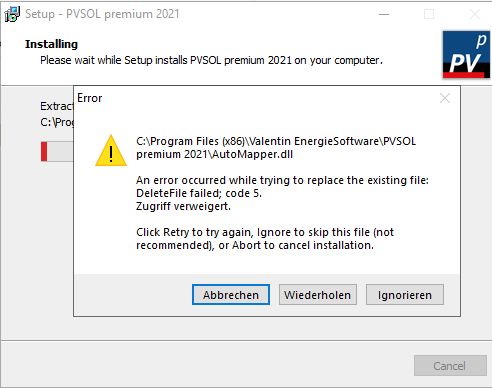
Hello! I tried to update to 2021 R6 an got the error "An error occurred while trying to replace the existing file: DeleteFile failed; code 5." See screenshot. Is it fine to ignore and skip? Thanks, Frido
-
Hi there! What format you are using for your 3D model? Here is a document with a list of supported formats: https://www.valentin-software.com/wp-content/uploads/legacy-downloads/sonstiges/en/3d-recherche-rev-01-en.pdf I have had the best results using .dae or .obj files in the past. However, I have found 3D models to be very unreliable (invisible walls that casting shade, module areas floating mid-air after saving the file etc.) so personally I try to avoid them when ever possible. Hope this helps. Regards, Frido
-
Hello everyone! I am again having the same issue, now in 2021 R6. Not sure of the reason, but there are no polystring configs in my file. Forcing simulation doesn’t do the trick. Is it possible that there is a limit to the amount of Module Areas displayed? Tested it after 16 Module Areas configured -> no problem. Tested again after 28 Module Areas total configured, -> now it is blank again. EDIT: For troubleshooting, I deleted the first 16 Module Areas, leaving me with the latest 12 Areas. Simulation worked as expected. So there definitely seems to be some kind of limit to the amount of Module Areas displayed in the documentation? Regards, Frido
-
The option to enlarge the "Define Module Areas" window, so one doesn't have to scroll every time once beyond 9 strings. EDIT: Also, it would make it easier if the list could be sorted A->Z / 1->9. (Especially later when setting up the inverter config)
-
-
-
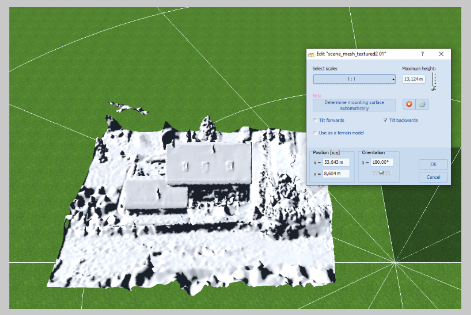
Hi Argo! PVSol crashed on me at the first try. Also, when opening your model using MeshLab, I got an Error, but it did open. So I exported your file again as an .obj using MeshLab. This did the trick for me, was able to import no problem. I am unable to attach the file right now, but I am sure you will manage to do justthe same. Hope this helps. Regards, Frido
-
Hi Frederik, funnily enough, I have this problem with every file I have tried today (three so far). Two of which I have already created and exported the documentation for without the issue last week. I will provide you the following files shortly: PVSol Project (created last week) Corresponding pdf documentation exported last week (v01) where the issue wasn’t present. Corresponding pdf documentation exported today (v02) with the issue of the blank Module Area results. But as I mentioned, it happens with all of the project files I have tried so far today. Often, a restart of PVSol and/or my PC does the trick to resolve this issue, but not today it seems. Hope this helps, Frido
-
-