

Skip to content
View in the app

A better way to browse. Learn more.

Forum Valentin Software

A full-screen app on your home screen with push notifications, badges and more.

To install this app on iOS and iPadOS
  1. Tap the Share icon in Safari
  2. Scroll the menu and tap Add to Home Screen.
  3. Tap Add in the top-right corner.
To install this app on Android
  1. Tap the 3-dot menu (⋮) in the top-right corner of the browser.
  2. Tap Add to Home screen or Install app.
  3. Confirm by tapping Install.

Fayez

Members
  • Joined

  • Last visited

  1. Fayez posted a topic in PV*SOL
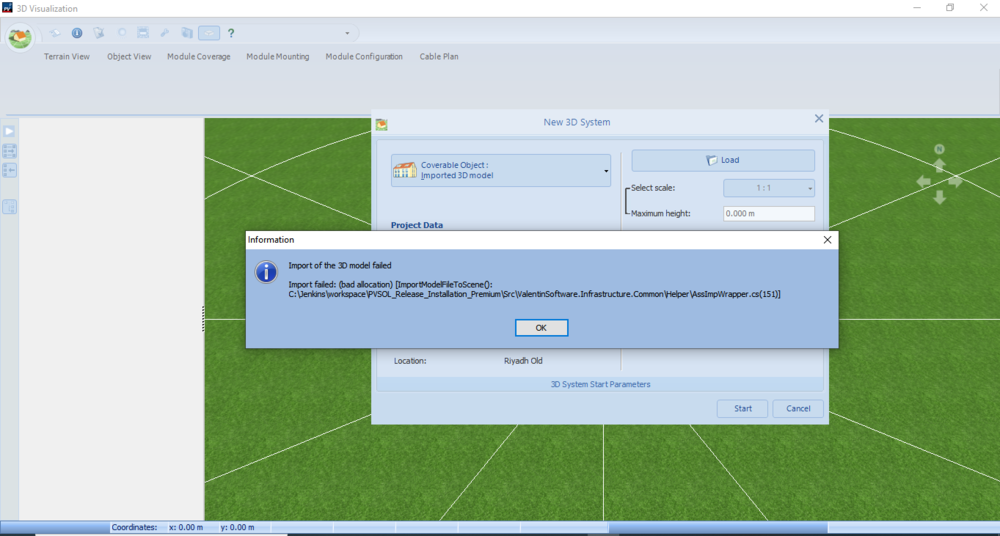
    I tried to add 3d module but I got this message below. so could anyone give the solution for it? Thanks in advance.
  2. Fayez replied to Fayez's topic in PV*SOL
    Thank you
  3. Fayez joined the community
  4. Fayez posted a topic in PV*SOL
    Hi How can I divide the batteries into more than one inverter because in the program I can choose the number of batteries I want for the system and which inverter I want to connect, so what is the solution to divide them into more than one inverter? Thanks in advance

Account

Navigation

Search

Search

Configure browser push notifications

Chrome (Android)
  1. Tap the lock icon next to the address bar.
  2. Tap Permissions → Notifications.
  3. Adjust your preference.
Chrome (Desktop)
  1. Click the padlock icon in the address bar.
  2. Select Site settings.
  3. Find Notifications and adjust your preference.