
developer_mh
-
Posts
1,860 -
Joined
-
Last visited
-
Days Won
173
Everything posted by developer_mh
-
Hi S1192, for questions like this it would be best to provide a project file. Then we can more easily where which number comes from. You can post it directly here or send it via private message to me. Kind regards, Martin
-
Hi Chris, depending on the size of the batteries, the installed PV power and the load, it can happen that the batteries are really not used that much. In those cases, the cycle load can be as low as you described it. Please also have a look at the help pages, where the cycle load is described (applies in the same way to lithium based batteries): https://help.valentin-software.com/pvsol/en/calculation/battery-systems/lead-acid-batteries/#cycles-durability Kind regards, Martin
-
Hey Afriyie, have you also checked this file? "C:\Users\USERNAME\Documents\Valentin EnergieSoftware\Installation.ini" Also, you can check all older PVSOL.ini files in each subfolder of "C:\Users\USERNAME\Documents\Valentin EnergieSoftware\" Hope that helps, kind regards, Martin
-
Hello Tade, There is no clear answer to your question, but I will try to clarify the situation anyway. From version 2025 R1, there will be an option in the software to switch from a new user license to an old perpetual license. However, an internet connection is required for this option, as the user license must be “switched off” on the license server. Nevertheless, there are two possible solutions to your problem: Firstly, you can activate an “old” program version (before 2025 R1) with the serial number of the perpetual license and use a “new” program version (after 2025 R1) with the user license in parallel. If there is no internet available, you can continue working with the “old program version”. However, it would be easier if you used the new “Offline Mode” of our user licenses. With an available internet connection, a user license can be taken “offline” for a period of one to five days. This means that the user license also works completely offline, but can only be used on the corresponding device during this period. This “Offline Mode” can be interrupted at any time or extended as often as required (when an internet connection is available again). I hope that answers your question. Kind regards, Martin
-
Hi Boris, the 'Yield reduction due to shading' is calculated as the ratio of the PV Generator Energy (AC) minus the Clipping at the Feed-in Point without shadows and the same number with shadows. So, as example you have the following (the numbers are from one of our example projects). System 1, without feed-in clipping/export control: without shadows: PV Generator Energy (AC) =145,377 kWh Feed-in Clipping = 0 kWh with shadows: PV Generator Energy (AC) =132,972 kWh Feed-in Clipping = 0 kWh Yield reduction =1 - (132,972 - 0) / (145,377 - 0) = 8.6 % System 2, with feed-in clipping/export control: without shadows: PV Generator Energy (AC) =145,377 kWh Feed-in Clipping = 59470 kWh with shadows: PV Generator Energy (AC) =132,972 kWh Feed-in Clipping = 52,822 kWh Yield reduction =1 - (132,972 - 52,822) / (145,377 - 59470) = 6.8 % Hope that helps, kind regards, Martin
-
Hi Ali, you can send your inquiry to our technical support team, they can help you out: https://valentin-software.com/en/support/technical-support/ Kind regards, Martin
-
 Hallo Joceblaze, du hattest dich mit deinem Anliegen ja schon an den technischen Support gewendet, daher gehe ich davon aus, dass du schon eine Antwort bekommen hast. Für die Mitleser: Wir sind an der Klärung des Sachverhaltes dran. Es scheint ein sehr neues Phänomen zu sehen und es tritt extrem selten auf (2 User bisher). Wir hoffen, es trotzdem bald identifizieren und den Fehler beheben zu können. Beste Grüße, Martin
 -
Bug? - Fehlermeldung bei der Anzeige des Gestellsystem PDF's
developer_mh replied to Haggendampf's topic in PV*SOL
Hallo Haggen, das wirkt so, als wäre die pdf kaputt, die von K2 base kam. Kannst du versuchen, die zip-Datei aus K2 base nochmal herunterzuladen und dann nochmal in PV*SOL zu importieren? Wir machen in PV*SOL eigentlich nichts damit, außer sie über diesen Button 'Gestellsystem PDF anzeigen' zum Speichern anzubieten. Daher würde ich vermuten, dass die Datei entweder schon auf Seiten von K2 base kaputt gegangen ist, oder dann beim Download der zip-Datei, die die pdf enthält. Beste Grüße, Martin -
Hi Leonardo, do you use the same versions of PV*SOL on both machines? In PV*SOL premium 2024 R7 the way of calculating the number of 3D points was changed, which leads to a smaller number of allowed 3D points in reality. We will go back to the previous state with the upcoming release R8, but in the meanwhile you could also use R6 again. https://downloads.valentin.de/pvsol/setup_pvsolpremium_2024_6.exe Kind regards, Martin
-
Hi Oliveira, no, you are not doing anything wrong. This is a question that is asked quite often since it is admittedly not very clear in the GUI. Please find an answer here: Kind regards, Martin
-
Hi Scott, please contact our technical support team: https://valentin-software.com/en/support/technical-support/ You can look into the Windows Event Viewer and see if you find any errors related to PV*SOL or AutoCAD. Also send them the PV*SOL log file along with your customer number (or the end customers one). Thanks and kind regards, Martin
-
Hi Mircea, thank you for reporting this. This will be fixed in the upcoming release PV*SOL premium 2024 R8. Kind regards, Martin
-
Hi Hircel, hybrid inverters are actually handled as two devices in PV*SOL, even if in reality this is only one device that you mount onto the wall. So you would choose the hybrid inverter as PV inverter (as you already did, I assume), and then you choose the same model as battery system. Kind regards, Martin
-
Hi Kaiyzer, in this case it might be necessary to draw the mounting surface yourself, with this tool: Kind regards, Martin

-
Hi Stephen, yes, you'll need to delete the first rows and columns that don't contain actual values. Please refer to our help pages: https://help.valentin-software.com/pvsol/123d680be8176321efd38404fdb7 4e86/en/pages/consumption/ Just to test, I quickly edited your file, the import works with this file: 2336543092418 - edited.csv Best, Martin
-
Hi Boris, yes, no problem. You can download the setup file for PV*SOL premium 2024 R6 here: https://downloads.valentin.de/pvsol/setup_pvsolpremium_2024_6.exe You can also install R6 and R7 side by side if you choose a different installation directory. Kind regards, Martin
-
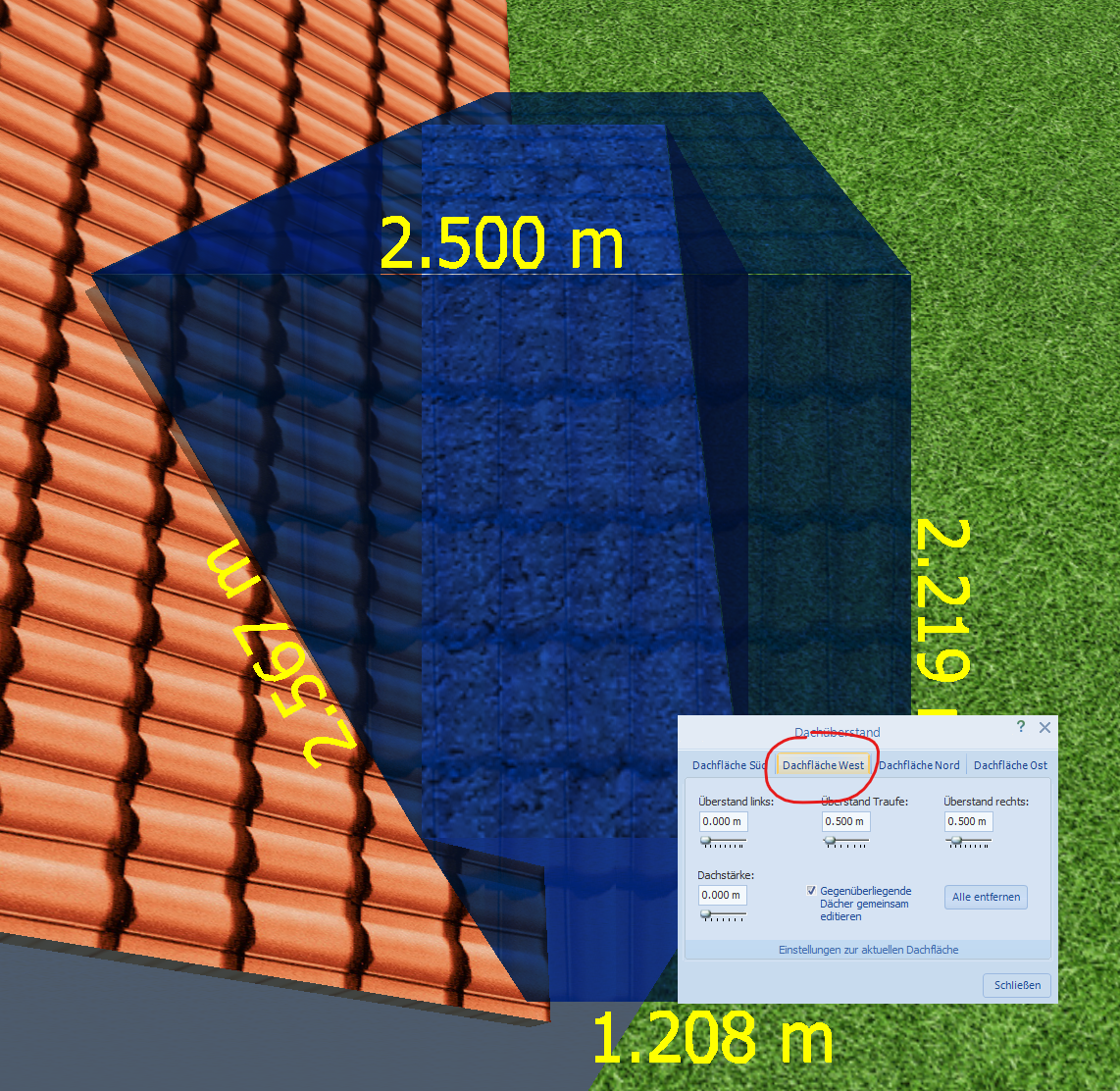
Ah, verstehe, hatte das mit dem Erker nicht direkt auf dem Schirm. Dann scheint mir das Problem lösbar zu sein, wenn man beim Einstellen der Dachüberstände des Erkers darauf achtet, die richtige Dachfläche zu bearbeiten: Wenn ich hier z.B. Dachfläche Süd wähle, bekomme ich das gleiche Bild wie du oben, Variante "Brett vor dem Kopf". Hoffe, das hilft weiter, viele Grüße, Martin

-
Hi song_cq, if it is possible for you it would be best to provide a project file so that we can look into that. But in general, the position in "Remuneration and savings" refers to a complete year while the positions of the first year in the cash flow actually might not be a complete calendar year. There are also other factors to be considered like the interest on capital and so on. Kind regards, Martin
-
Hi Steen Olesen, we do not have such datasets, but perhaps other users can help you out? Kind regards, Martin
-
Hi BorisG, thank you for reporting this. The edit button was literally the last thing that was fixed before the release, but unfortunately this last version of the 3D visualisation did not make it in the setup for R7. So this will be fixed in the next version. We are sorry for the inconvenience caused. Regarding the other issue: You can just change the object type from tree to "Arbitrary Building", there should be no limit of polygon points. Kind regards, Martin
-
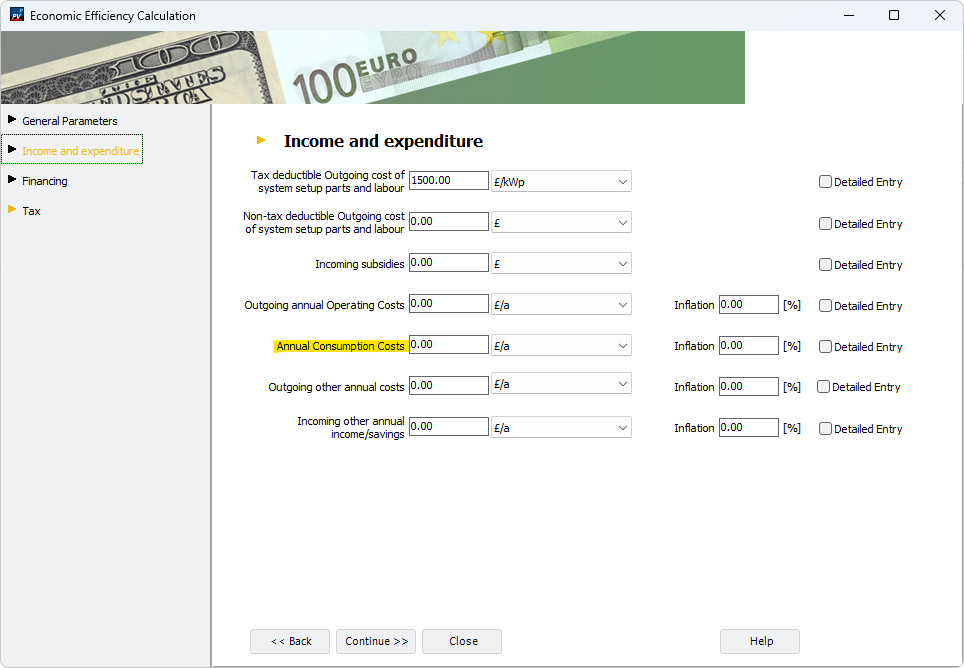
Hi Alain, I guess you are referring to this one here: This is just another item for entering specific cost positions in the economic calculations. It is treated the same way as e.g. "Outgoing annual Operating Costs" and "Outgoing other annual costs". The term originally came from the economics of combined heat and power plants and is not really suitable for pure PV systems. However, if you have a thermal system with an external boiler, you could enter costs that are related to the purchase of fuel, for example. Hope that helps, kind regards, Martin
-
Hi Alin Furcea, the system type that you would require is not available (yet) in PV*SOL. It is very high on our priority list, but I can't give a date of release yet. In the meantime you can add the heat pump as electrical appliance, then you can simulate all in one system as required. Just with the disadvantage that the heat pump is treated like a normal consumer and hence not controllable. Best regards, Martin
-
Hi Ivan Stojkovic, thanks a lot for your question. 17% f deviation really is a a lot, given that the meteo data are identical. There will be differences caused by varying values for the diffuse irradiance, as you already assumed, but this can't be responsible for 17% of deviation. But I can't really guess what causes the deviation as long as I don't see the project files. One point where you could start is to compare the energy balance of PV*SOL and PVsyst, perhaps you can see where the main differences occur. Hope that helps, kind regards, Martin
- 1 reply
-
- 1
-

-
Hi Kaspars, could you send a project or some screenshots in order to clarify the issue? I just checked it again, and for me it works fine. Kind regards, Martin
-
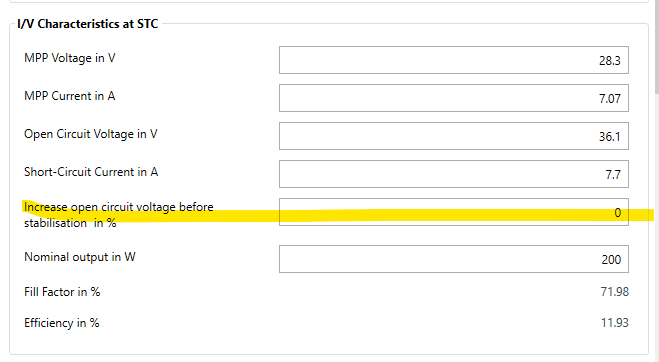
Hi fpWE, the factors can be found in our online help, here: https://help.valentin-software.com/pvsol/en/calculation/pv-modules/module-temperature/ Concerning the light induced degradation, there is this factor here: It is filled in by the manufacturer. If you create your own PV module or copy an existing one, you can change this parameter to your liking. But it is not really important for simulation, as we consider all degradation effects during operation to be summarized in the overall module degradation: https://help.valentin-software.com/pvsol/en/pages/pv-modules/module-degradation/ Kind regards, Martin