

Skip to content
View in the app

A better way to browse. Learn more.

Forum Valentin Software

A full-screen app on your home screen with push notifications, badges and more.

To install this app on iOS and iPadOS
  1. Tap the Share icon in Safari
  2. Scroll the menu and tap Add to Home Screen.
  3. Tap Add in the top-right corner.
To install this app on Android
  1. Tap the 3-dot menu (⋮) in the top-right corner of the browser.
  2. Tap Add to Home screen or Install app.
  3. Confirm by tapping Install.

Pumperniggl

Members
  • Joined

  • Last visited

Everything posted by Pumperniggl

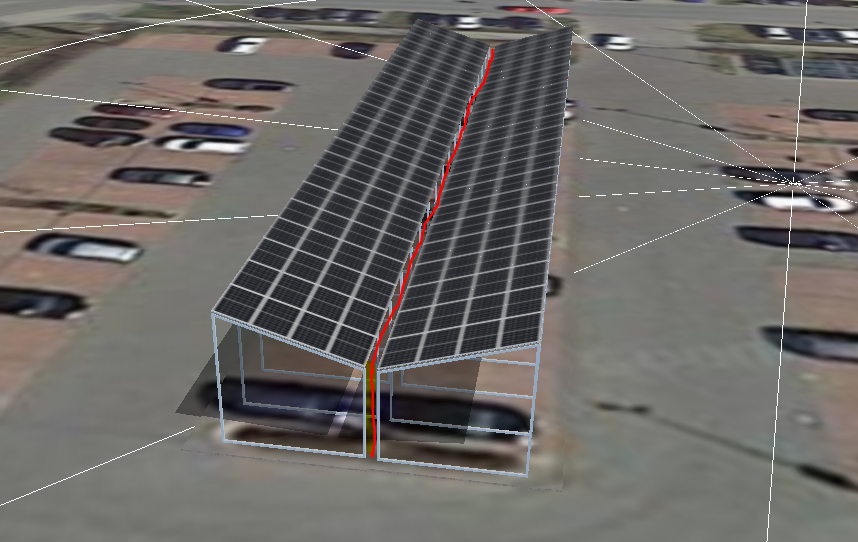
  1. Hey @chudy14, your project looks great! I'm currently writing my Bachelor Thesis about different ways of implementing solar carports in parking infastructure. Therefore i also want to simulate different projects in PVSol. Do you maybe have some more details of your project above? How did you manage to get this alignment (V-formation)? I tried it with two seperate polygons per parking row (and creating pv rows facing each other in order to build the V-formation) but then i always have to much space left between the V-formation. I would very much appreciate your help. Thanks a lot!
Account

Navigation

Search

Search

Configure browser push notifications

Chrome (Android)
  1. Tap the lock icon next to the address bar.
  2. Tap Permissions → Notifications.
  3. Adjust your preference.
Chrome (Desktop)
  1. Click the padlock icon in the address bar.
  2. Select Site settings.
  3. Find Notifications and adjust your preference.