

Skip to content
View in the app

A better way to browse. Learn more.

Forum Valentin Software

A full-screen app on your home screen with push notifications, badges and more.

To install this app on iOS and iPadOS
  1. Tap the Share icon in Safari
  2. Scroll the menu and tap Add to Home Screen.
  3. Tap Add in the top-right corner.
To install this app on Android
  1. Tap the 3-dot menu (⋮) in the top-right corner of the browser.
  2. Tap Add to Home screen or Install app.
  3. Confirm by tapping Install.

GHO

Members
  • Joined

  • Last visited

Everything posted by GHO

  1. We see a lot more Thermal system & Battery application. Unfortunetly this is nog possible in PV-sol. Please add a new system type for a future proof pv-sol. ''3d, Grid-connected PV system wilth Electrical Appliances, Battery system and Thermal system''
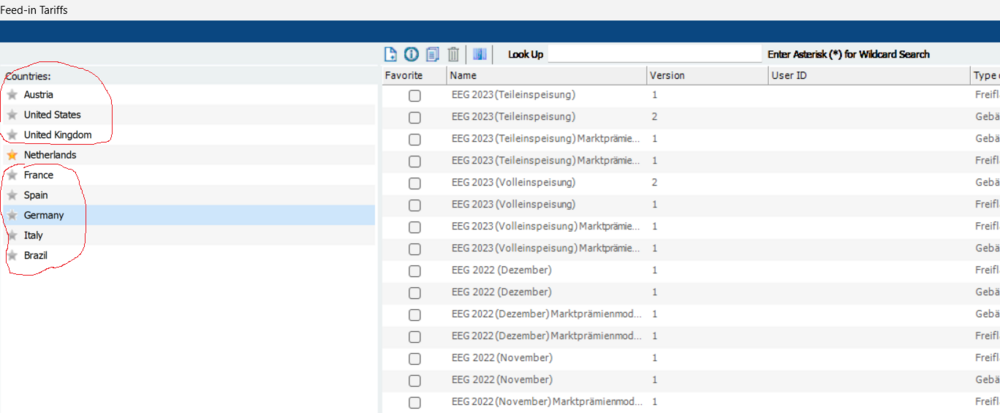
  2. Hi, Is it possible to remove other country standard feed-in tariffs? We only used ''The Netherlands'' and unfortunetly an other country is always standard, which is inefficiënt to me
  3. Dear Valaentin, We as you to import the dutch netting plans: <dutch> https://www.rijksoverheid.nl/onderwerpen/energie-thuis/plan-kabinet-afbouw-salderingsregeling-zonnepanelen#:~:text=Vanaf 2025 kunnen huishoudens en,2023%3A 100% To the Pv-Sol Designer, for a real future financial overview.

Account

Navigation

Search

Search

Configure browser push notifications

Chrome (Android)
  1. Tap the lock icon next to the address bar.
  2. Tap Permissions → Notifications.
  3. Adjust your preference.
Chrome (Desktop)
  1. Click the padlock icon in the address bar.
  2. Select Site settings.
  3. Find Notifications and adjust your preference.