

Skip to content
View in the app

A better way to browse. Learn more.

Forum Valentin Software

A full-screen app on your home screen with push notifications, badges and more.

To install this app on iOS and iPadOS
  1. Tap the Share icon in Safari
  2. Scroll the menu and tap Add to Home Screen.
  3. Tap Add in the top-right corner.
To install this app on Android
  1. Tap the 3-dot menu (⋮) in the top-right corner of the browser.
  2. Tap Add to Home screen or Install app.
  3. Confirm by tapping Install.

Oliver Schneider

Members
  • Joined

  • Last visited

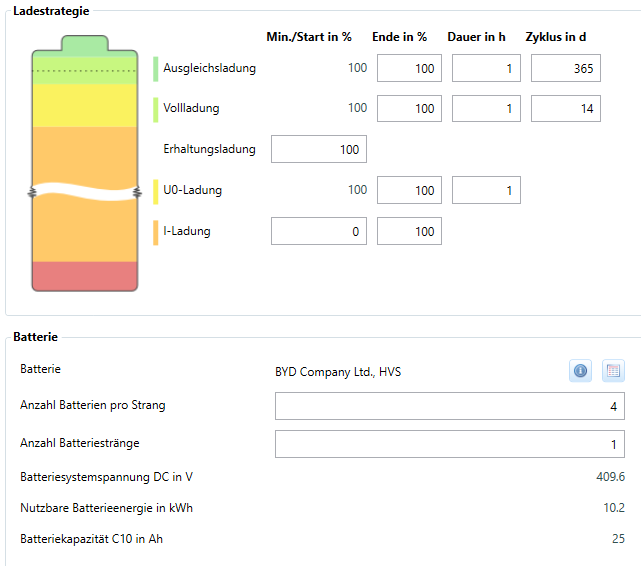
  1. Hallo Zusammen, ich habe eine Frage bezüglich der Ladestrategie, welche man bei der Speicherauslegung einstellen kann. Gibt es eine Vorlage um die Parameter richtig einzustellen? Die Vorlage für Lithium-Ionen-Speicher im Valentin Help Center habe ich schon gesehen. Dennoch wollte ich fragen, ob es eine bessere (speziell für BYD) Ladestrategie gibt. Eine weitere Frage wäre, warum bei der Kombination mit Fronius Symo Gen24 plus WR eine AC Kopplung voreingestellt ist? Eine DC-Kopplung ist doch ebenfalls möglich bei dieser Kombination. Vielen Dank schonmal!
Account

Navigation

Search

Search

Configure browser push notifications

Chrome (Android)
  1. Tap the lock icon next to the address bar.
  2. Tap Permissions → Notifications.
  3. Adjust your preference.
Chrome (Desktop)
  1. Click the padlock icon in the address bar.
  2. Select Site settings.
  3. Find Notifications and adjust your preference.