

Skip to content
View in the app

A better way to browse. Learn more.

Forum Valentin Software

A full-screen app on your home screen with push notifications, badges and more.

To install this app on iOS and iPadOS
  1. Tap the Share icon in Safari
  2. Scroll the menu and tap Add to Home Screen.
  3. Tap Add in the top-right corner.
To install this app on Android
  1. Tap the 3-dot menu (⋮) in the top-right corner of the browser.
  2. Tap Add to Home screen or Install app.
  3. Confirm by tapping Install.

Hugo Ferreira

Members
  • Joined

  • Last visited

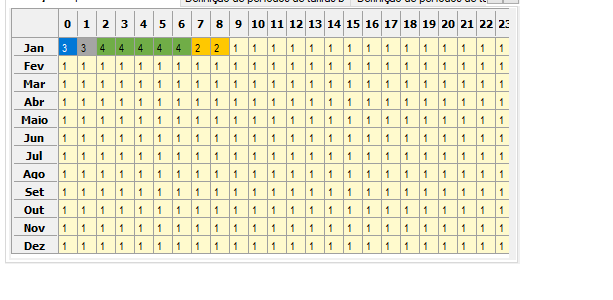
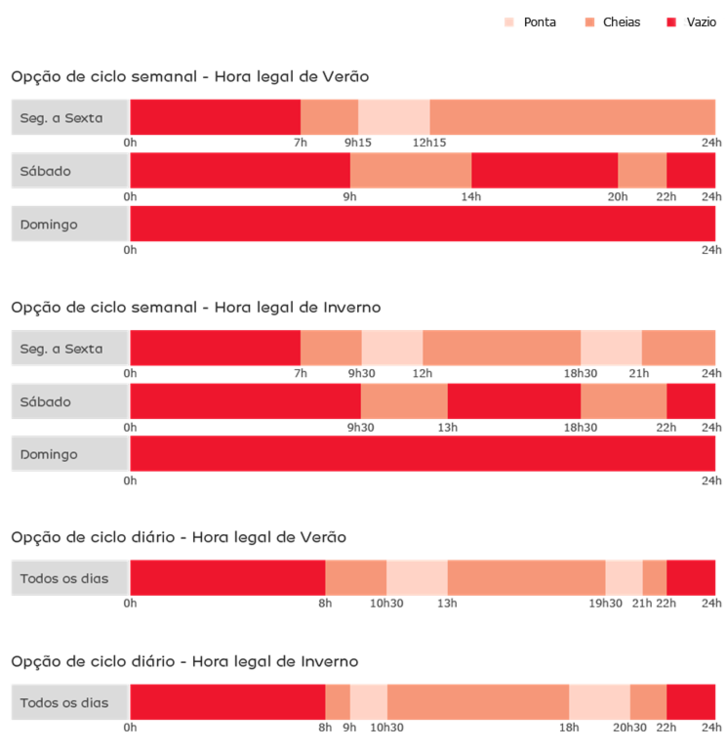
  1. Hello everyone I'm a PVSOL Premium user and I've been trying to use it in the most complete way possible. I think the software has a lot to explore and can offer a complete analysis in some cases but it is not yet prepared for the Portuguese electricity tariff system. In our legislation the electricity prices are set for 15 min intervals and PVSOL is only prepared for hourly tariffs. It would be very helpful if you include the 15 min tariffs intervals in future updates so we can provide a complete analysis using only one software. I attached some images that show PVSOL vs Portugal's tariffs.
Account

Navigation

Search

Search

Configure browser push notifications

Chrome (Android)
  1. Tap the lock icon next to the address bar.
  2. Tap Permissions → Notifications.
  3. Adjust your preference.
Chrome (Desktop)
  1. Click the padlock icon in the address bar.
  2. Select Site settings.
  3. Find Notifications and adjust your preference.