Skip to content
View in the app

A better way to browse. Learn more.

Forum Valentin Software

A full-screen app on your home screen with push notifications, badges and more.

To install this app on iOS and iPadOS
  1. Tap the Share icon in Safari
  2. Scroll the menu and tap Add to Home Screen.
  3. Tap Add in the top-right corner.
To install this app on Android
  1. Tap the 3-dot menu (⋮) in the top-right corner of the browser.
  2. Tap Add to Home screen or Install app.
  3. Confirm by tapping Install.

Gustav

Members
  • Joined

  • Last visited

Everything posted by Gustav

  1. Gustav posted a topic in PV*SOL
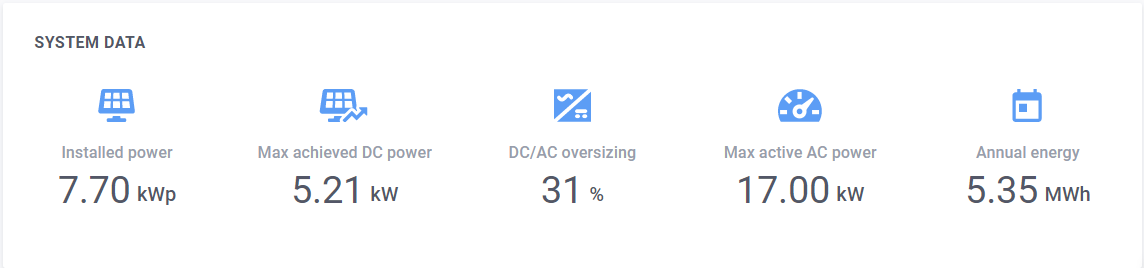
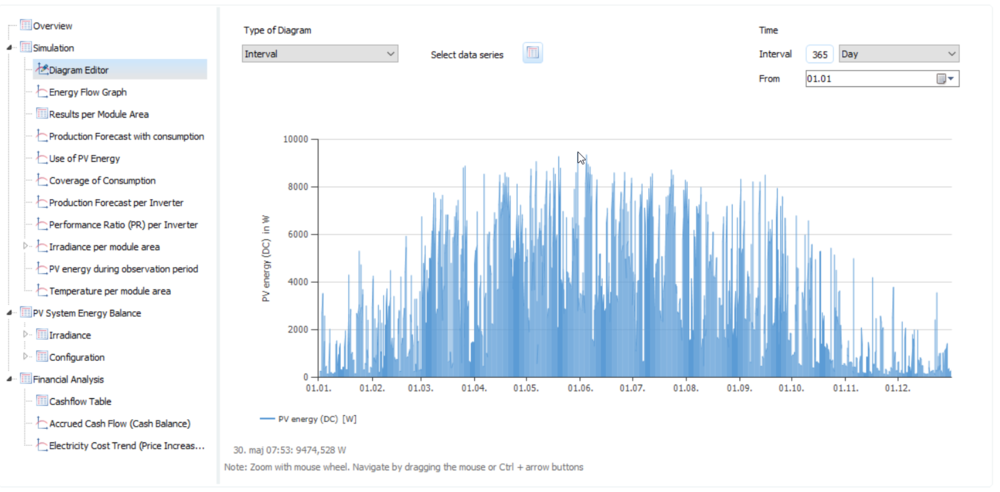
    Hi, I'm searching for a quick solution for checking the peak power production of a site (maximum production during 1 minute in year). According to https://forum.valentin-software.com/topic/483-design-peak-power-outcome/?tab=comments#comment-1070 there are 3 ways of checking this, using the Diagram editor or exporting a simulation result file as a CSV file. I'm trying getting the PV Energy (DC) included in the CSV-file but I don't succeed, how to do this? Would be a nice feature if the production peak could be printed in the PDF-export, is there a plan to implement this in PVSOL? Comparing with the Solaredge Designer this value is stated visibly in the project export. See attached; Kind regards, Gustav
Account

Navigation

Search

Search

Configure browser push notifications

Chrome (Android)
  1. Tap the lock icon next to the address bar.
  2. Tap Permissions → Notifications.
  3. Adjust your preference.
Chrome (Desktop)
  1. Click the padlock icon in the address bar.
  2. Select Site settings.
  3. Find Notifications and adjust your preference.