

Skip to content
View in the app

A better way to browse. Learn more.

Forum Valentin Software

A full-screen app on your home screen with push notifications, badges and more.

To install this app on iOS and iPadOS
  1. Tap the Share icon in Safari
  2. Scroll the menu and tap Add to Home Screen.
  3. Tap Add in the top-right corner.
To install this app on Android
  1. Tap the 3-dot menu (⋮) in the top-right corner of the browser.
  2. Tap Add to Home screen or Install app.
  3. Confirm by tapping Install.

Alexanderabc

Members
  • Joined

  • Last visited

Everything posted by Alexanderabc

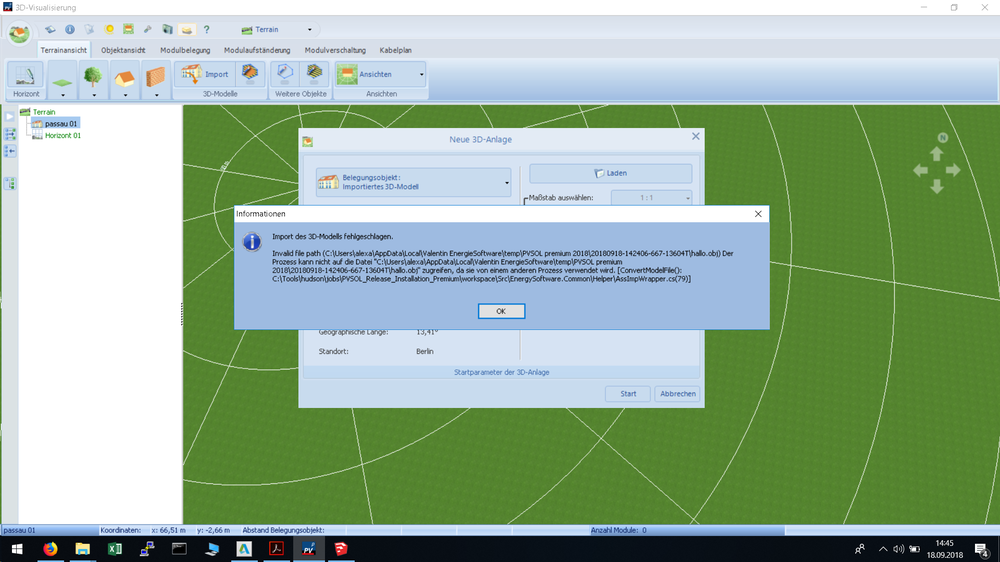
  1. Hallo zusammen, In meiner Arbeit werde ich mehrere PV-Anlagen vor allem im Stadtgebiet berechnen. Nun habe ich mir eine Testdatei des Bayerischen Vermessungsamt heruntergeladen (https://www.ldbv.bayern.de/service/testdaten.html) im .3ds-Format und wollte diese nun mit PV*SOL importieren als 3D-Modell. Leider kommt dann folgende Fehlermeldung (im Anhang). Nun zur Frage: Wie kann ich den Fehler beheben und was ist der Grund der Fehlermeldung? :) Danke. Gruß Alex
Account

Navigation

Search

Search

Configure browser push notifications

Chrome (Android)
  1. Tap the lock icon next to the address bar.
  2. Tap Permissions → Notifications.
  3. Adjust your preference.
Chrome (Desktop)
  1. Click the padlock icon in the address bar.
  2. Select Site settings.
  3. Find Notifications and adjust your preference.