

Skip to content
View in the app

A better way to browse. Learn more.

Forum Valentin Software

A full-screen app on your home screen with push notifications, badges and more.

To install this app on iOS and iPadOS
  1. Tap the Share icon in Safari
  2. Scroll the menu and tap Add to Home Screen.
  3. Tap Add in the top-right corner.
To install this app on Android
  1. Tap the 3-dot menu (⋮) in the top-right corner of the browser.
  2. Tap Add to Home screen or Install app.
  3. Confirm by tapping Install.

PVSOL Noob

Members
  • Joined

  • Last visited

Everything posted by PVSOL Noob

  1. Hello Frederik, Vielen Dank, ich kläre dies ab und melde mich, laut Rückmeldung funktioniert die Datei auf anderen Geräten. LG
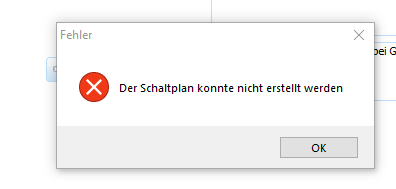
  2. Hello @ALL ein User bei uns bekommt immer diese Fehlermeldung (Der Schaltplan konnte nicht erstellt werden) PVSOL -> es wurden schon alle Updates installiert, sowie eine Neuinstallation durchgeführt Windows -> alle Treiber aktualisiert LG PVSOL Noob
Account

Navigation

Search

Search

Configure browser push notifications

Chrome (Android)
  1. Tap the lock icon next to the address bar.
  2. Tap Permissions → Notifications.
  3. Adjust your preference.
Chrome (Desktop)
  1. Click the padlock icon in the address bar.
  2. Select Site settings.
  3. Find Notifications and adjust your preference.